Cám ơn Thiện đã dành thời gian trả lời 3 thắc mắc của mình siêu chi tiết như này, đặc biệt là suggestions của bạn ở câu 2 và solutions cho câu 3. Đúng là trước đó mình lại chưa nghĩ đến chuyện gom cả các required params vào chung 1 object cho tiện 😅
À, và ngoài 3 kỹ thuật bạn đã nêu trong bài viết, mình muốn bổ sung thêm 1 kỹ thuật cũng khá thú vị nữa (dù hơi ít trường hợp cần dùng đến), là dùng kết hợp rest và spread của ES6. Kỹ thuật này thường được dùng khi mình không chắc chắn (và cũng không quy định cụ thể) về số lượng params có thể truyền vào khi định nghĩa hàm. Nó cũng có tác dụng tương tự "Bỏ trứng vào cùng 1 giỏ", nhưng "giỏ" này không phải object mà là 1 array.
Nếu định nghĩa hàm => Dùng rest
Nếu gọi hàm => Dùng spread (có thể có hoặc không)
Ví dụ hàm tính tổng n số:
function sum (...params) {  // đây là "rest", params lúc này là 1 mảng
    let total = 0
    for (let i = 0; i < params.length; i++) {
        total += params[i]
    }
    return total
}

const array = [1, 1, 2, 3, 5, 8]

console.log(sum(...array))    // đây là "spread"
// Dòng trên có thể được viết theo kiểu này:
console.log(sum(1, 1, 2, 3, 5, 8))    // Có thể truyền tiếp n số đằng sau nữa vẫn được
Hy vọng sẽ có lúc kỹ thuật này hữu ích với mọi người! ^ ^
Cái quan trọng nhất trong vòng 10 tháng bạn học được những gì, lộ trình như nào, cách học ra sao, nên học những gì,... thì lại không thấy chia sẻ. Toàn nói chung chung, tóm lại là PR MindX là chính



THẢO LUẬN
Bài viết tuyệt vời quá anh ơi ))
From VIT with love
))
From VIT with love 
Good job bro
tks
Anh toàn cày ác quá
ông nên xem lại thì có
Cảm ơn tác giả đã chia sẻ
Oh, khá thú vị, khi đảo thứ tự như vậy (và restart app, ko restart DB) thì có 1 sự thay đổi nhỏ.
API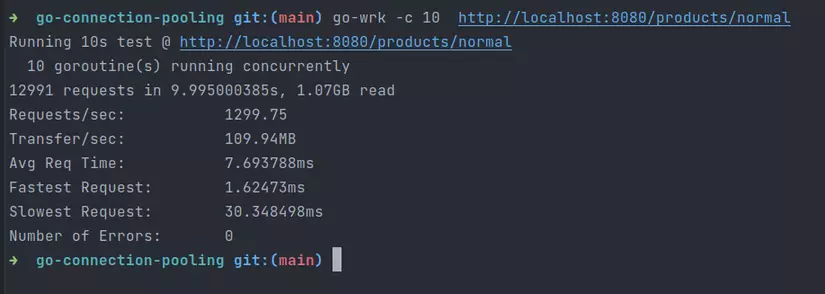
/normalkhông còn cái nào bị lỗi, và số req cũng tăng từ 9k->13k. Không biết là do đâu, để mình nghiên cứu thêm.nhờ bạn thử chạy thứ tự ngược lại xem kết quả có thay đổi gì nhiều không pooled > normal => new (nhớ restart lại database nhé )
ôi trời quá đã bác êi :>
Google Authenticator có export ra mà bạn.
anh ơi, anh có thể lên tiếp bài hay cho em xin file code về bước tiếp theo là khai phá dữ liệu và trực quan hóa dữ liệu được không ạ??? Em cảm ơn ạ
Cảm ơn Hà đã góp ý nha 😁
Cám ơn Thiện đã dành thời gian trả lời 3 thắc mắc của mình siêu chi tiết như này, đặc biệt là suggestions của bạn ở câu 2 và solutions cho câu 3. Đúng là trước đó mình lại chưa nghĩ đến chuyện gom cả các required params vào chung 1 object cho tiện 😅
À, và ngoài 3 kỹ thuật bạn đã nêu trong bài viết, mình muốn bổ sung thêm 1 kỹ thuật cũng khá thú vị nữa (dù hơi ít trường hợp cần dùng đến), là dùng kết hợp rest và spread của ES6. Kỹ thuật này thường được dùng khi mình không chắc chắn (và cũng không quy định cụ thể) về số lượng params có thể truyền vào khi định nghĩa hàm. Nó cũng có tác dụng tương tự "Bỏ trứng vào cùng 1 giỏ", nhưng "giỏ" này không phải object mà là 1 array.
Ví dụ hàm tính tổng n số:
Hy vọng sẽ có lúc kỹ thuật này hữu ích với mọi người! ^ ^
Dịch dở quá... ẹc ẹc (
(
Anh cho em hỏi chút, hệ thống nghiệp vụ buộc phải có ràng buộc PK để đảm bảo toàn vẹn dữ liệu, nghiệp vụ thì cần xử lý như nào khi bảng đã partition ạ
hi bạn.. có thể nội dung bài viết trên chưa đáp ứng được nhu cầu tìm kiếm thông tin của bạn. Bạn có thể xem chi tiết hơn về cách Uyên tạo CV và tìm việc tại https://www.youtube.com/watch?v=0TTu6hOrieA&list=PLVYpBFUhN2wTA0Y_AZmuQ9-YMtWDVX-lJ&index=3 đây nha.. cảm ơn bạn đã quan tâm ^^
Mình nghĩ CNN vốn đã hội tụ nhanh hơn ViT thông thường rồi. Nên là không cần learning rate nhỏ thì nó vẫn hội tụ nhanh hơn ViT mà
à thế à =))😀
Cái quan trọng nhất trong vòng 10 tháng bạn học được những gì, lộ trình như nào, cách học ra sao, nên học những gì,... thì lại không thấy chia sẻ. Toàn nói chung chung, tóm lại là PR MindX là chính
không bạn, là ngẫu nhiên, đa phần bạn thấy câu nào khó hay dài có thể là nó, hoặc không =))