


Banking Demo -- Phase 4 : CI/CD — Build image và cập nhật deploy
Bài 7/11: CI/CD — Build image và cập nhật deploy
Mở đầu
Ở bài 5 chúng ta đã deploy Banking Demo bằng ArgoCD (Git quản lý resource), ở bài 6 đã có monitoring và KEDA. Mỗi lần sửa code (auth-service, account-service, frontend…), nếu vẫn build image tay, push registry, rồi sửa image tag trong values và sync ArgoCD tay thì dễ sót và tốn thời gian. CI/CD tự động hóa:
- push code → CI chạy lint, test, build
- push image;
- sau đó cập nhật values và ArgoCD sync (hoặc auto-sync) để rollout.
Bài này trình bày theo thứ tự:
- (1) định hướng nâng cấp application (Phase 4) để rõ ta đang build gì và tại sao cần CI/CD;
- (2) CI/CD trong Banking Demo dùng như thế nào;
- (3) GitHub Actions có những step nào;
- (4) CD với ArgoCD;
- (5) thực hành từ push code đến deploy.
1. Định hướng nâng cấp application (Phase 4)
Trước khi bật CI/CD, cần xác định application layer ta đang nâng cấp là gì — từ đó mới biết CI phải build những service nào và CD rollout cái gì.
Application v2 so với bản gốc (v1)
Phase 4 nâng cấp application (v2) so với bản gốc (v1), vẫn chạy trên cùng Helm chart và ArgoCD (Phase 2):
| Hạng mục | Bản gốc (v1) | Phase 4 (v2) |
|---|---|---|
| Đăng ký | {username, password} |
{phone, username, password} — validate phone, sinh số tài khoản 12 chữ số unique, trả về account_number. |
| Đăng nhập | Chỉ username + password |
Hỗ trợ phone hoặc username (backward compatible). |
| Chuyển tiền | (theo user id / username) | Chuyển theo số tài khoản (to_account_number), API lookup tên người nhận. |
| UI | React cơ bản | Form rõ ràng hơn, hiển thị account number, tên người nhận khi chuyển. |
| Logging | Log thường | Structured logging (JSON), middleware log request/response, event register_success/failed, login_success/failed — phù hợp Phase 3 (Loki, Grafana). |
| Validation & HTTP | Cơ bản | Chuẩn hóa 400/409/401, validate length, phone digits; dễ debug. |
| Sau deploy | Kiểm tra tay | Smoke test (Helm Job) chạy health + login qua Kong, log Smoke tests passed. |
Code v2 nằm trong phase4-application-v2/ (common, services, frontend); CI build từ đây và push image; Helm values (Phase 2) trỏ image tag tới SHA/tag do CI tạo.
Tại sao cần CI/CD khi đã có v2?
- Nhiều service (auth, account, transfer, notification, frontend): mỗi lần sửa code phải build đúng service, push đúng registry, cập nhật đúng values — làm tay dễ nhầm.
- Thay đổi thường xuyên (tính năng mới, sửa lỗi, thêm log): cần pipeline cố định (lint → test → build → push) để chất lượng đồng nhất và deploy nhanh.
- Git làm nguồn chân lý (bài 5): deploy qua Git (values + tag); CI chỉ cần build và push image, con người (hoặc script) cập nhật tag trong values rồi ArgoCD sync hoặc auto-sync.
Vì vậy bước tiếp theo là: dùng CI/CD như thế nào (luồng tổng thể), rồi GitHub Actions có những step nào (chi tiết).
2. CI/CD trong Banking Demo — dùng như thế nào
Luồng tổng thể:
Code push/PR → CI (GitHub Actions) → Push images → Cập nhật values trong Git → CD (ArgoCD sync)
| Giai đoạn | Công cụ | Việc làm |
|---|---|---|
| CI | GitHub Actions | Lint → Test → Build Docker image (chỉ service thay đổi) → Push lên GitLab Container Registry. |
| CD | ArgoCD | Đọc Helm values từ Git (đã cập nhật image.tag) → Render Helm → Apply lên Kubernetes (rollout 5 service). |
Trong Banking Demo:
- CI không tự động sửa Git: bước "cập nhật
image.tagtrong 5 file values" do người (hoặc script riêng) thực hiện, rồi commit + push. Cách này đơn giản, kiểm soát được và đúng tinh thần GitOps. - CD: ArgoCD có thể sync tay (bấm Sync sau khi push values) hoặc auto-sync định kỳ (vd 5 phút/lần) để tự rollout khi thấy values thay đổi trên Git.
Như vậy: định hướng app (v2) → CI/CD dùng như thế này; phần dưới đi vào GitHub Actions có những step nào và ArgoCD cấu hình ra sao.
3. GitHub Actions — các bước (steps) cụ thể
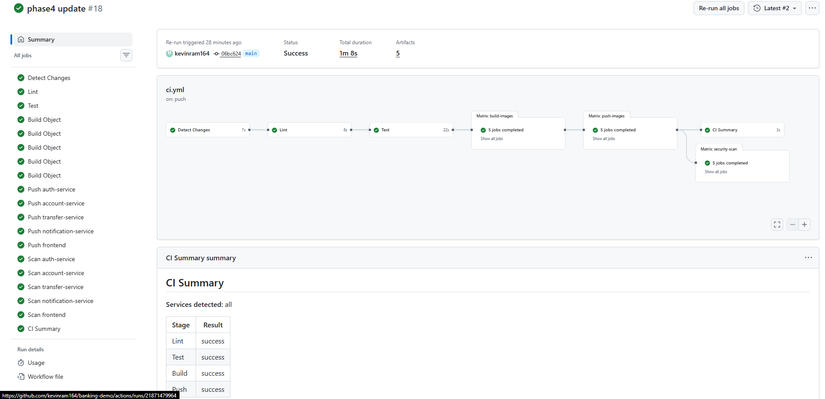
CI được định nghĩa trong .github/workflows/ci.yml, gồm các job chạy theo thứ tự. Mỗi job gồm nhiều step (bước).

3.1. Khi nào CI chạy (trigger)
| Event | Điều kiện |
|---|---|
| Push | Branch main, develop — và chỉ khi có thay đổi trong đường dẫn (path) liên quan code app. |
| Pull Request | Branch main — cùng bộ path. |
| Chạy tay (manual) | workflow_dispatch — chọn service cần build, có thể bỏ test, force push. |
Path filters — CI chỉ chạy khi có thay đổi trong:
common/**,services/**,frontend/**phase4-application-v2/**.github/workflows/ci.yml
Không trigger khi chỉ đổi: phase2-helm-chart/**, phase3-monitoring-keda/**, k8s/**, *.md. Sửa Helm values hoặc tài liệu sẽ không gây build lại app.
3.2. Các job (và step) theo thứ tự

| Job | Mục đích | Step chính (tóm tắt) |
|---|---|---|
| detect-changes | Xác định service nào thay đổi | Checkout repo → paths-filter (theo từng service + common) → Build danh sách service cần build (output services-list). Nếu common đổi → build all. |
| lint | Kiểm tra code | Checkout → Setup Python → ruff check cho common, services, phase4-application-v2. |
| test | Chạy test | Checkout → Setup Python → Install deps → python -m compileall → pytest (phase4-application-v2/tests). Có thể tắt qua input khi chạy tay (skip_tests). |
| build-images | Build Docker image | Với matrix (auth, account, transfer, notification, frontend): nếu service nằm trong services-list thì checkout → Docker Buildx → metadata (tags) → build image → upload artifact (tar). Service không đổi thì skip. |
| push-images | Push lên registry | Chỉ chạy khi push main/develop (hoặc manual + force_push). Với từng service: download artifact → load image → login GitLab Registry → tag (SHA, branch, latest) → push. |
| security-scan | Quét bảo mật image | Trivy scan image (HIGH, CRITICAL), continue-on-error: true để không chặn pipeline. |
Build có chọn lọc:
- Đổi
phase4-application-v2/services/auth-service/**→ chỉ build auth-service. - Đổi
phase4-application-v2/common/**→ build tất cả (common dùng chung). - Đổi
phase4-application-v2/frontend/**→ chỉ build frontend.
3.3. Chạy tay (workflow_dispatch)
Trong GitHub: Actions → chọn workflow CI → Run workflow.
| Input | Ý nghĩa |
|---|---|
| services | all hoặc chọn từng service / tổ hợp (vd: auth-service, frontend). |
| skip_tests | Bỏ qua job test (hotfix nhanh). |
| force_push | Push image kể cả khi không ở branch main. |
3.4. Image tag và registry
- Registry: GitLab Container Registry (vd:
registry.gitlab.com/<group>/banking-demo-payment/). - Tag:
sha:<7 ký tự>(vd:abc1234) — deploy theo đúng commit.branch(vd:main,develop).latest— chỉ khi push lênmain.
Trong Helm values nên dùng image.tag = SHA để mỗi lần sync tương ứng đúng một commit.
3.5. Secrets (GitHub)
Trong Settings → Secrets and variables → Actions cần:
| Secret | Dùng để |
|---|---|
GITLAB_USERNAME |
Đăng nhập GitLab (registry). |
GITLAB_TOKEN |
Personal Access Token (scope: read_registry, write_registry). |
Workflow chỉ đọc qua secrets.GITLAB_USERNAME, secrets.GITLAB_TOKEN, không ghi plain text vào file.
4. CD — ArgoCD: cập nhật values và rollout
Sau khi CI đã push image (tag = SHA), bước CD:
- Lấy SHA từ GitHub Actions (vd:
abc1234). - Sửa
image.tagtrong 5 file values: auth-service, account-service, transfer-service, notification-service, frontend (trongphase2-helm-chart/banking-demo/charts/<service>/values.yaml). - Commit + push lên Git.
- ArgoCD đọc Git → render Helm với values mới → apply lên cluster (rollout 5 Deployment).

Sync tay hay auto-sync?
- Sync tay: Vào ArgoCD UI (hoặc CLI) bấm Sync sau khi đã push values — kiểm soát chặt thời điểm rollout.
- Auto-sync định kỳ (vd 5 phút/lần): Cấu hình ArgoCD Application với
syncPolicy.automated(và có thểprune: false,selfHeal: falsetùy chính sách). Khi values trên Git đổi, ArgoCD tự sync và rollout service mà không cần bấm Sync. Phù hợp khi đã tin tưởng luồng CI + review values.
Trong Phase 4 có thể chuyển từ sync tay sang trigger auto 5 phút một lần cho các Application service để rollout tự động sau khi push values.
Chỉ rollout 5 service, tránh động postgres/redis
- Một Application deploy cả chart: ArgoCD UI → banking-demo → Sync → Selective Sync — chọn chỉ 5 Deployment (auth, account, transfer, notification, frontend), bỏ chọn StatefulSet/Service postgres, redis.
- Per-service Applications: Chỉ sync 5 Application (auth-service, account-service, transfer-service, notification-service, frontend); không sync postgres, redis.
5. Thực hành: từ push code đến deploy
Bước chuẩn bị deploy :
Trước khi bắt đầu CI/CD và rollout application v2, cần chuẩn bị:
5.1. DB Migration (bắt buộc — làm TRƯỚC khi deploy v2)
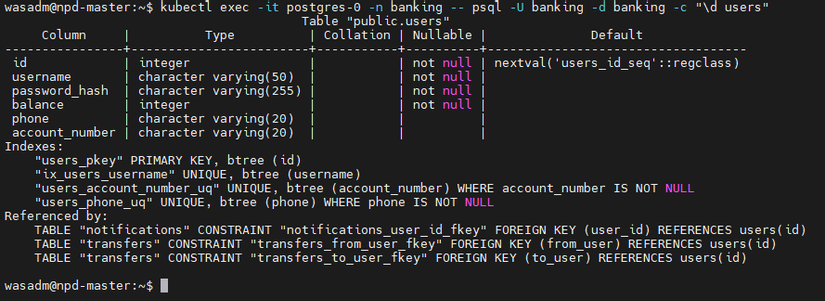
Application v2 thêm 2 cột phone và account_number vào bảng users. Nếu deploy v2 trước khi migration, app sẽ crash vì không tìm thấy cột.
Bước 1.1: Backup DB
# K8s: dump qua kubectl
kubectl exec -it postgres-0 -n banking -- pg_dump -U banking banking > backup_before_v2_$(date +%Y%m%d).sql

# Hoặc nếu có pg_dump local, kết nối trực tiếp
pg_dump -h <postgres-host> -U banking -d banking > backup_before_v2.sql
Bước 1.2: Chạy migration SQL
-- 1. Add columns (nullable)
ALTER TABLE users ADD COLUMN IF NOT EXISTS phone VARCHAR(20);
ALTER TABLE users ADD COLUMN IF NOT EXISTS account_number VARCHAR(20);

-- 2. Backfill account_number cho user cũ (nếu có)
DO $$
DECLARE
  r RECORD;
  candidate TEXT;
BEGIN
  FOR r IN SELECT id FROM users WHERE account_number IS NULL LOOP
    LOOP
      candidate := lpad((floor(random()*1e12))::bigint::text, 12, '0');
      EXIT WHEN NOT EXISTS (SELECT 1 FROM users WHERE account_number = candidate);
    END LOOP;
    UPDATE users SET account_number = candidate WHERE id = r.id;
  END LOOP;
END $$;

-- 3. Add unique index
CREATE UNIQUE INDEX IF NOT EXISTS users_account_number_uq ON users(account_number) WHERE account_number IS NOT NULL;
CREATE UNIQUE INDEX IF NOT EXISTS users_phone_uq ON users(phone) WHERE phone IS NOT NULL;
Bước 1.3: Chạy SQL trên K8s
kubectl exec -it postgres-0 -n banking -- psql -U banking -d banking -c "
ALTER TABLE users ADD COLUMN IF NOT EXISTS phone VARCHAR(20);
ALTER TABLE users ADD COLUMN IF NOT EXISTS account_number VARCHAR(20);
-- paste phần backfill + index từ trên
"
Hoặc copy toàn bộ SQL vào một file migration_v2.sql rồi:
kubectl exec -i postgres-0 -n banking -- psql -U banking -d banking < migration_v2.sql
Kiểm tra sau migration:
kubectl exec -it postgres-0 -n banking -- psql -U banking -d banking -c "\d users"
# Phải thấy 2 cột mới: phone, account_number
5.2. Cấu hình GitHub Secrets
CI cần quyền push image lên GitLab Container Registry. Vào GitHub repo → Settings → Secrets and variables → Actions, thêm:
| Secret | Mô tả |
|---|---|
GITLAB_USERNAME |
Username GitLab (đăng nhập registry). |
GITLAB_TOKEN |
Personal Access Token với scope: read_registry, write_registry. |
Cách tạo GitLab Token:
- Vào GitLab → User Settings → Access Tokens (hoặc Preferences → Access Tokens).
- Tạo token với:
- Name:
github-actions-registry - Scopes:
read_registry,write_registry - Expiration: (tùy chọn)
- Name:
- Copy token và paste vào GitHub Secrets.
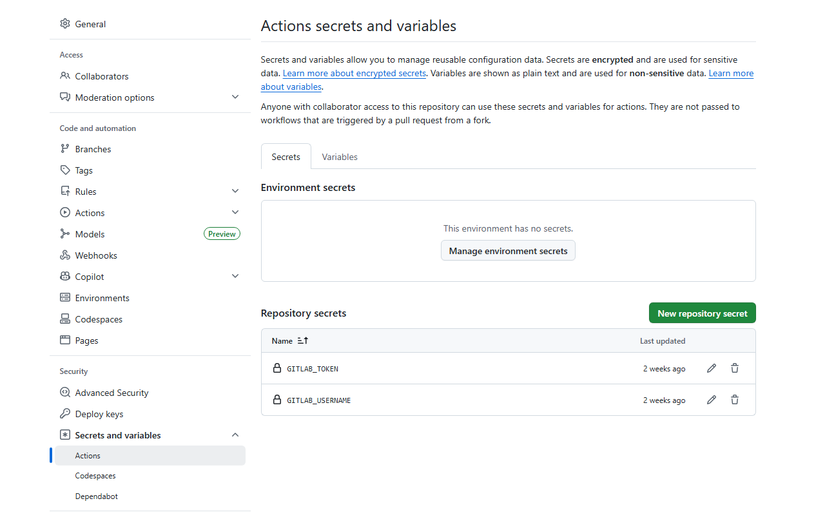
Kiểm tra:
Sau khi thêm secrets, push code lên main → vào GitHub Actions → run CI → job push-images không báo lỗi authentication.
DEPLOY NEW VERSION
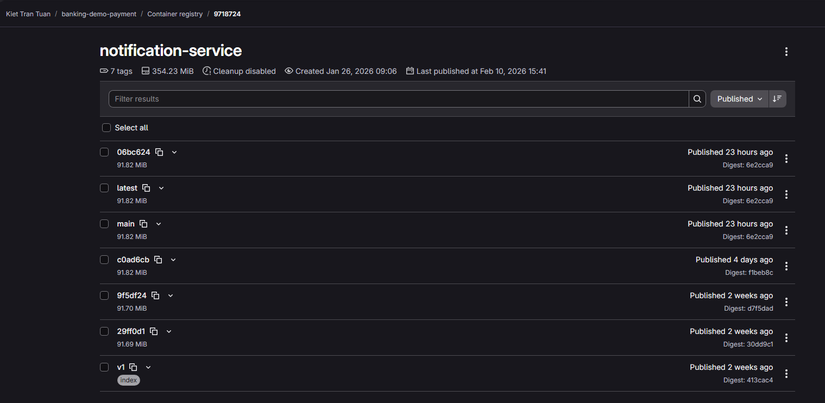
Bước 1: Push code → CI chạy
git add phase4-application-v2/services/auth-service/
git commit -m "feat: update auth flow"
git push origin main
Vào GitHub → Actions xem run CI. Đợi xong, ghi lại commit SHA (vd: abc1234).

Bước 2: Cập nhật image tag trong Helm values
Sửa 5 file trong phase2-helm-chart/banking-demo/charts/:
auth-service/values.yaml,account-service/values.yaml,transfer-service/values.yaml,notification-service/values.yaml,frontend/values.yaml
Trong mỗi file (nếu service đó vừa build): đặt image.tag = SHA (vd: abc1234). Ví dụ:
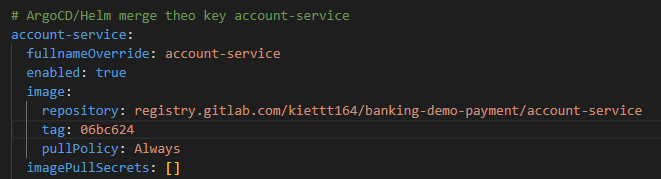
auth-service:
  image:
    repository: registry.gitlab.com/<group>/banking-demo-payment/auth-service
    tag: abc1234
Bước 3: Commit và push values
git add phase2-helm-chart/banking-demo/charts/auth-service/values.yaml \
  phase2-helm-chart/banking-demo/charts/account-service/values.yaml \
  phase2-helm-chart/banking-demo/charts/transfer-service/values.yaml \
  phase2-helm-chart/banking-demo/charts/notification-service/values.yaml \
  phase2-helm-chart/banking-demo/charts/frontend/values.yaml
git commit -m "chore: bump images to abc1234"
git push origin main
Bước 4: ArgoCD sync (hoặc đợi auto-sync)
- Nếu sync tay: ArgoCD UI → banking-demo → Sync (dùng Selective Sync chỉ 5 service), hoặc sync từng Application tương ứng.
- Nếu đã bật auto-sync 5 phút: đợi ArgoCD tự sync sau khi push values.
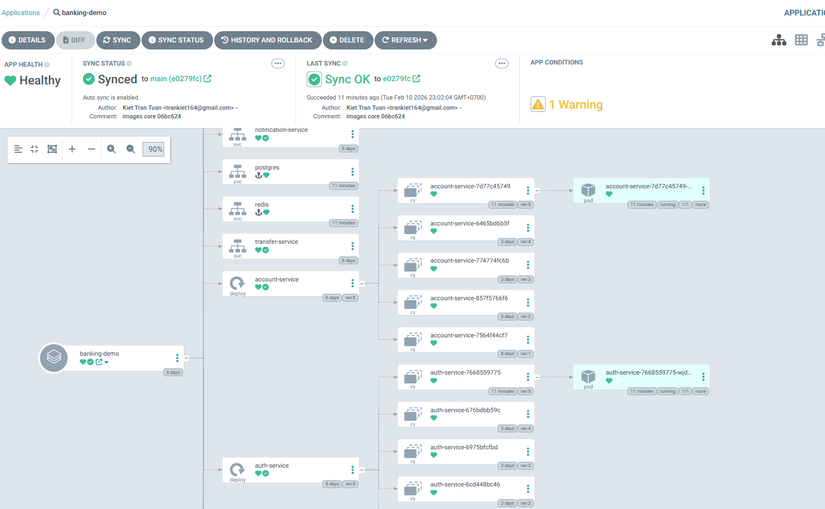
Bước 5: Kiểm tra
kubectl get pods -n banking
curl -s https://<ingress-host>/api/auth/health
Vào web, tạo các tài khoản bằng số điện thoại của bạn bè, người thân, và thực hiện chuyển khoản cho nhau :
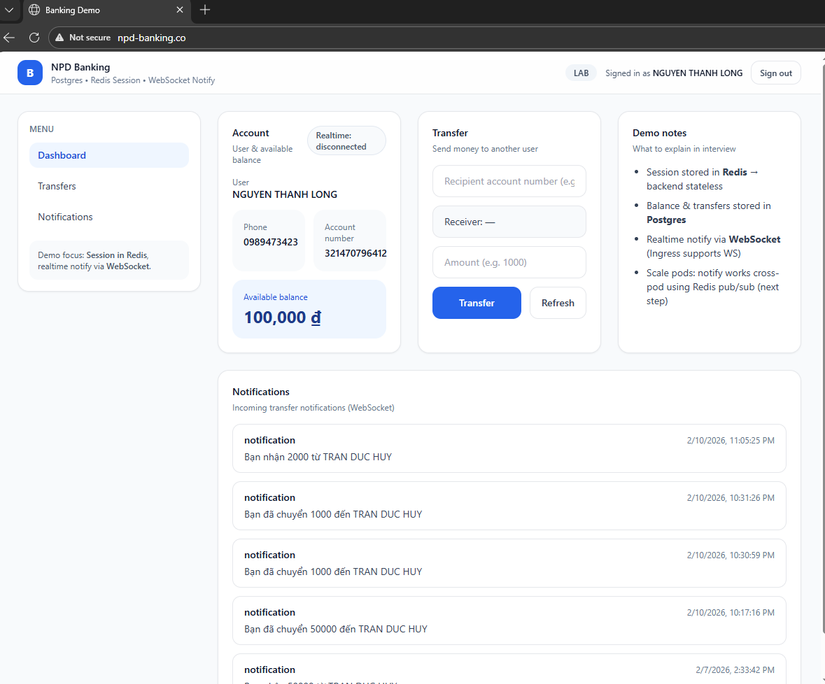

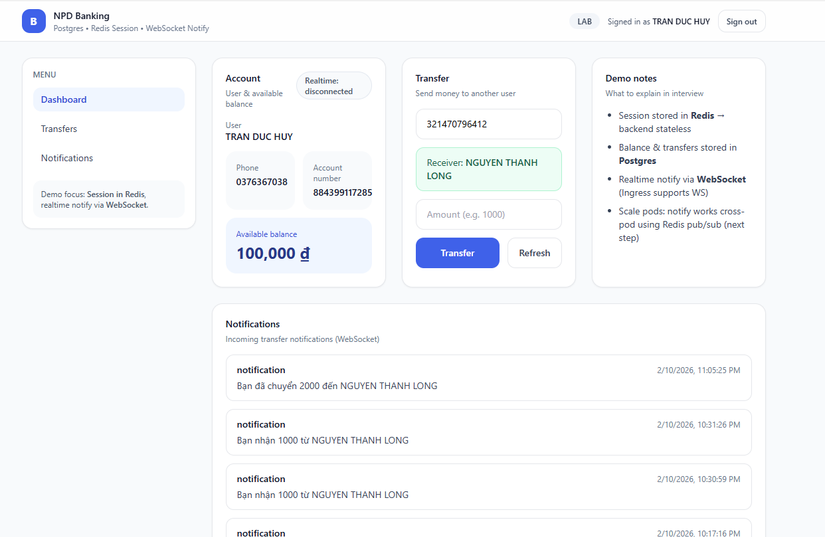


Sau đó có thể chạy smoke test (Helm template smoke-test job) để verify health + login qua Kong.
Tóm tắt luồng
| Bước | Hành động |
|---|---|
| 1 | Push code → CI chạy (lint, test, build, push images). |
| 2 | Lấy commit SHA từ GitHub Actions. |
| 3 | Sửa image.tag trong 5 file values (auth, account, transfer, notification, frontend). |
| 4 | Commit + push values → ArgoCD sync (tay hoặc auto 5 phút); chỉ 5 app, không động postgres/redis. |
| 5 | Verify + smoke test (tùy chọn). |
Mở rộng (tùy chọn)
- Tự động cập nhật values: Script hoặc job CI (sau push image) clone repo, sửa 5 file values bằng
yq/sed, commit và push — cần token Git có quyền ghi. - Trigger ArgoCD sync từ CI: Gọi ArgoCD API hoặc
argocd app syncsau khi push values — cần cấu hình token ArgoCD. - Nhiều môi trường: Staging/production dùng branch hoặc valueFiles khác nhau (đã nói ở bài 5).
Lưu ý
- Secrets:
GITLAB_USERNAME,GITLAB_TOKENchỉ cấu hình trong GitHub Secrets. - Path filter: Chỉ thay đổi code app (common, services, frontend, phase4-application-v2) mới trigger CI; sửa Helm chart hoặc docs không build lại.
- DB migration: Phase 4 thêm cột
phone,account_number— cần chạy migration trước khi deploy v2; chi tiết xemphase4-application-v2/README.md.
Tóm tắt
- Định hướng nâng cấp app (Phase 4): Application v2 (phone, account_number, transfer theo số tài khoản, logging, smoke test) — từ đó xác định CI build 5 service và CD rollout 5 Deployment.
- CI/CD dùng như thế nào: Code push → CI (lint, test, build, push) → cập nhật values trong Git → ArgoCD sync (tay hoặc auto 5 phút).
- GitHub Actions: Trigger theo path; các job detect-changes → lint → test → build-images → push-images → security-scan; manual trigger; image tag SHA/branch/latest; secrets cho registry.
- CD: Cập nhật
image.tagtrong 5 file values, commit + push; ArgoCD sync tay hoặc auto-sync (vd 5 phút); Selective Sync hoặc per-service Application để tránh động postgres/redis.
Bài tiếp theo: Security & Reliability (Phase 7) — JWT hardening, Kong plugins, SLO/alerting.
Bài tiếp theo
Bài 8: Security & Reliability (Phase 7)
- Auth hardening (JWT design)
- Kong security plugins
- SLO và alerting (SRE)
Tags: #cicd #github-actions #argocd #helm #kubernetes #devops #microservices #phase4
All rights reserved
