


Banking Demo — Phase 1: Docker Compose → Kubernetes — Migrate từng bước
Bài 3/11: Từ Docker Compose lên Kubernetes bằng manifest files.
Repo: https://github.com/kevinram164/banking-demo.git
Mở đầu
Ở bài 2, chúng ta đã chạy toàn bộ hệ thống bằng Docker Compose trên local. Nhưng khi muốn “production-like” hơn (tự healing, networking chuẩn cluster, scale, rollout…), Kubernetes mới là sân chơi chính.
Trong bài này, mình sẽ hướng dẫn migrate từ Docker Compose lên Kubernetes theo đúng cấu trúc repo của bạn (folder phase1-docker-to-k8s/) bằng manifest YAML thuần (chưa dùng Helm).
Mục tiêu của Phase 1:
- Postgres + Redis chạy bằng StatefulSet (có volume/PVC).
- Kong làm API Gateway (Deployment + ConfigMap).
- 4 microservices + frontend chạy bằng Deployment + Service.
- Ingress (HAProxy Ingress) route theo path:
/→ frontend,/api&/ws→ Kong.
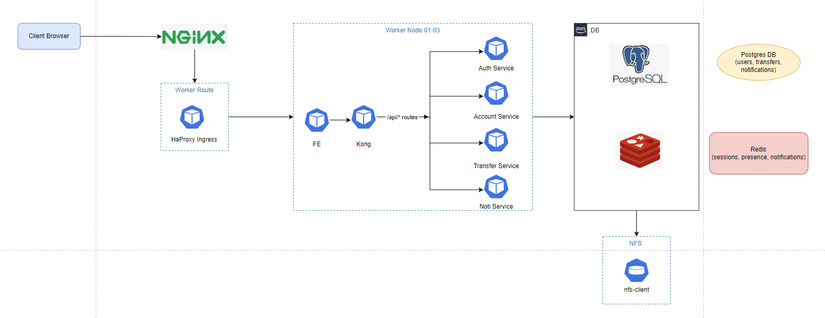
Kiến trúc trên Kubernetes (Phase 1)
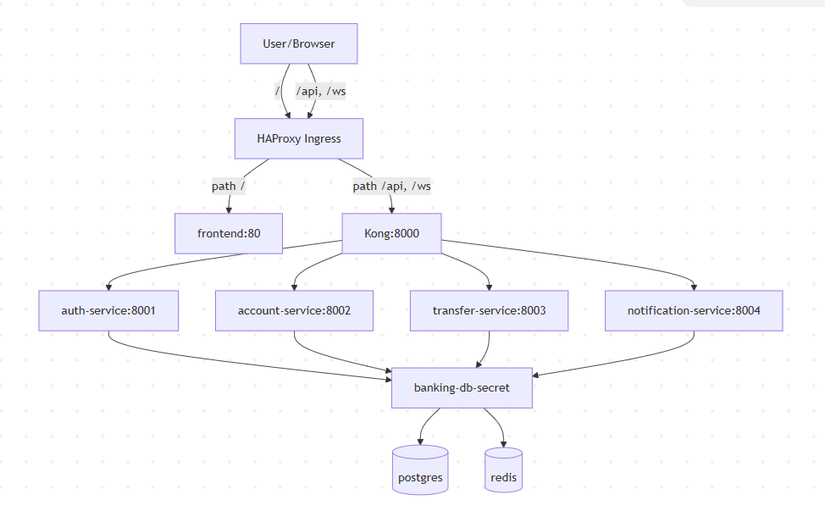
Mapping: Docker Compose → Kubernetes
Đây là cách tư duy từ Compose sang K8s:
| Trong Docker Compose | Trên Kubernetes | File Phase 1 |
|---|---|---|
postgres + volume |
StatefulSet + PVC + Headless Service | postgres.yaml |
redis + volume |
StatefulSet + PVC + Headless Service | redis.yaml |
kong + mount kong.yml |
Deployment + ConfigMap | kong.yaml, kong-configmap.yaml |
auth/account/transfer/notification |
Deployment + Service | *-service.yaml |
frontend + port 3000 |
Deployment + Service + Ingress route / |
frontend.yaml, ingress.yaml |
.env / environment |
Secret + envFrom/secretKeyRef | secret.yaml |
Port mapping 3000:80 |
Ingress / Service (ClusterIP) | ingress.yaml |
Điểm khác biệt : trên K8s, bạn thường không expose từng container ra host. Bạn expose Ingress (hoặc LoadBalancer) và route nội bộ bằng Service DNS.
Điều kiện cần trước khi apply
1) Cluster đã có Ingress Controller (HAProxy)
Manifest Phase 1 dùng:
ingressClassName: haproxy- host ví dụ:
npd-banking.co
Nếu bạn dùng NGINX Ingress hoặc khác, bạn cần chỉnh ingressClassName và/hoặc annotation tương ứng.
2) Có StorageClass nfs-client (khuyến nghị)
postgres.yaml và redis.yaml dùng:
storageClassName: nfs-client
Nếu cluster bạn không có nfs-client, bạn cần:
- Tạo StorageClass tương ứng, hoặc
- Đổi
storageClassNamesang StorageClass có sẵn trong cluster.
3) ImagePullSecrets (tuỳ cluster)
Trong Phase 1:
- Postgres/Redis/Kong pull từ Docker Hub (có thể gặp rate limit) → manifest có
imagePullSecrets: dockerhub-registry. - App images pull từ GitLab Registry → manifest microservices dùng
imagePullSecrets: gitlab-registry.
Bạn cần tạo các secret này trong namespace banking (chỉ khi cluster yêu cầu auth).
Thứ tự triển khai (quan trọng)
Trong phase1-docker-to-k8s/PHASE1.md đã có thứ tự chuẩn:
- Namespace + Secret (để mọi thứ còn lại có chỗ deploy + có env)
- Postgres + Redis (data layer phải sẵn sàng trước)
- Kong ConfigMap → Kong Deployment/Service
- 4 microservices + frontend
- Ingress (route traffic vào hệ thống)
Triển khai từng bước
Bước 1: Tạo namespace và secret
cd phase1-docker-to-k8s
kubectl apply -f namespace.yaml
kubectl apply -f secret.yaml
secret.yaml tạo secret banking-db-secret chứa:
DATABASE_URL: trỏ về service DNSpostgres:5432REDIS_URL: trỏ về service DNSredis:6379
Tư duy quan trọng: trên K8s, host không phải localhost; host là tên Service.
Bước 2: Deploy Postgres + Redis (StatefulSet)
kubectl apply -f postgres.yaml
kubectl apply -f redis.yaml

kubectl -n banking rollout status statefulset/postgres
kubectl -n banking rollout status statefulset/redis
Vì sao dùng StatefulSet?
- Pod có “identity” cố định:
postgres-0,redis-0 - PVC gắn theo pod:
pgdata-postgres-0,redis-data-redis-0 - Phù hợp cho workload có state
Bước 3: Deploy Kong (ConfigMap → Deployment/Service)
kubectl apply -f kong-configmap.yaml
kubectl apply -f kong.yaml
kubectl apply -f kong-service.yaml
Trong Phase 1, Kong chạy declarative config (không cần DB riêng). Cấu hình route nằm trong ConfigMap kong-config, key kong.yml.
Bước 4: Deploy microservices + frontend
kubectl apply -f auth-service.yaml
kubectl apply -f account-service.yaml
kubectl apply -f transfer-service.yaml
kubectl apply -f notification-service.yaml
kubectl apply -f frontend.yaml
Bước 5: Deploy Ingress
kubectl apply -f ingress.yaml
Ingress Phase 1 route:
/→ servicefrontend:80/api→ servicekong:8000/ws→ servicekong:8000
Verify sau khi deploy
1) Kiểm tra pods/service/ingress
kubectl get pods -n banking
kubectl get svc -n banking
kubectl get ingress -n banking
Bạn cần thấy:
postgres-0,redis-0Running/Readykong-...,auth-service-...,account-service-...,transfer-service-...,notification-service-...,frontend-...Ready
2) Kiểm tra health endpoint nội bộ
Nếu bạn muốn test nhanh trong cluster:
kubectl -n banking port-forward svc/kong 8000:8000
curl http://localhost:8000/api/auth/health
curl http://localhost:8000/api/account/health
curl http://localhost:8000/api/transfer/health
curl http://localhost:8000/api/notifications/health
3) Truy cập từ bên ngoài qua Ingress
Tuỳ cluster, bạn sẽ có:
- DNS/host trỏ tới Ingress, hoặc
- IP của LoadBalancer/NodePort
Trong manifest có host ví dụ npd-banking.co. Nếu bạn chạy local/minikube/kind thì thường cần chỉnh host hoặc dùng /etc/hosts.
Giải thích nhanh các “mảnh ghép” quan trọng
1) Secret: cấu hình kết nối đúng “địa chỉ K8s”
DATABASE_URL và REDIS_URL trong secret trỏ về:
postgres:5432(Service DNS)redis:6379(Service DNS)
Đây là điểm hay bị sai nếu bạn quen Docker Compose (tuy Compose cũng dùng service name, nhưng nhiều bạn lại hardcode localhost).
2) Headless Service cho StatefulSet
Postgres/Redis dùng clusterIP: None để tạo headless service → pod có DNS ổn định.
3) Kong config: strip_path và route WebSocket
Kong routes kiểu:
/api/auth→ upstream/register,/login(vìstrip_path: true)/wsroute về notification-service và bậtprotocols: http/httpsđể hỗ trợ WebSocket qua Ingress.
4) ReadinessProbe giúp rollout “đúng nhịp”
Manifest có readiness probe cho:
- Postgres:
pg_isready - Redis:
redis-cli ping - Kong:
kong health - Các service:
/health
Readiness giúp Service chỉ route traffic tới pod “Ready”.
Debug nhanh các lỗi hay gặp
1) ImagePullBackOff / rate limit Docker Hub
Triệu chứng: Postgres/Redis/Kong không pull được image.
Cách xử lý:
- Tạo secret
dockerhub-registry(docker-registry type) trong namespacebanking - Hoặc mirror image vào registry riêng
2) App pods crash do không pull được image GitLab Registry
Triệu chứng: ErrImagePull ở các pod auth/account/transfer/notification/frontend.
Cách xử lý:
- Tạo secret
gitlab-registrytrong namespacebanking - Hoặc đổi image sang registry khác mà cluster pull được
3) PVC pending (không có StorageClass)
Triệu chứng: postgres-0/redis-0 Pending.
Kiểm tra:
kubectl get pvc -n banking
kubectl describe pvc <pvc-name> -n banking
Sửa:
- Tạo/đổi
storageClassNamecho phù hợp cluster.
4) Ingress không route được
Triệu chứng: vào host không ra frontend, hoặc API 404.
Checklist:
- Cluster có HAProxy Ingress Controller chưa?
ingressClassNameđúng chưa?- Host bạn truy cập có match
npd-banking.cokhông?
Tóm tắt
Sau bài này, bạn đã có bản chạy trên Kubernetes với:
- StatefulSet cho Postgres/Redis (có PVC)
- Kong làm gateway
- 4 microservices + frontend
- Ingress route
/và/api,/ws
Đây là bước đệm hoàn hảo để sang Phase 2 (Helm + GitOps), nơi chúng ta biến đống YAML này thành chart có values, templates, và deploy bằng ArgoCD.
Bài tiếp theo
Bài 4: Helm Chart Bootstrap — gom manifest thành 1 chart “umbrella”
- Vì sao chọn “bootstrap style” (templates chung, values theo service)
- Cách parameter hóa ports/probes/resources/env
- Install/upgrade và bật/tắt component theo
enabled
Tags: #kubernetes #k8s #ingress #kong #statefulset #devops
All rights reserved
