


Banking Demo — Full DevOps với Microservices, triển khai với Docker Compose
Bài 2/11: Triển khai ứng dụng với Docker Compose từ A-Z
Mở đầu
Trong bài đầu tiên : https://viblo.asia/p/banking-demo-full-devops-voi-microservices-introduction-PoL7eQrN4vk , chúng ta đã làm quen với tổng quan dự án Banking Demo. Trước khi chuyển sang Kubernetes, cần hiểu rõ cách ứng dụng chạy trên Docker Compose — đây là bước nền tảng để sau này migrate lên K8s.
Bài viết này hướng dẫn chi tiết cách triển khai Banking Demo bằng Docker Compose: yêu cầu, cấu trúc file, thứ tự khởi động, kiểm tra và xử lý lỗi thường gặp.
Repo: https://github.com/kevinram164/banking-demo.git
Điều kiện cần
- Docker phiên bản 20.10+
- Docker Compose v2 (CLI
docker compose, không dùngdocker-composev1) - 4–6 GB RAM trống (Postgres, Redis, Kong, 4 services, Frontend)
- Port trống: 3000, 5432, 6379, 8000, 8001
Kiểm tra cài đặt:
docker --version
docker compose version
Cấu trúc docker-compose.yml
File docker-compose.yml gồm 8 services chia làm 3 nhóm:
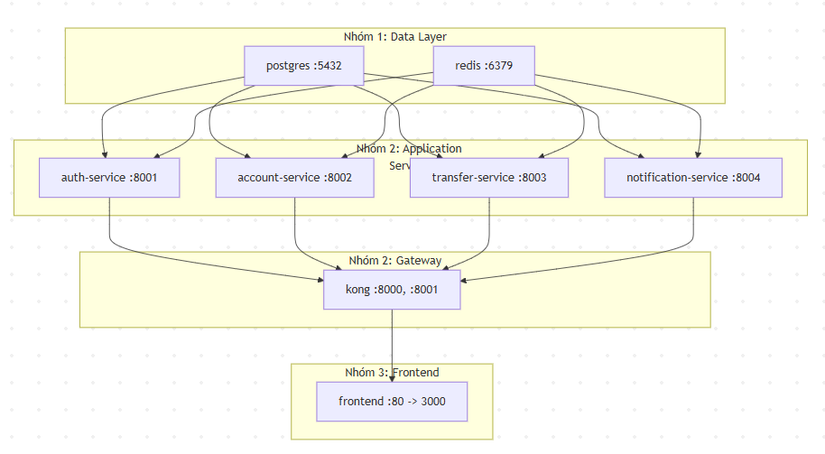
Nhóm 1: Data Layer
| Service | Image | Port | Mô tả |
|---|---|---|---|
| postgres | postgres:16 | 5432 | Database chính (users, balances, transfers, notifications) |
| redis | redis:7-alpine | 6379 | Session, presence, Pub/Sub cho thông báo real-time |
Nhóm 2: API Gateway & Microservices
| Service | Build | Port (nội bộ) | Mô tả |
|---|---|---|---|
| kong | kong:3.4 | 8000 (proxy), 8001 (admin) | API Gateway, route request đến các service |
| auth-service | Dockerfile | 8001 | Đăng ký, đăng nhập, session |
| account-service | Dockerfile | 8002 | Profile, số dư |
| transfer-service | Dockerfile | 8003 | Chuyển khoản |
| notification-service | Dockerfile | 8004 | Thông báo, WebSocket |
Nhóm 3: Frontend
| Service | Build | Port | Mô tả |
|---|---|---|---|
| frontend | ./frontend | 3000 → 80 | React SPA, Nginx serve static + proxy /api, /ws |
Chi tiết từng service
Phần này giải thích chức năng, API, dữ liệu và luồng xử lý của từng service để bạn hiểu rõ trước khi triển khai.
1. postgres (Data Layer)
- Vai trò: Lưu toàn bộ dữ liệu nghiệp vụ — users, số dư, lịch sử chuyển khoản, thông báo.
- Database:
banking, userbanking. - Bảng chính (các service dùng chung):
- users:
id,username,password_hash,balance(mặc định 100.000 cho demo). - transfers:
id,from_user,to_user,amount,created_at. - notifications:
id,user_id,message,is_read,created_at.
- users:
- Lưu ý: Bảng được tạo tự động khi service khởi động (
Base.metadata.create_all). Volumepgdatagiữ data sau khidocker compose down(trừ khi dùngdown -v).
2. redis (Data Layer)
- Vai trò: Session đăng nhập, presence (online), và Pub/Sub cho thông báo real-time.
- Các key/pattern:
session:<session_id>: value =user_id, TTL 24h (86400s). Auth-service tạo khi login; các service khác đọc qua headerX-Sessionđể biết user hiện tại.presence:<user_id>: value ="online", TTL 60s. Notification-service gia hạn mỗi 20s khi user còn mở WebSocket; hết TTL = offline.- Channel Pub/Sub
notify:<user_id>: Transfer-service publish message khi có chuyển khoản; Notification-service subscribe và đẩy qua WebSocket tới client.
- Lý do dùng Redis: Backend stateless — nhiều instance vẫn dùng chung session và real-time qua Redis.
3. kong (API Gateway)
- Vai trò: Một điểm vào cho toàn bộ API và WebSocket; route theo path, CORS, (sau này có thể thêm rate limit, auth plugin).
- Port: 8000 (proxy — client gọi), 8001 (admin API — cấu hình).
- Routing (trong
kong/kong.yml):/api/auth→ auth-service:8001 (strip_path: request tới Kong là/api/auth/register, tới service là/register)./api/account→ account-service:8002/api/transfer→ transfer-service:8003/api/notifications→ notification-service:8004/ws→ notification-service:8004 (WebSocket).
- CORS: Plugin CORS cho phép origin
http://localhost:3000, credentials, các header nhưX-Session. - Declarative mode: Không dùng database Kong; cấu hình đọc từ file
kong.ymlmount vào container.
4. auth-service (Port 8001)
- Vai trò: Đăng ký user mới, đăng nhập và tạo session (lưu Redis).
- API:
- POST /register: Body
{ "username", "password" }. Username ≥ 3 ký tự, password ≥ 6. Tạo user trong Postgres (balance mặc định 100.000), trả vềid,username,balance. - POST /login: Body
{ "username", "password" }. Kiểm tra credentials, tạo session trong Redis (session:<sid>→ user_id), trả vềsession,username,balance. Client lưusessionvà gửi headerX-Sessioncho các request sau. - GET /health: Kiểm tra kết nối Postgres + Redis.
- POST /register: Body
- Dữ liệu: Đọc/ghi users (Postgres), ghi session (Redis). Dùng
common/auth(hash/verify password),common/redis_utils(create_session).
5. account-service (Port 8002)
- Vai trò: Cung cấp thông tin user hiện tại và số dư (cần đăng nhập).
- API:
- GET /me: Header
X-Session. Lấy user_id từ Redis, đọc User trong Postgres, trả vềid,username,balance. - GET /balance: Header
X-Session. Chỉ trả vềbalance. - GET /health: Kiểm tra Postgres + Redis.
- GET /me: Header
- Auth: Mọi endpoint (trừ /health) cần header
X-Sessionhợp lệ; nếu thiếu hoặc hết hạn → 401.
6. transfer-service (Port 8003)
- Vai trò: Chuyển tiền giữa hai user, ghi lịch sử và gửi thông báo real-time.
- API:
- POST /transfer: Header
X-Session. Body{ "to_username", "amount" }. Sender = user từ session; receiver = user theoto_username. Kiểm tra amount > 0, đủ số dư, không chuyển cho chính mình. Dùng SELECT FOR UPDATE trên hai user để tránh race condition; cập nhật balance, tạo bản ghi transfers và hai bản ghi notifications (cho sender và receiver); commit. Sau commit gọi Redis PUBLISHnotify:<receiver_id>để Notification-service đẩy real-time qua WebSocket. - GET /health: Kiểm tra Postgres + Redis.
- POST /transfer: Header
- Dữ liệu: Đọc/ghi users, transfers, notifications (Postgres); chỉ ghi Redis (publish). Transaction đảm bảo consistency; push thông báo sau commit để người nhận chỉ thấy khi giao dịch đã ghi xong.
7. notification-service (Port 8004)
- Vai trò: Lấy danh sách thông báo (REST) và phát thông báo real-time qua WebSocket.
- API:
- GET /notifications: Header
X-Session. Trả về tối đa 50 thông báo mới nhất của user (từ bảng notifications), cóid,message,is_read,created_at. - WebSocket /ws: Query
?session=<session_id>. Xác thực session → user_id. Subscribe Redis channelnotify:<user_id>. Mỗi message từ channel (do Transfer-service publish) được gửi xuống client dạng{ "type": "notification", "message": "..." }. Đồng thời chạy vòng lặp presence: mỗi 20s setpresence:<user_id>= online (TTL 60s); khi WebSocket đóng thì xóa presence. - GET /health: Kiểm tra Postgres + Redis.
- GET /notifications: Header
- Luồng real-time: Client mở WebSocket với session → Notification-service subscribe
notify:user_id. Khi có chuyển khoản, Transfer-service publish → Notification-service nhận → gửi JSON qua WebSocket → client (React) cập nhật UI.
8. frontend (Port 3000 → 80)
- Vai trò: Giao diện web (React SPA); gọi API và WebSocket qua Nginx proxy tới Kong.
- Công nghệ: React, Tailwind CSS; build ra static files; Nginx listen 80, map ra host port 3000.
- Proxy (trong
frontend/nginx.conf):location /→ serve file tĩnh, SPA fallbackindex.html.location /api/→ proxy_passhttp://kong:8000/api/(REST).location /ws→ proxy_passhttp://kong:8000/ws(WebSocket, upgrade headers).
- Luồng user: Vào http://localhost:3000 → React load → đăng ký/đăng nhập qua
/api/auth/*→ lưu session (vd localStorage) → gọi/api/account/me,/api/transfer/transfer,/api/notifications/notificationsvới headerX-Session→ mở WebSocket/ws?session=...để nhận thông báo real-time.
Tóm tắt luồng dữ liệu
| Service | Postgres | Redis |
|---|---|---|
| auth-service | users (read/write) | session (write) |
| account-service | users (read) | session (read) |
| transfer-service | users, transfers, notifications (read/write) | publish notify |
| notification-service | notifications (read) | session (read), presence (write), subscribe notify |
Thứ tự khởi động và dependency
Docker Compose dùng depends_on để đảm bảo thứ tự khởi động:
- postgres, redis — chạy trước, có
healthcheck - auth-service, account-service, transfer-service, notification-service —
depends_on: postgres (healthy), redis - kong —
depends_on4 services trên (chờ chúng start) - frontend —
depends_on: kong
# Ví dụ dependency của auth-service
auth-service:
  depends_on:
    postgres:
      condition: service_healthy   # Đợi Postgres sẵn sàng
    redis:
      condition: service_started   # Đợi Redis start
Chi tiết cấu hình quan trọng
Kong — Declarative config mode
Kong được cấu hình không dùng database (mode KONG_DATABASE: "off"), đọc routes từ file kong/kong.yml:
kong:
  environment:
    KONG_DATABASE: "off"
    KONG_DECLARATIVE_CONFIG: /kong/kong.yml
  volumes:
    - ./kong/kong.yml:/kong/kong.yml:ro
File kong.yml khai báo routes: /api/auth → auth-service, /api/account → account-service, v.v. Kong không cần Postgres riêng, đơn giản hơn cho demo.
Các service — Build từ root context
Mỗi microservice có Dockerfile riêng trong services/<tên>/, nhưng build.context là root (.):
auth-service:
  build:
    context: .
    dockerfile: services/auth-service/Dockerfile
Lý do: các service dùng thư mục common/ (DB, models, Redis, auth). Build từ root mới copy được common/ vào image.
Biến môi trường chung
Các service cần:
DATABASE_URL: kết nối Postgres (hostnamepostgrestrong Docker network)REDIS_URL: kết nối Redis (hostnameredis)CORS_ORIGINS:http://localhost:3000cho frontend
DATABASE_URL: postgresql://banking:bankingpass@postgres:5432/banking
REDIS_URL: redis://redis:6379/0
CORS_ORIGINS: http://localhost:3000
Frontend — Proxy qua Kong
Frontend (Nginx) expose port 3000, nhưng container listen 80. Cấu hình proxy:
/api/*→http://kong:8000/api/*/ws→http://kong:8000/ws(WebSocket)
User truy cập http://localhost:3000 → mọi API call và WebSocket đều đi qua Kong.
Các bước triển khai
Bước 1: Clone repository
git clone https://github.com/<your-username>/banking-demo.git
cd banking-demo
Bước 2: Build và chạy
docker compose up -d --build
-d: chạy nền (detached)--build: build lại image trước khi chạy (cần cho lần đầu hoặc khi đổi code)
Lần đầu có thể mất 3–5 phút do build 5 image (frontend + 4 services).
Bước 3: Kiểm tra trạng thái
docker compose ps
Tất cả services phải ở trạng thái running. Nếu có service unhealthy hoặc restart liên tục, xem logs:
docker compose logs -f <service-name>
Bước 4: Truy cập ứng dụng
| Đích | URL |
|---|---|
| Frontend | http://localhost:3000 |
| API (Kong proxy) | http://localhost:8000 |
| Kong Admin API | http://localhost:8001 |
Bước 5: Test API
# Đăng ký user mới
curl -X POST http://localhost:8000/api/auth/register \
  -H "Content-Type: application/json" \
  -d '{"username":"user1","password":"pass123456"}'

# Đăng nhập
curl -X POST http://localhost:8000/api/auth/login \
  -H "Content-Type: application/json" \
  -d '{"username":"user1","password":"pass123456"}'
Response đăng nhập sẽ có session — dùng header X-Session: <session_id> cho các request cần auth.
Kiểm tra Redis và PostgreSQL
Redis
# Ping
docker exec banking-redis redis-cli ping
# PONG

# Liệt kê keys
docker exec banking-redis redis-cli keys '*'
session:<id>— phiên đăng nhập (user_id, TTL ~24h)presence:<user_id>— user đang online (WebSocket mở, TTL 60s)
PostgreSQL
# Kết nối và list bảng
docker exec -it banking-postgres psql -U banking -d banking -c "\dt"

# Xem users
docker exec banking-postgres psql -U banking -d banking -c "SELECT id, username, balance FROM users;"
Xử lý lỗi thường gặp
Port đã được sử dụng
Error: port is already allocated
Kiểm tra process đang dùng port (vd: 5432, 6379, 3000):
# Windows
netstat -ano | findstr :5432

# Linux/Mac
lsof -i :5432
Tắt process đó hoặc đổi port trong docker-compose.yml (vd: "5433:5432").
Kong không start / unhealthy
Kong phụ thuộc 4 services. Nếu auth/account/transfer/notification chưa ready, Kong có thể fail. Kiểm tra:
docker compose logs kong
Đảm bảo kong/kong.yml tồn tại và mount đúng. Service names trong kong.yml phải trùng tên service trong docker-compose (auth-service, account-service, …).
Service không kết nối được Postgres/Redis
Lỗi kiểu connection refused hoặc could not translate host name "postgres" — thường do:
- Postgres/Redis chưa healthy → tăng
start_periodtrong healthcheck hoặc đợi lâu hơn - Sai tên host: trong Docker network, hostname là tên service (
postgres,redis), không phảilocalhost
Build lỗi (common module not found)
Nếu Dockerfile build thiếu common/:
- Kiểm tra
build.context: .(root) - Kiểm tra
COPY common/ ./common/trong Dockerfile
Dừng và xóa
# Dừng tất cả
docker compose down

# Dừng và xóa cả volumes (xóa data Postgres)
docker compose down -v
Tóm tắt
| Bước | Lệnh |
|---|---|
| Chạy | docker compose up -d --build |
| Xem logs | docker compose logs -f <service> |
| Kiểm tra | docker compose ps |
| Dừng | docker compose down |
| Xóa data | docker compose down -v |
Bài tiếp theo
Bài 3: Docker Compose → Kubernetes — Migrate từng bước
- Chuyển từng service sang K8s manifest
- StatefulSet cho Postgres, Redis
- Kong API Gateway trên Kubernetes
- Ingress và luồng traffic
Tags: #docker #docker-compose #microservices #kong #devops
All rights reserved
