


[P1] Cài đặt Prometheus + Grafana trên Ubuntu 20.04
Cảnh báo Spam: Bài đăng này chưa sẵn sàng để xuất bản. Tác giả có thể đã vô tình công khai nó trong quá trình viết. Do đó, bạn nên suy nghĩ trước khi đọc bài bài này.
Cài đặt Prometheus
- Lấy link cài đặt mới nhất tại: https://prometheus.io/download/
wget https://github.com/prometheus/prometheus/releases/download/v2.33.3/prometheus-2.33.3.linux-amd64.tar.gz
tar -xvzf prometheus-2.33.3.linux-amd64.tar.gz
mv prometheus-2.33.3.linux-amd64 /usr/local/prometheus/
- Tạo service prometheus trong systemd
vi /etc/systemd/system/prometheus.service
- Để nội dung file:
[Unit]
Description=Prometheus
Wants=network-online.target
After=network-online.target

[Service]
User=root
Group=root
Type=simple
ExecStart=/usr/local/prometheus/prometheus \
--config.file /usr/local/prometheus/prometheus.yml \
--storage.tsdb.path /usr/local/prometheus/ \
--web.console.templates=/usr/local/prometheus/consoles \
--web.console.libraries=/usr/local/prometheus/console_libraries

[Install]
WantedBy=multi-user.target
- Restart và enable services.
systemctl daemon-reload
systemctl start prometheus
systemctl status prometheus
Cài đặt Grafana
- Lấy link bộ cài mới nhất tại: https://grafana.com/grafana/download
- Chạy các lệnh sau để tiến hành cài đặt:
sudo apt-get install -y adduser libfontconfig1
wget https://dl.grafana.com/enterprise/release/grafana-enterprise_8.4.1_amd64.deb
sudo dpkg -i grafana-enterprise_8.4.1_amd64.deb
service grafana-server start
systemctl daemon-reload
systemctl start grafana-server
systemctl status grafana-server
sudo systemctl enable grafana-server.service
- Sau khi cài đặt xong truy cập vào Grfana: http://IP:3000 default password: admin/admin
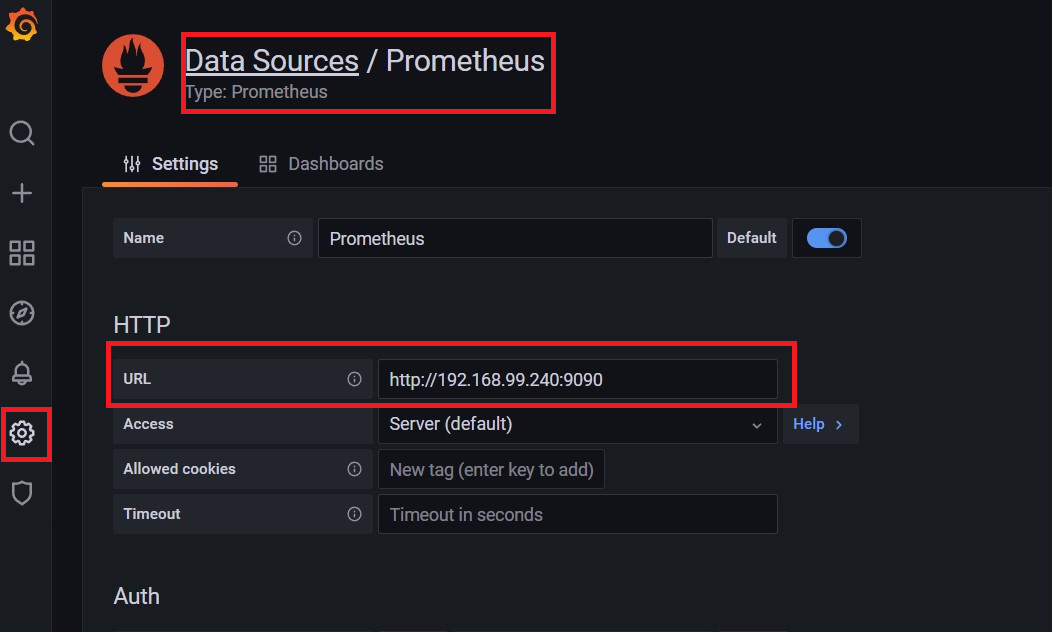
- Vào configuration - Data Source - chọn Prometheus - điền thông tin máy chủ Prometheus.
![image.png]()
All rights reserved
