


7 thư viện cốt lõi không thể thiếu cho Node.js Backend Development
Gần 2026 rồi mà Node.js vẫn giữ vững vị trí trong backend. Với dev kinh nghiệm, thách thức không còn là "Node.js có làm được không?" mà là "Library nào ổn định, hiệu quả, đáng standardize?". Bài này review 7 thư viện core tạo thành Node.js backend stack hiện đại đáng tin cậy – kèm cách giữ môi trường dev ổn định khi dùng chúng.
1. Express.js — Web Framework tối giản, battle-tested
Dù NestJS, Fastify đang lên, Express.js vẫn là industry standard cho nhiều production backend:
- Core siêu nhỏ, middleware model linh hoạt.
- Hoàn hảo cho REST API, microservice, internal tool nhanh.
- Dễ reason full lifecycle của request.
Server API đơn giản với error handling cơ bản:
const express = require("express");
const app = express();

// Parse JSON request body
app.use(express.json());

// Basic route
app.get("/api/status", (req, res) => {
  res.json({ state: "running", uptime: process.uptime() });
});

// Handle POST requests
app.post("/api/users", (req, res) => {
  const { username } = req.body;
  if (!username) {
    return res.status(400).json({ error: "Username is required" });
  }
  res.status(201).json({ id: Date.now(), username });
});

app.listen(3000, () => {
  console.log("Server is active on port 3000");
});
Express cũng là foundation cho nhiều framework cao cấp hơn, hiểu nó tạo nền tảng vững cho toàn ecosystem.
2. Prisma — Type-safe ORM cho Database hiện đại
Prisma là "next-generation ORM" cải thiện đáng kể cách Node.js app tương tác SQL database:
- Data model định nghĩa trong file
schema.prisma. - Prisma generate fully typed client cho TypeScript/JavaScript hiện đại.
- Nhiều runtime bug (typo, sai field name, relation invalid) thành compile-time error.
Ví dụ sử dụng:
// Giả sử đã định nghĩa User model trong schema.prisma
import { PrismaClient } from "@prisma/client";

const prisma = new PrismaClient();

async function main() {
  // Tạo record
  const newUser = await prisma.user.create({
    data: {
      email: "dev@example.com",
      name: "Backend Engineer",
    },
  });

  // Query record
  const user = await prisma.user.findUnique({
    where: {
      email: "dev@example.com",
    },
  });

  console.log("User found:", user);
}

main().catch(console.error);
Nếu làm TypeScript, type safety và autocomplete của Prisma thôi đã đủ justify adopt nó.
3. Passport.js — Authentication Strategy linh hoạt
Authentication dễ rối nhanh. Passport.js cung cấp unified interface quanh nhiều strategy:
- Local username/password login.
- OAuth provider như Google, GitHub, Twitter...
- Custom strategy cho internal SSO.
Mỗi "strategy" encapsulate auth logic riêng:
const passport = require("passport");
const LocalStrategy = require("passport-local").Strategy;
const { verifyPassword, getUser } = require("./db"); // Simulated DB operations

passport.use(
  new LocalStrategy(async function (username, password, done) {
    try {
      const user = await getUser(username);
      if (!user) {
        return done(null, false);
      }

      const isValid = await verifyPassword(user, password);
      if (!isValid) {
        return done(null, false);
      }

      return done(null, user);
    } catch (err) {
      return done(err);
    }
  }),
);
Bằng cách giữ auth logic trong strategy, route handler focus vào business logic.
4. Joi — Input Validation mạnh mẽ cho API
Input validation là first line defense mọi backend. Joi cung cấp chainable API mô tả data structure mạnh mẽ:
- Validate type, range, format, custom rule.
- Tuyệt cho Express middleware validate request body trước khi vào business logic.
Ví dụ:
const Joi = require("joi");

// Define validation schema
const productSchema = Joi.object({
  name: Joi.string().min(3).required(),
  price: Joi.number().positive().precision(2).required(),
  tags: Joi.array().items(Joi.string()).max(5),
  isAvailable: Joi.boolean().default(true),
});

// Validate input
const inputData = { name: "Keyboard", price: 99.99, tags: ["electronic"] };
const { error, value } = productSchema.validate(inputData);

if (error) {
  console.error("Invalid input:", error.details[0].message);
} else {
  console.log("Sanitized data:", value);
}
Joi giúp giữ validation logic declarative, centralized thay vì rải if check khắp controller.
5. Mongoose — ODM cho MongoDB
Với NoSQL workload, Mongoose vẫn là go-to ODM cho MongoDB:
- Thêm schema/model lên flexible MongoDB document.
- Middleware hooks (pre/post save, validate...).
- Làm modeling và validation predictable hơn.
Ví dụ:
const mongoose = require("mongoose");

// Connect to MongoDB
mongoose.connect("mongodb://127.0.0.1:27017/project_db");

// Define schema
const TaskSchema = new mongoose.Schema({
  title: String,
  isCompleted: { type: Boolean, default: false },
  createdAt: { type: Date, default: Date.now },
});

const Task = mongoose.model("Task", TaskSchema);

// Create and save a document
const task = new Task({ title: "Review Code" });
task.save().then(() => console.log("Task saved"));
Nếu stack mix relational (qua Prisma) và MongoDB (qua Mongoose), cover được nhiều data model khác nhau.
6. Socket.IO — Real-time Communication đơn giản
Với real-time chat, notification, collaborative app, HTTP không đủ. Socket.IO wrap WebSocket và manage:
- Browser compatibility.
- Automatic reconnection.
- Event-based messaging client-server.
Server ví dụ:
const { Server } = require("socket.io");

// Listen on port 8080
const io = new Server(8080, {
  cors: { origin: "*" },
});

io.on("connection", (socket) => {
  console.log(`Client connected: ${socket.id}`);

  // Custom event handler
  socket.on("ping", (data) => {
    // Respond to the client
    socket.emit("pong", { received: data, time: Date.now() });
  });
});
Socket.IO giúp build interactive feature không cần manual manage WebSocket fallback và connection state.
7. Biome — Linting & Formatting siêu nhanh một tool
Về tooling, Biome (viết bằng Rust) nhanh chóng thay thế ESLint + Prettier combo:
- Blazing-fast formatter cho JavaScript/TypeScript và file liên quan.
- Integrated linter với hàng trăm rule.
- Unified config trong single file.
Ví dụ biome.json:
{
  "$schema": "https://biomejs.dev/schemas/1.9.4/schema.json",
  "formatter": {
    "enabled": true,
    "indentStyle": "space",
    "lineWidth": 120
  },
  "linter": {
    "enabled": true,
    "rules": {
      "recommended": true
    }
  },
  "javascript": {
    "formatter": {
      "quoteStyle": "single"
    }
  }
}
Bằng cách consolidate linting + formatting thành single fast tool, simplify CI pipeline và giảm config drift qua project.
One-click setup môi trường Node.js và Database
Tất cả library trên mạnh, nhưng real project thường gặp vấn đề khác: môi trường chính nó.
- Configuration of dev environment đau đầu khi cần multiple Node.js version cho project khác nhau.
- App này depend PostgreSQL (cho Prisma), app kia cần MongoDB (cho Mongoose), plus Redis/service khác.
- Manage manual với Docker, system service, port juggling dễ error.
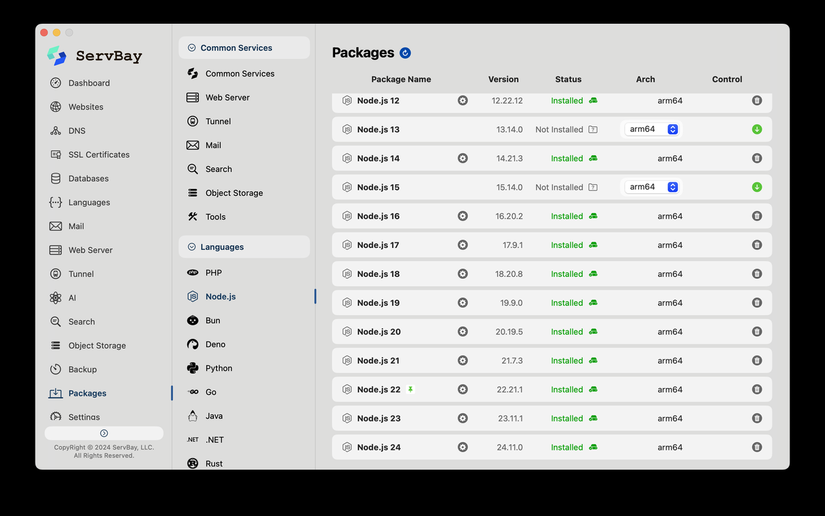 Local environment manager như ServBay lúc này rất giá trị:
- Cài Node.js một click
Manage Node.js không cần edit PATH tay hay install global tool. Chọn version cần và dùng ngay. - Multiple Node.js version song song
Pin Node 14 cho legacy service, dùng Node 22 cho project mới – cả hai chạy cùng máy không conflict. - Heterogeneous database, homogeneous workflow
SQL database (PostgreSQL, MySQL) và NoSQL store (MongoDB, Redis) chạy concurrent. Mirror production-like architecture local không cần complex container setup.
Tool tốt set lower bound productivity, nhưng môi trường ổn định define upper limit. Kết hợp 7 core Node.js library trên với environment manager robust simplify configuration of dev environment và giúp manage Node.js unlock backend dev workflow mượt mà, scalable hơn.
All rights reserved
