


Xây Dựng Voice Chat AI
Xây Dựng Voice Chat AI: STT → RAG → LLM → TTS Trên LiveKit
Tổng Quan Hệ Thống
Bài viết này mô tả cách xây dựng một Voice Agent cho phép người dùng hội thoại với AI bằng giọng nói thời gian thực — không gõ phím, không đợi lâu.
Flow cơ bản:
User nói → STT → RAG tìm context → LLM sinh câu trả lời → TTS → User nghe
Stack công nghệ:
| Tầng | Công nghệ | Ghi chú |
|---|---|---|
| Real-time Audio | LiveKit | WebRTC rooms, agent framework |
| STT | OpenAI Whisper / Soniox | Speech-to-Text |
| LLM | Gemini / GPT-4 | Sinh câu trả lời |
| TTS | OpenAI TTS (nova) | Text-to-Speech |
| VAD | Silero VAD | Phát hiện ai đang nói |
| RAG | sentence-transformers + ChromaDB | Tìm kiếm knowledge base |
| Backend | FastAPI + Python async | API server |
| Frontend | React + LiveKit JS SDK | Giao diện |
Kiến Trúc: Mỗi User — Một Room Riêng
Nguyên tắc thiết kế: 1 user = 1 LiveKit room = 1 Voice Agent instance.
User A → Room A → Agent A
User B → Room B → Agent B
User C → Room C → Agent C
Mỗi agent hoàn toàn isolated, không shared state, LiveKit xử lý toàn bộ WebRTC complexity.
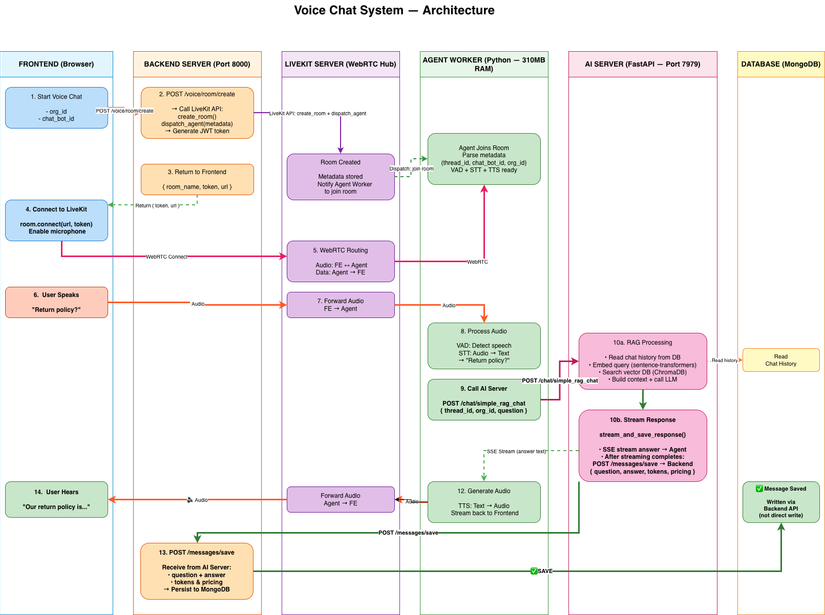
Request Flow Chi Tiết
User nói: "Thời tiết hôm nay?"
    │
    ▼ WebRTC audio stream
LiveKit Room
    │
    ▼ Audio routing
Voice Agent
    ├─ STT:     "Thời tiết hôm nay?"        (~300ms)
    ├─ RAG API: Tìm context liên quan        (~250ms)
    ├─ LLM:     Sinh câu trả lời             (~800ms)
    └─ TTS:     Tổng hợp giọng "nova"        (~400ms)
    │
    ▼ Audio stream
User nghe: "Hôm nay Hà Nội nắng, 32°C"

Total: ~1.75s end-to-end
Backend: Tạo Room & Dispatch Agent
# voice_controller.py

@router.post("/join")
async def join_voice_room(request: JoinRequest):
    room_name = f"voice-{request.thread_id}"

    # Tạo room riêng cho user
    await lk_api.room.create_room(
        CreateRoomRequest(name=room_name)
    )

    # Dispatch agent vào room
    await lk_api.agent_dispatch.create_dispatch(
        CreateAgentDispatchRequest(
            room=room_name,
            agent_name="rag-voice-agent",
            metadata=json.dumps({
                "thread_id": request.thread_id,
                "chat_bot_id": request.chat_bot_id,
                "org_id": request.org_id
            })
        )
    )

    # Cấp token cho user
    token = AccessToken(api_key, api_secret)
    token.with_identity(request.thread_id)
    token.add_grants(VideoGrants(room_join=True, room=room_name))

    return {"room_name": room_name, "token": token.to_jwt()}
Voice Agent: Xử Lý Hội Thoại
Shared Models — Load Một Lần, Dùng Chung
# shared_models.py — Khởi tạo 1 lần khi server start

_shared_stt = openai.STT(api_key=settings.OPENAI_KEY)
_shared_tts = openai.TTS(voice="nova")
_shared_vad = silero.VAD.load()

def get_shared_stt(): return _shared_stt
def get_shared_tts(): return _shared_tts
def get_shared_vad(): return _shared_vad
Không share model → mỗi agent load riêng → lãng phí 145MB duplicate. Share model giúp tiết kiệm đáng kể RAM trên production.
Agent Entrypoint
# voice_agent.py

async def entrypoint(ctx: JobContext):
    await ctx.connect()

    # Lấy metadata từ dispatch
    metadata = json.loads(ctx.job.dispatch.metadata)

    # Khởi tạo agent với context của user
    agent = ChatAgent(
        thread_id=metadata["thread_id"],
        chat_bot_id=metadata["chat_bot_id"],
        org_id=metadata["org_id"]
    )

    # AgentSession dùng shared models
    session = AgentSession(
        llm=openai.LLM(model="gpt-4o-mini"),
        stt=get_shared_stt(),
        tts=get_shared_tts(),
        vad=get_shared_vad()
    )

    await session.start(ctx.room, agent)
Chat Agent — Gọi RAG API
class ChatAgent(Agent):
    def __init__(self, thread_id: str, chat_bot_id: str, org_id: str):
        super().__init__(instructions="Bạn là trợ lý AI hữu ích.")
        self.thread_id = thread_id
        self.chat_bot_id = chat_bot_id
        self.org_id = org_id
        self.rag_api_url = settings.RAG_API_URL

    @function_tool
    async def answer_question(self, query: Annotated[str, "Câu hỏi của user"]) -> str:
        """Trả lời câu hỏi dựa trên knowledge base."""
        async with httpx.AsyncClient() as client:
            response = await client.post(
                f"{self.rag_api_url}/message/chat",
                json={
                    "thread_id": self.thread_id,
                    "query": query,
                    "chat_bot_id": self.chat_bot_id,
                    "org_id": self.org_id
                },
                timeout=30.0
            )
            return response.json()["answer"]
Frontend: Kết Nối LiveKit
// VoiceChat.tsx

const joinVoiceRoom = async () => {
  // 1. Lấy token từ backend
  const { room_name, token } = await api.post("/voice/join", {
    thread_id: threadId,
    chat_bot_id: chatBotId,
  });

  // 2. Kết nối LiveKit room
  const room = new Room();
  await room.connect(LIVEKIT_URL, token);

  // 3. Bật mic
  await room.localParticipant.setMicrophoneEnabled(true);
};
LiveKit JS SDK tự xử lý: VAD, echo cancellation, reconnect khi mất mạng.
RAG Service — Tách Riêng Để Scale Độc Lập
Thay vì nhúng RAG vào mỗi voice agent (tốn ~150MB embedding model/instance), tách thành microservice riêng:
Voice Agent (180MB) ──HTTP──▶ RAG API Service (3GB, shared)
                                ├─ Embedding model: 100MB
                                ├─ Vector DB (ChromaDB): 500MB
                                └─ LLM (Gemini/GPT): API call
Lợi ích:
- Voice agent lightweight (~180MB vs ~330MB nếu nhúng RAG)
- RAG scale độc lập, có thể cache, có thể dùng GPU riêng
- Upgrade model AI không cần redeploy voice agent
Memory Profile Thực Tế
$ docker stats

voice-agent:  310MB/instance
rag-api:      3GB (shared bởi tất cả agents)

Với 10 concurrent users:
├─ 10 voice agents × 310MB = 3.1GB
└─ 1 rag-api × 3GB = 3GB (không nhân thêm)
Total: ~6.1GB — hợp lý cho production
Breakdown một agent:
310MB/agent
├─ Python runtime + FastAPI: 180MB
├─ STT/TTS/VAD (amortized):   80MB
├─ LLM HTTP client:            20MB
└─ Audio buffers:              30MB
Ưu & Nhược Điểm
Ưu điểm:
- Isolation hoàn hảo — mỗi user hoàn toàn độc lập
- Reconnect tự động — LiveKit tự xử lý network drop
- Privacy tự nhiên — room riêng, không lo data leak
- Dễ debug — 1 user = 1 agent = 1 log stream
- Production-ready — không có edge case ẩn
Nhược điểm:
- RAM tuyến tính theo số users — cần scale ngang
- Room creation overhead ~1s khi user mới join
- Chi phí infra tăng tuyến tính (có thể giảm bằng auto-scale)
Kết Luận
Kiến trúc Private Mode với LiveKit cho phép xây dựng voice chat AI chất lượng cao, ổn định mà không cần phát minh lại wheel:
- LiveKit xử lý toàn bộ WebRTC, reconnect, NAT traversal
- OpenAI Whisper + TTS cho chất lượng âm thanh tốt nhất hiện tại
- Tách RAG thành microservice riêng giúp hệ thống scale độc lập từng tầng
All rights reserved
