
[Series 100 Bài Học HTML/CSS Thực Chiến - Bài 82]: Xây Dựng Màn Hình "Quản Lý Kho Hàng & Cảnh Báo Sắp Hết Hàng" (Seller Warehouse & Stock Alert UI) Trong Kênh Người Bán Shopee
Chào mừng anh em đã bước sang Bài 82 trong chuỗi 100 Bài Học Làm Chủ HTML/CSS Qua Dự Án Clone Shopee!
Ở Bài 81, chúng ta đã hoàn thành tính năng Phóng To Ảnh Sản Phẩm Toàn Màn Hình (CSS Lightbox Gallery) không cần JavaScript. Hôm nay, chúng ta sẽ quay trở lại Chương 13 (Kênh Người Bán) để giải quyết một bài toán vận hành sống còn của mọi chủ Shop: Màn Hình "Quản Lý Kho Hàng & Cảnh Báo Sắp Hết Hàng" (Seller Warehouse & Stock Alert UI)!
Trong thương mại điện tử, việc để sản phẩm bán chạy bất ngờ về 0 tồn kho giữa dịp Siêu Sale không chỉ làm mất doanh thu mà còn khiến Shopee hạ thứ hạng hiển thị của sản phẩm. Vì vậy, giao diện Quản Lý Kho Hàng cần giúp chủ Shop phát hiện rủi ro chỉ trong 2 giây nhờ 4 kỹ thuật CSS thực chiến:
-
Thanh Chỉ Số Sức Khỏe Kho Hàng (
Warehouse Health Strip): Tóm tắt tức thì Tổng SKU đang bán (128), Sắp hết hàng (2màu Vàng Cam) và Đã hết hàng (1màu Đỏ khẩn cấp). -
Bộ Lọc Trạng Thái Tồn Kho Bằng CSS Radio Tabs: Cho phép lọc tức thì giữa Tất cả (4) | Còn nhiều hàng | Sắp hết hàng (dưới 10) | Đã hết hàng (0) mà không cần một dòng JavaScript nào!
-
Thanh Mức Tồn Kho Trực Quan (
Stock Level Bar) & Nhãn Cảnh Báo Nhấp Nháy: Mỗi mã phân loại (SKU) đều có thanh tiến trình mức tồn kho đổi màu theo ngưỡng an toàn (Xanh Ngọc khi dồi dào, Vàng Cam khi sắp cạn, Đỏ kèm chấm nhấp nháy@keyframes stockPulsekhi về0). -
Ngăn Kéo Nhập Kho Nhanh Tại Chỗ (
Inline Restock Drawerbằng<details>): Bấm nút "Nhập thêm" ngay trên dòng sản phẩm sắp hết để mở form cộng thêm số lượng tồn kho và chọn kho lưu trữ (Kho TP.HCM), tương thích 100% với Dark Mode (Bài 55)!
1. Giải phẫu Màn Hình "Quản Lý Kho Hàng" (Seller Warehouse UI)
Hãy quan sát giao diện thực tế của khu vực Quản Lý Sản Phẩm & Số Lượng Kho Hàng trên Kênh Người Bán Shopee — nơi liệt kê rõ từng phân loại hàng, mã SKU, số lượng tồn kho và thao tác cập nhật nhanh:
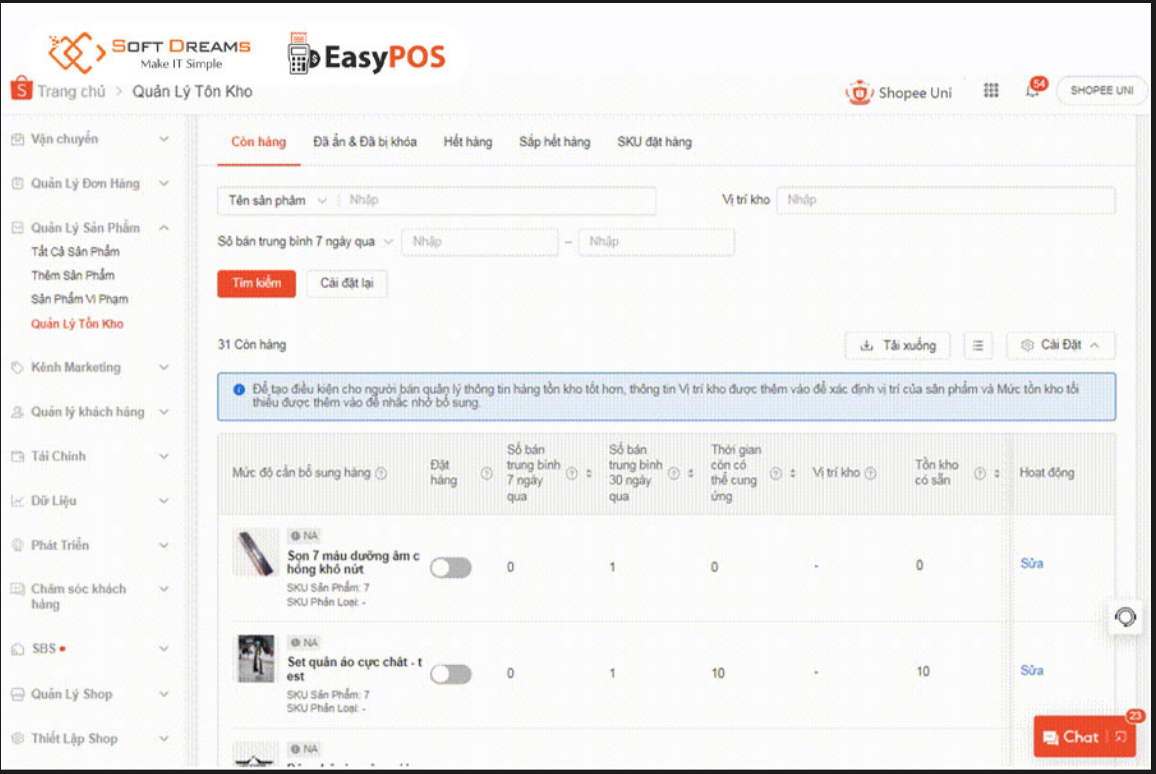
Toàn bộ khối Quản Lý Kho Hàng (.seller-warehouse-card) bên trong .seller-workspace được tổ chức thành 3 tầng mạch lạc từ trên xuống dưới:
Plaintext
+-----------------------------------------------------------------------------------+
|  QUẢN LÝ KHO HÀNG & CẢNH BÁO TỒN KHO            Kho: [ 📍 Kho TP.HCM - Q.Tân Phú ]| <-- 1. Header + Kho mặc định
|  [ Tổng SKU: 128 ]     [ ⚠️ Sắp hết hàng: 2 ]     [ 🚨 Đã hết hàng: 1 ]           |     + 3 Thẻ chỉ số kho
+-----------------------------------------------------------------------------------+
|  [ Tất cả (4) ]   [ Còn hàng (1) ]   [ Sắp hết (2) ]   [ Hết hàng (1) ]           | <-- 2. Bộ lọc CSS Radio
+-----------------------------------------------------------------------------------+
|  SẢN PHẨM & MÃ SKU              | MỨC TỒN KHO & CẢNH BÁO       | THAO TÁC         | <-- 3. Danh sách SKU
|  [📦] AULA F75 Pro (Trắng Xanh) | 6 / 100 sp  [⚠️ Sắp hết]     | [ + Nhập thêm ]  |     (Bấm mở form nhập kho!)
|       SKU: AULA-F75-WBL         | [██░░░░░░░░░░░░░░░░]  6%     |                  |
|  -------------------------------------------------------------------------------  |
|  [📦] AULA WIN68 HE (Đen)       | 0 / 50 sp   [🚨 Hết hàng]    | [ + Nhập gấp ]   | <-- Viền đỏ mép trái!
|       SKU: AULA-W68-BLK         | [░░░░░░░░░░░░░░░░░░]  0%     |                  |
+-----------------------------------------------------------------------------------+
| Kỹ thuật CSS trong Bài 82 | Khai báo cốt lõi | Tác dụng thực chiến |
|---|---|---|
| Phân cấp màu viền cảnh báo mép trái | .wh-item--low { border-left: 3.5px solid #f59e0b; }.wh-item--out { border-left: 3.5px solid #ff424f; } |
Giúp nhân viên kho quét mắt từ trên xuống và nhận diện ngay dòng nào cần nhập gấp mà không cần đọc từng con số! |
| Thanh mức tồn kho đổi màu theo ngưỡng | .wh-bar-fill--ok (Xanh Ngọc), --low (Vàng Cam), --out (Đỏ) |
Biểu diễn trực quan tỷ lệ hàng còn lại so với sức chứa tiêu chuẩn của kệ kho. |
Form nhập kho tại chỗ (<details>) |
<details class="wh-restock-drawer"> đặt ngay bên dưới mỗi dòng SKU |
Chủ Shop bấm "Nhập thêm" để nhập số lượng bổ sung ngay trên đúng mã SKU đó mà không bị chuyển trang mất ngữ cảnh. |
2. Thực hành: Code Màn Hình "Quản Lý Kho Hàng & Cảnh Báo Sắp Hết Hàng" (index.html & main.css)
Bước 1: Bổ sung HTML Khối Quản Lý Kho Hàng (.seller-warehouse-card) vào index.html
Hãy mở file index.html, tìm đến bên trong <div class="seller-workspace"> của Chương 13 (Kênh Người Bán) (ngay bên dưới khối .seller-ads-card của Bài 77) và chèn toàn bộ cấu trúc Bài 82: Quản Lý Kho Hàng & Cảnh Báo Sắp Hết Hàng dưới đây:
HTML
<!-- ========================================================= -->
<!-- BÀI 82: QUẢN LÝ KHO HÀNG & CẢNH BÁO SẮP HẾT HÀNG (SKU) -->
<!-- ========================================================= -->
<div class="seller-card seller-warehouse-card">
<!-- Hệ thống 4 nút Radio lọc trạng thái tồn kho -->
<input type="radio" name="wh-filter" id="wh-all" class="wh-ctrl-input" checked>
<input type="radio" name="wh-filter" id="wh-ok" class="wh-ctrl-input">
<input type="radio" name="wh-filter" id="wh-low" class="wh-ctrl-input">
<input type="radio" name="wh-filter" id="wh-out" class="wh-ctrl-input">
<!-- 1. Header & Chọn Kho Lưu Trữ -->
<div class="seller-card__header seller-card__header--row">
<div>
<h3 class="seller-card__title">Quản Lý Kho Hàng & Cảnh Báo Tồn Kho</h3>
<p class="seller-card__subtitle">Theo dõi số lượng khả dụng theo từng mã SKU và bổ sung tồn kho kịp thời trước giờ Flash Sale</p>
</div>
<span class="wh-location-badge">
<i class="fa-solid fa-warehouse"></i> Kho TP.HCM (Q. Tân Phú)
</span>
</div>
<!-- 3 Thẻ Chỉ Số Sức Khỏe Kho Hàng -->
<div class="wh-health-grid">
<div class="wh-health-box">
<span class="wh-health__label">Tổng mã phân loại (SKU)</span>
<strong class="wh-health__val">128</strong>
<span class="wh-health__sub">Tổng tồn kho: 4.620 sản phẩm</span>
</div>
<div class="wh-health-box wh-health-box--low">
<span class="wh-health__label"><i class="fa-solid fa-triangle-exclamation"></i> Sắp hết hàng (dưới 10 sp)</span>
<strong class="wh-health__val wh-val--low">2</strong>
<span class="wh-health__sub">Cần lên kế hoạch nhập thêm trong 48h</span>
</div>
<div class="wh-health-box wh-health-box--out">
<span class="wh-health__label"><i class="fa-solid fa-circle-exclamation"></i> Đã hết hàng (0 sp)</span>
<strong class="wh-health__val wh-val--out">1</strong>
<span class="wh-health__sub">Sản phẩm đang tạm ẩn nút Mua Ngay</span>
</div>
</div>
<!-- 2. Thanh Bộ Lọc Trạng Thái Tồn Kho (CSS Radio Pills) -->
<div class="wh-filter-bar" role="tablist" aria-label="Lọc trạng thái tồn kho">
<label for="wh-all" class="wh-filter-pill">Tất cả (4)</label>
<label for="wh-ok" class="wh-filter-pill">Còn nhiều hàng (1)</label>
<label for="wh-low" class="wh-filter-pill">Sắp hết hàng <span class="wh-pill-badge wh-pill--low">2</span></label>
<label for="wh-out" class="wh-filter-pill">Đã hết hàng <span class="wh-pill-badge wh-pill--out">1</span></label>
</div>
<!-- 3. DANH SÁCH MÃ SKU & NGĂN KÉO NHẬP KHO NHANH -->
<div class="wh-sku-list">
<!-- SKU 1: ĐÃ HẾT HÀNG (0/50 - CẢNH BÁO ĐỎ KHẨN CẤP) -->
<article class="wh-sku-item wh-item--out">
<div class="wh-sku-main">
<div class="wh-sku-prod">
<img src="https://placehold.co/96x96/7b1fa2/ffffff?text=WIN68+HE" alt="AULA WIN68 HE" class="wh-sku-img">
<div class="wh-sku-info">
<h4>Bàn phím từ tính AULA WIN68 HE Rapid Trigger 8000Hz</h4>
<span class="wh-sku-code">Phân loại: <strong>Đen Carbon</strong> · SKU: <code>AULA-W68-BLK</code></span>
</div>
</div>
<div class="wh-stock-meter">
<div class="wh-meter-top">
<span class="wh-stock-num wh-val--out"><strong>0</strong> / 50 sp</span>
<span class="wh-status-tag wh-tag--out">
<span class="wh-pulse-dot"></span> Hết hàng
</span>
</div>
<div class="wh-bar-track">
<div class="wh-bar-fill wh-bar-fill--out" style="width: 4%;"></div>
</div>
<span class="wh-velocity-note">Tốc độ bán: ~14 sp / ngày · Đang có 38 khách chờ hàng</span>
</div>
</div>
<!-- Ngăn kéo Nhập Kho Nhanh tại chỗ (<details>) -->
<details class="wh-restock-drawer" open>
<summary class="btn btn--primary wh-restock-btn">
<i class="fa-solid fa-boxes-stacked"></i> Nhập kho gấp
</summary>
<form class="wh-restock-form" onsubmit="return false;">
<div class="wh-restock-fields">
<div class="wh-input-group">
<label>Số lượng nhập thêm</label>
<input type="number" class="wh-num-input" value="50" min="1">
</div>
<div class="wh-input-group">
<label>Ghi chú phiếu nhập</label>
<input type="text" class="wh-text-input" value="Nhập bổ sung lô hàng Flash Sale 12.12" placeholder="Nhập mã lô hàng...">
</div>
<button type="submit" class="btn btn--primary wh-confirm-btn">Cập Nhật Tồn Kho</button>
</div>
</form>
</details>
</article>
<!-- SKU 2: SẮP HẾT HÀNG (6/100 - CẢNH BÁO VÀNG CAM) -->
<article class="wh-sku-item wh-item--low">
<div class="wh-sku-main">
<div class="wh-sku-prod">
<img src="https://placehold.co/96x96/ee4d2d/ffffff?text=F75+Pro" alt="AULA F75 Pro" class="wh-sku-img">
<div class="wh-sku-info">
<h4>Bàn phím cơ không dây AULA F75 Pro 3 Mode Mạch Xuôi</h4>
<span class="wh-sku-code">Phân loại: <strong>Trắng Xanh, Reaper</strong> · SKU: <code>AULA-F75-WBL</code></span>
</div>
</div>
<div class="wh-stock-meter">
<div class="wh-meter-top">
<span class="wh-stock-num wh-val--low"><strong>6</strong> / 100 sp</span>
<span class="wh-status-tag wh-tag--low">Sắp hết (6%)</span>
</div>
<div class="wh-bar-track">
<div class="wh-bar-fill wh-bar-fill--low" style="width: 12%;"></div>
</div>
<span class="wh-velocity-note">Tốc độ bán: ~9 sp / ngày · Dự kiến hết sau 16 giờ</span>
</div>
</div>
<details class="wh-restock-drawer">
<summary class="btn order-btn--secondary wh-restock-btn">
<i class="fa-solid fa-plus"></i> Nhập thêm hàng
</summary>
<form class="wh-restock-form" onsubmit="return false;">
<div class="wh-restock-fields">
<div class="wh-input-group">
<label>Số lượng nhập thêm</label>
<input type="number" class="wh-num-input" value="100" min="1">
</div>
<div class="wh-input-group">
<label>Ghi chú phiếu nhập</label>
<input type="text" class="wh-text-input" placeholder="Nhập mã lô hàng / nhà cung cấp...">
</div>
<button type="submit" class="btn btn--primary wh-confirm-btn">Cập Nhật Tồn Kho</button>
</div>
</form>
</details>
</article>
<!-- SKU 3: SẮP HẾT HÀNG (8/60 - CẢNH BÁO VÀNG CAM) -->
<article class="wh-sku-item wh-item--low">
<div class="wh-sku-main">
<div class="wh-sku-prod">
<img src="https://placehold.co/96x96/00bfa5/ffffff?text=SC580" alt="Chuột AULA SC580" class="wh-sku-img">
<div class="wh-sku-info">
<h4>Chuột Gaming Không Dây AULA SC580 3 Mode Siêu Nhẹ 58g</h4>
<span class="wh-sku-code">Phân loại: <strong>Trắng Sữa</strong> · SKU: <code>AULA-SC580-WHT</code></span>
</div>
</div>
<div class="wh-stock-meter">
<div class="wh-meter-top">
<span class="wh-stock-num wh-val--low"><strong>8</strong> / 60 sp</span>
<span class="wh-status-tag wh-tag--low">Sắp hết (13%)</span>
</div>
<div class="wh-bar-track">
<div class="wh-bar-fill wh-bar-fill--low" style="width: 18%;"></div>
</div>
<span class="wh-velocity-note">Tốc độ bán: ~4 sp / ngày · Dự kiến hết sau 2 ngày</span>
</div>
</div>
<details class="wh-restock-drawer">
<summary class="btn order-btn--secondary wh-restock-btn">
<i class="fa-solid fa-plus"></i> Nhập thêm hàng
</summary>
<form class="wh-restock-form" onsubmit="return false;">
<div class="wh-restock-fields">
<div class="wh-input-group">
<label>Số lượng nhập thêm</label>
<input type="number" class="wh-num-input" value="40" min="1">
</div>
<div class="wh-input-group">
<label>Ghi chú phiếu nhập</label>
<input type="text" class="wh-text-input" placeholder="Nhập mã lô hàng...">
</div>
<button type="submit" class="btn btn--primary wh-confirm-btn">Cập Nhật Tồn Kho</button>
</div>
</form>
</details>
</article>
<!-- SKU 4: CÒN NHIỀU HÀNG (84/100 - AN TOÀN XANH NGỌC) -->
<article class="wh-sku-item wh-item--ok">
<div class="wh-sku-main">
<div class="wh-sku-prod">
<img src="https://placehold.co/96x96/2673dd/ffffff?text=AULA+F99" alt="AULA F99" class="wh-sku-img">
<div class="wh-sku-info">
<h4>Bàn phím cơ AULA F99 Wireless 98% Pin 8000mAh</h4>
<span class="wh-sku-code">Phân loại: <strong>Xám Đen, Graywood V3</strong> · SKU: <code>AULA-F99-GRY</code></span>
</div>
</div>
<div class="wh-stock-meter">
<div class="wh-meter-top">
<span class="wh-stock-num wh-val--ok"><strong>84</strong> / 100 sp</span>
<span class="wh-status-tag wh-tag--ok">Còn nhiều hàng</span>
</div>
<div class="wh-bar-track">
<div class="wh-bar-fill wh-bar-fill--ok" style="width: 84%;"></div>
</div>
<span class="wh-velocity-note">Tốc độ bán: ~5 sp / ngày · Đủ bán hơn 2 tuần</span>
</div>
</div>
<details class="wh-restock-drawer">
<summary class="btn order-btn--secondary wh-restock-btn">
<i class="fa-solid fa-sliders"></i> Điều chỉnh kho
</summary>
<form class="wh-restock-form" onsubmit="return false;">
<div class="wh-restock-fields">
<div class="wh-input-group">
<label>Số lượng tồn mới</label>
<input type="number" class="wh-num-input" value="84" min="0">
</div>
<div class="wh-input-group">
<label>Lý do điều chỉnh</label>
<input type="text" class="wh-text-input" placeholder="Kiểm kê định kỳ cuối tháng...">
</div>
<button type="submit" class="btn btn--primary wh-confirm-btn">Lưu Thay Đổi</button>
</div>
</form>
</details>
</article>
</div>
</div>
Bước 2: Viết CSS cho Seller Warehouse & Stock Alert UI trong ./assets/css/main.css
Hãy mở file main.css, cuộn xuống dưới cùng và bổ sung đoạn code CSS của Bài 82 dưới đây:
CSS
/* Bổ sung vào cuối file ./assets/css/main.css */

/* --- BÀI 82: QUẢN LÝ KHO HÀNG & CẢNH BÁO SẮP HẾT HÀNG (SELLER WAREHOUSE) --- */

.wh-ctrl-input {
    display: none;
}

.wh-location-badge {
    display: inline-flex;
    align-items: center;
    gap: 0.7rem;
    background-color: var(--bg-elevated, #f5f5f5);
    border: 1px solid var(--border-subtle, #e2e2e2);
    color: var(--text-primary);
    font-size: 1.3rem;
    font-weight: 500;
    padding: 0.65rem 1.4rem;
    border-radius: 4px;
}

.wh-location-badge i {
    color: var(--shopee-primary);
}

/* 1. 3 Thẻ Chỉ Số Sức Khỏe Kho Hàng */
.wh-health-grid {
    display: grid;
    grid-template-columns: repeat(3, 1fr);
    gap: 1.6rem;
    margin-bottom: 2rem;
}

.wh-health-box {
    background-color: var(--bg-elevated, #fafafa);
    border: 1px solid var(--border-subtle, rgba(0, 0, 0, 0.06));
    border-radius: 6px;
    padding: 1.4rem 1.8rem;
}

.wh-health-box--low {
    border-color: rgba(245, 158, 11, 0.35);
    background-color: rgba(245, 158, 11, 0.05);
}

.wh-health-box--out {
    border-color: rgba(255, 66, 79, 0.35);
    background-color: rgba(255, 66, 79, 0.05);
}

.wh-health__label {
    display: block;
    font-size: 1.3rem;
    color: var(--text-secondary);
    margin-bottom: 0.5rem;
}

.wh-health__val {
    display: block;
    font-size: 2.6rem;
    font-weight: 700;
    color: var(--text-primary);
    margin-bottom: 0.3rem;
    font-variant-numeric: tabular-nums;
}

.wh-val--ok  { color: #00bfa5 !important; }
.wh-val--low { color: #d97706 !important; }
.wh-val--out { color: #ff424f !important; }

.wh-health__sub {
    font-size: 1.2rem;
    color: var(--text-secondary);
}

/* 2. Thanh Bộ Lọc Trạng Thái Tồn Kho */
.wh-filter-bar {
    display: flex;
    flex-wrap: wrap;
    gap: 1rem;
    padding-bottom: 1.8rem;
    margin-bottom: 1.8rem;
    border-bottom: 1px solid var(--border-subtle, #eeeeee);
}

.wh-filter-pill {
    padding: 0.6rem 1.5rem;
    border-radius: 2rem;
    border: 1px solid var(--border-subtle, #dcdcdc);
    background-color: var(--white-color);
    font-size: 1.3rem;
    color: var(--text-primary);
    cursor: pointer;
    user-select: none;
    display: inline-flex;
    align-items: center;
    gap: 0.6rem;
    transition: all 0.15s ease;
}

.wh-filter-pill:hover {
    border-color: var(--shopee-primary);
    color: var(--shopee-primary);
}

.wh-pill-badge {
    font-size: 1.1rem;
    font-weight: 700;
    color: #ffffff;
    padding: 0 0.6rem;
    line-height: 1.6rem;
    border-radius: 1rem;
}

.wh-pill--low { background-color: #f59e0b; }
.wh-pill--out { background-color: #ff424f; }

#wh-all:checked ~ .wh-filter-bar label[for="wh-all"],
#wh-ok:checked ~ .wh-filter-bar label[for="wh-ok"],
#wh-low:checked ~ .wh-filter-bar label[for="wh-low"],
#wh-out:checked ~ .wh-filter-bar label[for="wh-out"] {
    background-color: var(--shopee-primary);
    border-color: var(--shopee-primary);
    color: #ffffff;
    font-weight: 500;
}

/* Lọc danh sách SKU theo trạng thái tồn kho bằng CSS thuần */
#wh-ok:checked ~ .wh-sku-list .wh-sku-item:not(.wh-item--ok),
#wh-low:checked ~ .wh-sku-list .wh-sku-item:not(.wh-item--low),
#wh-out:checked ~ .wh-sku-list .wh-sku-item:not(.wh-item--out) {
    display: none;
}

/* ================================================================= */
/* 3. DANH SÁCH MÃ SKU, THANH MỨC TỒN KHO & FORM NHẬP KHO TẠI CHỖ    */
/* ================================================================= */
.wh-sku-list {
    display: flex;
    flex-direction: column;
    gap: 1.4rem;
}

.wh-sku-item {
    border: 1px solid var(--border-subtle, #e8e8e8);
    border-left: 3.5px solid #00bfa5;
    border-radius: 6px;
    padding: 1.6rem 1.8rem;
    background-color: var(--white-color);
    animation: fadeIn ease 0.25s;
}

.wh-item--low { border-left-color: #f59e0b; }
.wh-item--out { border-left-color: #ff424f; }

.wh-sku-main {
    display: grid;
    grid-template-columns: 1.25fr 1fr;
    gap: 2.4rem;
    align-items: center;
    margin-bottom: 1.2rem;
}

.wh-sku-prod {
    display: flex;
    align-items: center;
    gap: 1.2rem;
}

.wh-sku-img {
    width: 5.6rem;
    height: 5.6rem;
    border-radius: 4px;
    object-fit: cover;
    border: 1px solid var(--border-subtle, #eeeeee);
    flex-shrink: 0;
}

.wh-sku-info h4 {
    font-size: 1.45rem;
    font-weight: 600;
    color: var(--text-primary);
    line-height: 2rem;
    margin-bottom: 0.4rem;
}

.wh-sku-code {
    font-size: 1.25rem;
    color: var(--text-secondary);
}

.wh-sku-code code {
    background-color: var(--bg-elevated, #f2f2f2);
    padding: 0.1rem 0.5rem;
    border-radius: 3px;
    font-size: 1.15rem;
    color: var(--text-primary);
}

/* Thanh mức tồn kho trực quan */
.wh-meter-top {
    display: flex;
    align-items: center;
    justify-content: space-between;
    margin-bottom: 0.6rem;
}

.wh-stock-num {
    font-size: 1.45rem;
    font-variant-numeric: tabular-nums;
}

.wh-status-tag {
    font-size: 1.15rem;
    font-weight: 600;
    padding: 0.2rem 0.85rem;
    border-radius: 2rem;
    display: inline-flex;
    align-items: center;
    gap: 0.5rem;
}

.wh-tag--ok  { background-color: rgba(0, 191, 165, 0.12); color: #00bfa5; }
.wh-tag--low { background-color: rgba(245, 158, 11, 0.14); color: #d97706; }
.wh-tag--out { background-color: rgba(255, 66, 79, 0.14); color: #ff424f; }

.wh-pulse-dot {
    width: 0.65rem;
    height: 0.65rem;
    border-radius: 50%;
    background-color: #ff424f;
    animation: livePulse 1.5s infinite;
}

.wh-bar-track {
    width: 100%;
    height: 0.75rem;
    background-color: var(--bg-elevated, #ececec);
    border-radius: 1rem;
    overflow: hidden;
    margin-bottom: 0.5rem;
}

.wh-bar-fill {
    height: 100%;
    border-radius: 1rem;
}

.wh-bar-fill--ok  { background-color: #00bfa5; }
.wh-bar-fill--low { background-color: #f59e0b; }
.wh-bar-fill--out { background-color: #ff424f; }

.wh-velocity-note {
    display: block;
    font-size: 1.2rem;
    color: var(--text-secondary);
}

/* Ngăn kéo Nhập Kho Nhanh (<details>) */
.wh-restock-btn {
    height: 3.2rem;
    padding: 0 1.4rem;
    font-size: 1.3rem;
    gap: 0.6rem;
    list-style: none;
    display: inline-flex;
    cursor: pointer;
}

.wh-restock-btn::-webkit-details-marker {
    display: none;
}

.wh-restock-form {
    margin-top: 1.2rem;
    padding: 1.4rem 1.6rem;
    background-color: var(--bg-soft-accent, #fffbf8);
    border: 1px dashed var(--shopee-primary);
    border-radius: 4px;
    animation: fadeIn ease 0.2s;
}

.wh-restock-fields {
    display: grid;
    grid-template-columns: 16rem 1fr auto;
    gap: 1.4rem;
    align-items: end;
}

.wh-input-group label {
    display: block;
    font-size: 1.2rem;
    font-weight: 500;
    color: var(--text-secondary);
    margin-bottom: 0.5rem;
}

.wh-num-input,
.wh-text-input {
    width: 100%;
    height: 3.6rem;
    padding: 0 1.2rem;
    border: 1px solid var(--border-subtle, #dcdcdc);
    border-radius: 4px;
    font-size: 1.35rem;
    color: var(--text-primary);
    background-color: var(--white-color);
    outline: none;
}

.wh-num-input:focus,
.wh-text-input:focus {
    border-color: var(--shopee-primary);
}

.wh-confirm-btn {
    height: 3.6rem;
    padding: 0 1.8rem;
    font-size: 1.35rem;
    white-space: nowrap;
}
Bước 3: Bổ sung quy tắc Responsive cho Màn Hình Kho Hàng trong ./assets/css/responsive.css
Trên màn hình Tablet (<= 1023px) và Điện thoại (<= 739px), chúng ta chuyển lưới 3 thẻ sức khỏe kho, bố cục 2 cột SKU và form nhập kho sang xếp chồng dọc gọn gàng:
CSS
/* Bổ sung vào cuối khối @media (max-width: 1023px) trong ./assets/css/responsive.css */
    .wh-health-grid,
    .wh-sku-main,
    .wh-restock-fields {
        grid-template-columns: 1fr;
        gap: 1.2rem;
    }

    .wh-confirm-btn {
        width: 100%;
    }
3. Giải mã dòng code: 3 Điểm sáng Kỹ thuật trong Bài 82
-
Tái sử dụng
@keyframes livePulse(Bài 72) cho cảnh báo Hết Hàng (.wh-pulse-dot):- Thay vì định nghĩa lại một keyframe nhấp nháy mới, ta tái sử dụng ngay hiệu ứng sóng tỏa
livePulseđã có sẵn trongmain.cssđể tạo chấm đỏ cảnh báo cho mã SKU đã về0— giữ file CSS tinh gọn tối đa.
- Thay vì định nghĩa lại một keyframe nhấp nháy mới, ta tái sử dụng ngay hiệu ứng sóng tỏa
-
Hiển thị tốc độ bán (
Sales Velocity) ngay dưới thanh tồn kho:- Thông tin "Tốc độ bán: ~9 sp / ngày · Dự kiến hết sau 16 giờ" giúp chủ Shop biết chính xác mức độ khẩn cấp thay vì chỉ nhìn vào con số
6khô khan.
- Thông tin "Tốc độ bán: ~9 sp / ngày · Dự kiến hết sau 16 giờ" giúp chủ Shop biết chính xác mức độ khẩn cấp thay vì chỉ nhìn vào con số
-
Ngăn kéo nhập kho
<details>mở sẵn cho mã SKU khẩn cấp nhất:- Gắn thuộc tính
opentrên thẻ<details>của sản phẩm AULA WIN68 HE (0 sp) giúp người xem thấy ngay giao diện form nhập kho nhanh ngay khi mở trang, còn các sản phẩm khác đóng gọn để tiết kiệm chiều cao.
- Gắn thuộc tính
4. Bài tập trải nghiệm thực tế & Hẹn gặp ở Bài 83!
Hãy lưu lại toàn bộ các file (index.html, main.css, responsive.css) và nhấn F5 trên trình duyệt!
-
Cuộn tới khu vực Quản Lý Kho Hàng & Cảnh Báo Tồn Kho (Bài 82) trong Kênh Người Bán:
-
Thử bấm qua lại giữa 4 nút lọc Tất cả | Còn nhiều hàng | Sắp hết hàng | Đã hết hàng để lọc nhanh các mã SKU cần xử lý!
-
Bấm vào nút "+ Nhập thêm hàng" ở dòng AULA F75 Pro (6/100 sp) để mở form nhập kho nhanh ngay tại chỗ!
-
Ở Bài 83, chúng ta sẽ tiếp tục mở rộng hệ sinh thái dịch vụ trên Shopee với một giao diện đặt vé cực kỳ hiện đại: Khu Vực "Shopee Travel — Đặt Vé Máy Bay & Khách Sạn" gồm form chọn điểm đi/đến, ngày bay và thẻ chuyến bay có đường bay nét đứt bằng CSS thuần!
All rights reserved