
[Series 100 Bài Học HTML/CSS Thực Chiến - Bài 79]: Xây Dựng Màn Hình "Nạp Thẻ Điện Thoại & Data 4G" (Digital Services UI) Với Lưới Chọn Nhà Mạng, Mệnh Giá Thẻ Cào & Tự Động Cập Nhật Tổng Tiền Bằng CSS :has()
Chào mừng anh em đã bước sang Bài 79 trong chuỗi 100 Bài Học Làm Chủ HTML/CSS Qua Dự Án Clone Shopee!
Ở Bài 78, chúng ta đã hoàn thành khu vực ShopeeFood — Đặt Đồ Ăn Giao Nhanh với thẻ quán ăn tỷ lệ 16:10 và bộ lọc món ăn. Hôm nay, chúng ta sẽ tiếp tục mở rộng hệ sinh thái tiện ích số (Digital Services) được người dùng sử dụng hằng ngày trên Shopee: Màn Hình "Nạp Thẻ Điện Thoại & Data 4G/5G" (Digital Services UI)!
Khác với mua hàng vật lý phải chờ giao vận, giao dịch nạp thẻ điện thoại và gói cước Data diễn ra chỉ trong 5 giây. Vì vậy, giao diện phải tối ưu tối đa tốc độ chạm chọn (Zero-Friction Selection) với 3 kỹ thuật CSS thuần cực kỳ thực chiến:
-
Chuyển Đổi Mượt Giữa 2 Tab Dịch Vụ (
Nạp Điện ThoạiGói Data 4G/5G): Dùng CSS Radio Tabs để hoán đổi toàn bộ lưới mệnh giá tiền (₫20k – ₫500k) sang lưới gói cước dung lượng (ST15K 3GB/3 ngày, SD90 1.5GB/ngày, 5G150 6GB/ngày...) mà không cần JavaScript! -
Lưới Chọn 4 Nhà Mạng Với Màu Thương Hiệu Riêng (
--telco-color): Gồm Viettel (Đỏ#ee0033), Vinaphone (Xanh dương#0066b3), Mobifone (Xanh đậm#005aab) và Vietnamobile (Cam#f37021). Khi chọn nhà mạng nào, viền thẻ và góc đánh dấu tích✓lập tức đổi sang đúng màu thương hiệu của nhà mạng đó! -
Tự Động Cập Nhật Tổng Tiền Thanh Toán & Mức Hoàn Xu Bằng
:has(): Khi bạn bấm chọn mệnh giá₫100.000hay₫200.000trong lưới, khung tóm tắt thanh toán bên dưới lập tức tự động đổi số tiền thực trả (đã giảm 3%) kèm nút "Thanh Toán Ngay", tương thích 100% với Dark Mode (Bài 55)!
1. Giải phẫu Màn Hình "Nạp Thẻ Điện Thoại & Data 4G" Trên Shopee
Hãy quan sát giao diện thực tế của mục Nạp Thẻ & Data 4G trên Shopee với thanh chọn dịch vụ, ô nhập số điện thoại, lưới chọn nhà mạng và các thẻ mệnh giá rõ ràng:
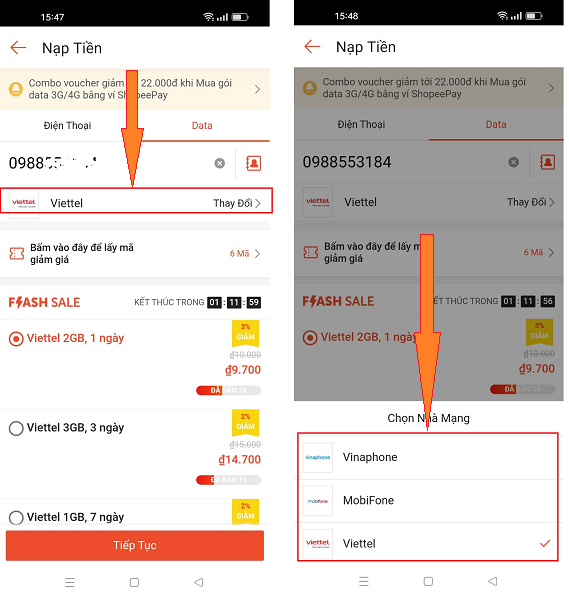
Trong Bài 79, chúng ta tổ chức khối Nạp Thẻ & Dịch Vụ Số (.digital-topup-section) theo bố cục 2 cột gọn gàng (1.4fr Khu vực chọn dịch vụ bên trái | 34rem Hộp Tóm Tắt Đơn & Thanh Toán bên phải):
Plaintext
|<------------------ 1.4fr Chọn Dịch Vụ & Mệnh Giá ------------------>|<------ 34rem Tóm Tắt Thanh Toán ------>|
+---------------------------------------------------------------------+----------------------------------------+
|  [ 📱 Nạp Điện Thoại ]   [ 📶 Gói Data 4G/5G ]   [ ⚡ Hóa Đơn ]     |  CHI TIẾT GIAO DỊCH                    |
+---------------------------------------------------------------------+  Số điện thoại:  0941 234 073          |
|  1. NHẬP SỐ ĐIỆN THOẠI & CHỌN NHÀ MẠNG                              |  Nhà mạng:       Viettel / Vina / Mobi |
|  [ +84 | 0941 234 073                                     (📞) ]    |  Chiết khấu:     -3% (Ưu đãi Shopee)   |
|  [ ✓ Viettel ]   [ Vinaphone ]   [ Mobifone ]   [ Vietnamobile ]    |  ------------------------------------  |
|                                                                     |  TỔNG THANH TOÁN (Đổi theo :has()!)    |
|  2. CHỌN MỆNH GIÁ NẠP (Hoặc Gói Data 4G)                            |  ₫97.000   ~~₫100.000~~                |
|  +---------------+  +---------------+  +---------------+            |  🪙 Nhận ngay +1.000 Shopee Xu         |
|  |   ₫20.000     |  |   ₫50.000     |  |  ✓ ₫100.000   |  <-- Hot!  |                                        |
|  | Giá: ₫19.400  |  | Giá: ₫48.500  |  | Giá: ₫97.000  |            |  [ ⚡ Thanh Toán Ngay (Nhận Tức Thì) ] |
|  +---------------+  +---------------+  +---------------+            |                                        |
|  +---------------+  +---------------+  +---------------+            |  🛡️ Giao dịch bảo mật · Nạp trực tiếp  |
|  |   ₫200.000    |  |   ₫300.000    |  |   ₫500.000    |            |     vào tài khoản chính trong 3 giây   |
|  | Giá: ₫194.000 |  | Giá: ₫291.000 |  | Giá: ₫485.000 |            |                                        |
|  +---------------+  +---------------+  +---------------+            |                                        |
+---------------------------------------------------------------------+----------------------------------------+
| Kỹ thuật CSS trong Bài 79 | Khai báo cốt lõi | Tác dụng thực chiến |
|---|---|---|
Biến màu cục bộ --telco-color cho 4 Nhà mạng |
.telco-card--viettel { --telco-color: #ee0033; } |
Khi :checked, cả viền thẻ, chữ tên nhà mạng và góc đánh dấu ✓ đều tự động ăn theo đúng màu thương hiệu riêng của từng nhà mạng! |
| Chuyển đổi lưới Mệnh giá Gói Data 4G | #topup-tab-data:checked ~ .topup-layout .topup-grid--money { display: none; } |
Giữ 2 lưới độc lập trong cùng một khung, bấm tab là hoán đổi tức thì không cần tải lại trang. |
Tự động cập nhật Tổng thanh toán bằng :has() |
.digital-topup-section:has(#amt-200k:checked) .topup-total--200k { display: flex; } |
Bấm chọn bất kỳ mệnh giá nào từ ₫20k đến ₫500k ở cột trái, số tiền thực trả bên cột phải lập tức nhảy theo chính xác! |
2. Thực hành: Code Màn Hình "Nạp Thẻ Điện Thoại & Data 4G" (index.html & main.css)
Bước 1: Bổ sung HTML Khối Nạp Thẻ & Data 4G (.digital-topup-section) vào index.html
Hãy mở file index.html, tìm đến bên trong <div class="shopee-container grid-container"> (ngay bên dưới khối ShopeeFood của Bài 78) và chèn toàn bộ cấu trúc Bài 79: Nạp Thẻ Điện Thoại & Data 4G dưới đây:
HTML
<!-- ================================================================= -->
<!-- BÀI 79: NẠP THẺ ĐIỆN THOẠI & DATA 4G/5G (DIGITAL SERVICES UI) -->
<!-- ================================================================= -->
<section class="digital-topup-section">
<!-- Hệ thống 2 nút Radio chuyển Tab: Nạp Điện Thoại <-> Gói Data 4G/5G -->
<input type="radio" name="topup-service-tab" id="topup-tab-money" class="topup-ctrl-input" checked>
<input type="radio" name="topup-service-tab" id="topup-tab-data" class="topup-ctrl-input">
<!-- 1. Header Dịch Vụ Số & Thanh 2 Tab Chuyển Đổi -->
<header class="topup-header">
<div class="topup-header__left">
<h2 class="section-title">
<i class="fa-solid fa-mobile-screen-button" style="color: var(--shopee-primary); margin-right: 0.6rem;"></i>
NẠP THẺ, DỊCH VỤ & DATA 4G/5G
</h2>
<span class="topup-promo-pill">Giảm ngay 3% · Nạp trực tiếp trong 3 giây</span>
</div>
<div class="topup-service-tabs" role="tablist" aria-label="Chọn loại dịch vụ số">
<label for="topup-tab-money" class="topup-service-tab">
<i class="fa-solid fa-sim-card"></i> Nạp Điện Thoại
</label>
<label for="topup-tab-data" class="topup-service-tab">
<i class="fa-solid fa-wifi"></i> Gói Data 4G / 5G
</label>
</div>
</header>
<!-- 2. BỐ CỤC 2 CỘT: CHỌN NHÀ MẠNG & MỆNH GIÁ (TRÁI) | TÓM TẮT THANH TOÁN (PHẢI) -->
<div class="topup-layout">
<!-- CỘT TRÁI: NHẬP SĐT, CHỌN NHÀ MẠNG & LƯỚI MỆNH GIÁ -->
<div class="topup-config-col">
<!-- Bước 1: Nhập số điện thoại & Chọn nhà mạng -->
<div class="topup-step-block">
<label for="topup-phone-input" class="topup-step-label">1. Nhập số điện thoại nhận tiền / Data</label>
<div class="topup-phone-box">
<span class="topup-phone-prefix">+84</span>
<input type="tel" id="topup-phone-input" class="topup-phone-input" value="0941 234 073" placeholder="Nhập số điện thoại (VD: 09xx xxx xxx)">
<span class="topup-phone-valid"><i class="fa-solid fa-circle-check"></i> Hợp lệ</span>
</div>
<!-- Lưới 4 Nhà Mạng với màu thương hiệu riêng (--telco-color) -->
<div class="topup-telco-grid" role="radiogroup" aria-label="Chọn nhà mạng">
<label class="telco-item telco-card--viettel">
<input type="radio" name="topup-telco" class="topup-ctrl-input" checked>
<span class="telco-card">
<strong>VIETTEL</strong>
<span>Di động 5G</span>
</span>
</label>
<label class="telco-item telco-card--vina">
<input type="radio" name="topup-telco" class="topup-ctrl-input">
<span class="telco-card">
<strong>vinaphone</strong>
<span>VNPT 4G/5G</span>
</span>
</label>
<label class="telco-item telco-card--mobi">
<input type="radio" name="topup-telco" class="topup-ctrl-input">
<span class="telco-card">
<strong>mobifone</strong>
<span>Di động 4G</span>
</span>
</label>
<label class="telco-item telco-card--vnm">
<input type="radio" name="topup-telco" class="topup-ctrl-input">
<span class="telco-card">
<strong>Vietnamobile</strong>
<span>Siêu Data</span>
</span>
</label>
</div>
</div>
<!-- Bước 2A: LƯỚI 6 MỆNH GIÁ THẺ CÀO (Hiện khi chọn tab Nạp Điện Thoại) -->
<div class="topup-step-block topup-grid-panel topup-panel--money">
<span class="topup-step-label">2. Chọn mệnh giá nạp (Chiết khấu trực tiếp 3%)</span>
<div class="topup-amount-grid" role="radiogroup" aria-label="Chọn mệnh giá thẻ nạp">
<label class="amount-item">
<input type="radio" name="topup-amount" id="amt-20k" class="topup-ctrl-input">
<span class="amount-card">
<strong class="amount-face">₫20.000</strong>
<span class="amount-pay">Thanh toán: ₫19.400</span>
</span>
</label>
<label class="amount-item">
<input type="radio" name="topup-amount" id="amt-50k" class="topup-ctrl-input">
<span class="amount-card">
<strong class="amount-face">₫50.000</strong>
<span class="amount-pay">Thanh toán: ₫48.500</span>
</span>
</label>
<label class="amount-item">
<input type="radio" name="topup-amount" id="amt-100k" class="topup-ctrl-input" checked>
<span class="amount-card">
<span class="amount-hot-tag">Phổ biến</span>
<strong class="amount-face">₫100.000</strong>
<span class="amount-pay">Thanh toán: ₫97.000</span>
</span>
</label>
<label class="amount-item">
<input type="radio" name="topup-amount" id="amt-200k" class="topup-ctrl-input">
<span class="amount-card">
<strong class="amount-face">₫200.000</strong>
<span class="amount-pay">Thanh toán: ₫194.000</span>
</span>
</label>
<label class="amount-item">
<input type="radio" name="topup-amount" id="amt-300k" class="topup-ctrl-input">
<span class="amount-card">
<strong class="amount-face">₫300.000</strong>
<span class="amount-pay">Thanh toán: ₫291.000</span>
</span>
</label>
<label class="amount-item">
<input type="radio" name="topup-amount" id="amt-500k" class="topup-ctrl-input">
<span class="amount-card">
<span class="amount-hot-tag">Tiết kiệm 15k</span>
<strong class="amount-face">₫500.000</strong>
<span class="amount-pay">Thanh toán: ₫485.000</span>
</span>
</label>
</div>
</div>
<!-- Bước 2B: LƯỚI 4 GÓI DATA 4G/5G (Hiện khi chọn tab Gói Data 4G/5G) -->
<div class="topup-step-block topup-grid-panel topup-panel--data">
<span class="topup-step-label">2. Chọn gói cước Data 4G / 5G tốc độ cao</span>
<div class="topup-data-grid" role="radiogroup" aria-label="Chọn gói Data 4G">
<label class="amount-item">
<input type="radio" name="topup-data-pkg" class="topup-ctrl-input" checked>
<span class="amount-card amount-card--data">
<span class="amount-hot-tag">Bán chạy</span>
<strong class="amount-face">ST15K — 3GB / 3 ngày</strong>
<span class="amount-pay">₫15.000 · Tốc độ cao 4G/5G</span>
</span>
</label>
<label class="amount-item">
<input type="radio" name="topup-data-pkg" class="topup-ctrl-input">
<span class="amount-card amount-card--data">
<strong class="amount-face">ST30K — 7GB / 7 ngày</strong>
<span class="amount-pay">₫30.000 · Không giới hạn TikTok</span>
</span>
</label>
<label class="amount-item">
<input type="radio" name="topup-data-pkg" class="topup-ctrl-input">
<span class="amount-card amount-card--data">
<strong class="amount-face">SD90 — 1.5GB / ngày (30N)</strong>
<span class="amount-pay">₫90.000 · Tổng 45GB / tháng</span>
</span>
</label>
<label class="amount-item">
<input type="radio" name="topup-data-pkg" class="topup-ctrl-input">
<span class="amount-card amount-card--data">
<span class="amount-hot-tag">Siêu 5G</span>
<strong class="amount-face">5G150 — 6GB / ngày (30N)</strong>
<span class="amount-pay">₫150.000 · Miễn phí gọi nội mạng</span>
</span>
</label>
</div>
</div>
</div>
<!-- CỘT PHẢI: HỘP TÓM TẮT ĐƠN & TỔNG TIỀN TỰ ĐỘNG CẬP NHẬT BẰNG :HAS() -->
<aside class="topup-summary-col">
<div class="topup-summary-card">
<h3 class="topup-summary__title">Tóm Tắt Giao Dịch</h3>
<div class="topup-summary-rows">
<div class="topup-sum-row">
<span>Loại dịch vụ</span>
<strong class="topup-svc-text--money">Nạp tiền điện thoại</strong>
<strong class="topup-svc-text--data">Mua gói Data 4G / 5G</strong>
</div>
<div class="topup-sum-row">
<span>Số điện thoại</span>
<strong>0941 234 073</strong>
</div>
<div class="topup-sum-row">
<span>Ưu đãi chiết khấu</span>
<strong style="color: #00bfa5;">Giảm 3% trực tiếp</strong>
</div>
</div>
<!-- TỔNG THANH TOÁN ĐỘNG (TỰ ĐỘNG ĐỔI KHI CHỌN MỆNH GIÁ BÊN TRÁI!) -->
<div class="topup-total-box">
<span class="topup-total-label">Tổng thanh toán</span>
<div class="topup-total-val topup-total--20k"><strong>₫19.400</strong><del>₫20.000</del></div>
<div class="topup-total-val topup-total--50k"><strong>₫48.500</strong><del>₫50.000</del></div>
<div class="topup-total-val topup-total--100k"><strong>₫97.000</strong><del>₫100.000</del></div>
<div class="topup-total-val topup-total--200k"><strong>₫194.000</strong><del>₫200.000</del></div>
<div class="topup-total-val topup-total--300k"><strong>₫291.000</strong><del>₫300.000</del></div>
<div class="topup-total-val topup-total--500k"><strong>₫485.000</strong><del>₫500.000</del></div>
<span class="topup-coins-bonus">
<i class="fa-solid fa-coins"></i> Hoàn thêm đến 1.000 Shopee Xu khi thanh toán ShopeePay
</span>
</div>
<label for="modal-qr-pay-toggle" class="btn btn--primary topup-checkout-btn">
<i class="fa-solid fa-bolt"></i> Thanh Toán Ngay
</label>
<p class="topup-security-note">
<i class="fa-solid fa-shield-halved"></i> Cộng tiền trực tiếp vào tài khoản chính sau 3 giây
</p>
</div>
</aside>
</div>
</section>
Bước 2: Viết CSS cho Digital Services UI, Màu Nhà Mạng & Tổng Tiền Động :has() trong ./assets/css/main.css
Hãy mở file main.css, cuộn xuống dưới cùng và bổ sung đoạn code CSS của Bài 79 dưới đây:
CSS
/* Bổ sung vào cuối file ./assets/css/main.css */

/* --- BÀI 79: NẠP THẺ ĐIỆN THOẠI & DATA 4G/5G (DIGITAL SERVICES UI) --- */

.digital-topup-section {
    background-color: var(--white-color);
    margin-top: 2rem;
    border-radius: 4px;
    box-shadow: 0 1px 2px 0 rgba(0, 0, 0, 0.05);
    overflow: hidden;
}

.topup-ctrl-input {
    display: none;
}

/* 1. Header & Thanh 2 Tab Dịch Vụ */
.topup-header {
    padding: 1.8rem 2.4rem;
    border-bottom: 1px solid var(--border-subtle, #eeeeee);
    display: flex;
    align-items: center;
    justify-content: space-between;
    flex-wrap: wrap;
    gap: 1.4rem;
}

.topup-header__left {
    display: flex;
    align-items: center;
    flex-wrap: wrap;
    gap: 1.2rem;
}

.topup-promo-pill {
    font-size: 1.2rem;
    font-weight: 600;
    color: #00bfa5;
    background-color: rgba(0, 191, 165, 0.1);
    padding: 0.35rem 1.1rem;
    border-radius: 2rem;
}

.topup-service-tabs {
    display: flex;
    background-color: var(--bg-elevated, #f2f2f2);
    padding: 0.35rem;
    border-radius: 6px;
    gap: 0.4rem;
}

.topup-service-tab {
    padding: 0.7rem 1.6rem;
    font-size: 1.35rem;
    font-weight: 500;
    color: var(--text-secondary);
    border-radius: 4px;
    cursor: pointer;
    user-select: none;
    display: inline-flex;
    align-items: center;
    gap: 0.6rem;
    transition: all 0.18s ease;
}

#topup-tab-money:checked ~ .topup-header label[for="topup-tab-money"],
#topup-tab-data:checked ~ .topup-header label[for="topup-tab-data"] {
    background-color: var(--white-color);
    color: var(--shopee-primary);
    font-weight: 600;
    box-shadow: 0 2px 6px rgba(0, 0, 0, 0.08);
}

/* Chuyển đổi giữa Lưới Mệnh Giá Tiền <-> Lưới Gói Data 4G/5G */
.topup-panel--data,
.topup-svc-text--data {
    display: none;
}

#topup-tab-data:checked ~ .topup-layout .topup-panel--money,
#topup-tab-data:checked ~ .topup-layout .topup-svc-text--money {
    display: none;
}

#topup-tab-data:checked ~ .topup-layout .topup-panel--data {
    display: block;
    animation: fadeIn ease 0.25s;
}

#topup-tab-data:checked ~ .topup-layout .topup-svc-text--data {
    display: inline;
}

/* ================================================================= */
/* 2. BỐ CỤC 2 CỘT: CHỌN NHÀ MẠNG, MỆNH GIÁ & TÓM TẮT THANH TOÁN     */
/* ================================================================= */
.topup-layout {
    padding: 2.4rem;
    display: grid;
    grid-template-columns: 1.4fr 34rem;
    gap: 2.8rem;
    align-items: start;
}

.topup-step-block {
    margin-bottom: 2.4rem;
}

.topup-step-block:last-child {
    margin-bottom: 0;
}

.topup-step-label {
    display: block;
    font-size: 1.45rem;
    font-weight: 600;
    color: var(--text-primary);
    margin-bottom: 1.2rem;
}

/* Ô nhập số điện thoại */
.topup-phone-box {
    display: flex;
    align-items: center;
    height: 4.6rem;
    border: 1.5px solid var(--border-subtle, #dcdcdc);
    border-radius: 4px;
    background-color: var(--bg-elevated, #fafafa);
    padding: 0 1.4rem;
    gap: 1rem;
    margin-bottom: 1.4rem;
    transition: border-color 0.15s ease, box-shadow 0.15s ease;
}

.topup-phone-box:focus-within {
    border-color: var(--shopee-primary);
    background-color: var(--white-color);
    box-shadow: 0 0 0 0.3rem rgba(238, 77, 45, 0.12);
}

.topup-phone-prefix {
    font-size: 1.45rem;
    font-weight: 700;
    color: var(--text-secondary);
    padding-right: 1rem;
    border-right: 1px solid var(--border-subtle, #dcdcdc);
}

.topup-phone-input {
    flex: 1;
    min-width: 0;
    font-size: 1.6rem;
    font-weight: 600;
    letter-spacing: 0.06rem;
    color: var(--text-primary);
    background-color: transparent;
}

.topup-phone-valid {
    font-size: 1.2rem;
    font-weight: 600;
    color: #00bfa5;
    white-space: nowrap;
}

/* Lưới 4 Nhà Mạng với biến màu thương hiệu --telco-color */
.topup-telco-grid {
    display: grid;
    grid-template-columns: repeat(4, 1fr);
    gap: 1rem;
}

.telco-card--viettel { --telco-color: #ee0033; }
.telco-card--vina    { --telco-color: #0066b3; }
.telco-card--mobi    { --telco-color: #005aab; }
.telco-card--vnm     { --telco-color: #f37021; }

.telco-item {
    cursor: pointer;
    user-select: none;
}

.telco-card {
    display: flex;
    flex-direction: column;
    align-items: center;
    justify-content: center;
    padding: 1.2rem 0.8rem;
    border: 1.5px solid var(--border-subtle, #e0e0e0);
    border-radius: 6px;
    background-color: var(--white-color);
    position: relative;
    overflow: hidden;
    transition: all 0.18s ease;
}

.telco-card strong {
    font-size: 1.45rem;
    font-weight: 800;
    color: var(--telco-color);
    margin-bottom: 0.2rem;
}

.telco-card span {
    font-size: 1.1rem;
    color: var(--text-secondary);
}

/* Trạng thái Nhà mạng đang chọn (:checked) */
.telco-item input:checked + .telco-card {
    border-color: var(--telco-color);
    background-color: var(--bg-soft-accent, #fffbf8);
    box-shadow: 0 3px 10px rgba(0, 0, 0, 0.06);
}

.telco-item input:checked + .telco-card::after {
    content: "✓";
    position: absolute;
    top: 0;
    right: 0;
    width: 1.8rem;
    height: 1.8rem;
    background-color: var(--telco-color);
    color: #ffffff;
    font-size: 1rem;
    font-weight: 700;
    display: flex;
    align-items: center;
    justify-content: center;
    border-bottom-left-radius: 4px;
}

/* ================================================================= */
/* 3. LƯỚI MỆNH GIÁ THẺ CÀO (3 CỘT) & LƯỚI GÓI DATA 4G (2 CỘT)       */
/* ================================================================= */
.topup-amount-grid {
    display: grid;
    grid-template-columns: repeat(3, 1fr);
    gap: 1.2rem;
}

.topup-data-grid {
    display: grid;
    grid-template-columns: repeat(2, 1fr);
    gap: 1.2rem;
}

.amount-item {
    cursor: pointer;
    user-select: none;
}

.amount-card {
    display: flex;
    flex-direction: column;
    align-items: center;
    justify-content: center;
    padding: 1.8rem 1.2rem;
    border: 1.5px solid var(--border-subtle, #e0e0e0);
    border-radius: 6px;
    background-color: var(--white-color);
    position: relative;
    overflow: hidden;
    text-align: center;
    transition: all 0.18s ease;
}

.amount-card--data {
    align-items: flex-start;
    text-align: left;
    padding: 1.6rem;
}

.amount-card:hover {
    border-color: var(--shopee-primary);
}

.amount-hot-tag {
    position: absolute;
    top: 0;
    left: 0;
    background-color: var(--shopee-primary);
    color: #ffffff;
    font-size: 1rem;
    font-weight: 600;
    padding: 0.15rem 0.7rem;
    border-bottom-right-radius: 4px;
}

.amount-face {
    font-size: 1.85rem;
    font-weight: 700;
    color: var(--text-primary);
    margin-bottom: 0.4rem;
    font-variant-numeric: tabular-nums;
}

.amount-card--data .amount-face {
    font-size: 1.5rem;
}

.amount-pay {
    font-size: 1.2rem;
    color: var(--text-secondary);
}

.amount-item input:checked + .amount-card {
    border-color: var(--shopee-primary);
    background-color: var(--bg-soft-accent, #fffbf8);
    box-shadow: 0 4px 12px rgba(238, 77, 45, 0.12);
}

.amount-item input:checked + .amount-card .amount-face {
    color: var(--shopee-primary);
}

.amount-item input:checked + .amount-card::after {
    content: "✓";
    position: absolute;
    bottom: 0;
    right: 0;
    width: 2rem;
    height: 2rem;
    background-color: var(--shopee-primary);
    color: #ffffff;
    font-size: 1.1rem;
    font-weight: 700;
    display: flex;
    align-items: center;
    justify-content: center;
    border-top-left-radius: 6px;
}

/* ================================================================= */
/* 4. CỘT PHẢI: HỘP TÓM TẮT & TỔNG TIỀN ĐỘNG THEO :HAS()             */
/* ================================================================= */
.topup-summary-card {
    background-color: var(--bg-elevated, #fafafa);
    border: 1px solid var(--border-subtle, #eeeeee);
    border-radius: 8px;
    padding: 2rem;
}

.topup-summary__title {
    font-size: 1.6rem;
    font-weight: 600;
    color: var(--text-primary);
    padding-bottom: 1.2rem;
    margin-bottom: 1.4rem;
    border-bottom: 1px solid var(--border-subtle, #e8e8e8);
}

.topup-summary-rows {
    display: flex;
    flex-direction: column;
    gap: 1rem;
    margin-bottom: 1.8rem;
}

.topup-sum-row {
    display: flex;
    justify-content: space-between;
    font-size: 1.35rem;
    color: var(--text-secondary);
}

.topup-sum-row strong {
    color: var(--text-primary);
}

.topup-total-box {
    background-color: var(--white-color);
    border: 1px dashed var(--shopee-primary);
    border-radius: 6px;
    padding: 1.4rem 1.6rem;
    margin-bottom: 1.8rem;
}

.topup-total-label {
    display: block;
    font-size: 1.25rem;
    color: var(--text-secondary);
    margin-bottom: 0.4rem;
}

/* Mặc định ẩn tất cả 6 mức tổng tiền -> Bật đúng mức đang chọn bằng :has()! */
.topup-total-val {
    display: none;
    align-items: baseline;
    gap: 1rem;
    margin-bottom: 0.6rem;
    font-variant-numeric: tabular-nums;
}

.topup-total-val strong {
    font-size: 2.6rem;
    font-weight: 800;
    color: var(--shopee-primary);
}

.topup-total-val del {
    font-size: 1.35rem;
    color: #999999;
}

/* BÍ THUẬT :HAS() — TỰ ĐỘNG CẬP NHẬT TỔNG TIỀN THANH TOÁN! */
.digital-topup-section:has(#amt-20k:checked)  .topup-total--20k,
.digital-topup-section:has(#amt-50k:checked)  .topup-total--50k,
.digital-topup-section:has(#amt-100k:checked) .topup-total--100k,
.digital-topup-section:has(#amt-200k:checked) .topup-total--200k,
.digital-topup-section:has(#amt-300k:checked) .topup-total--300k,
.digital-topup-section:has(#amt-500k:checked) .topup-total--500k {
    display: flex;
}

.topup-coins-bonus {
    display: block;
    font-size: 1.15rem;
    color: #d97706;
    line-height: 1.6rem;
}

.topup-checkout-btn {
    width: 100%;
    height: 4.4rem;
    font-size: 1.5rem;
    font-weight: 600;
    border-radius: 4px;
    gap: 0.7rem;
    cursor: pointer;
    margin-bottom: 1.2rem;
}

.topup-security-note {
    text-align: center;
    font-size: 1.2rem;
    color: var(--text-secondary);
}

.topup-security-note i {
    color: #00bfa5;
}
Bước 3: Bổ sung quy tắc Responsive cho Màn Hình Nạp Thẻ trong ./assets/css/responsive.css
Trên màn hình Tablet (<= 1023px) và Điện thoại (<= 739px), chúng ta chuyển bố cục 2 cột sang xếp dọc và hạ lưới nhà mạng/mệnh giá xuống 2 cột để dễ chạm trên màn hình nhỏ:
CSS
/* Bổ sung vào cuối khối @media (max-width: 1023px) trong ./assets/css/responsive.css */
    .topup-layout {
        grid-template-columns: 1fr;
    }

/* Bổ sung vào cuối khối @media (max-width: 739px) trong ./assets/css/responsive.css */
    .topup-header,
    .topup-layout {
        padding: 1.6rem;
    }

    .topup-telco-grid,
    .topup-amount-grid,
    .topup-data-grid {
        grid-template-columns: repeat(2, 1fr);
    }
3. Giải mã dòng code: 3 Điểm sáng Kỹ thuật trong Bài 79
-
Tự động tính tổng tiền thanh toán không cần JavaScript nhờ
:has():- Sáu thẻ mệnh giá (
#amt-20k#amt-500k) nằm ở cột trái, còn hộp tổng thanh toán nằm ở<aside>cột phải. Chỉ với 6 dòng quy tắc.digital-topup-section:has(#amt-*:checked), số tiền thực trả đã chiết khấu 3% tự động cập nhật mượt mà mỗi khi người dùng bấm chọn!
- Sáu thẻ mệnh giá (
-
Màu nhận diện động
--telco-colorcho từng Nhà mạng:- Thay vì phải viết 4 đoạn CSS dài cho viền, chữ và dấu tích góc của 4 nhà mạng, ta chỉ cần định nghĩa 1 biến cục bộ
--telco-colortrên mỗi thẻ — giúp code cực kỳ sạch sẽ và dễ thêm nhà mạng mới (như Wintel, Reddi...).
- Thay vì phải viết 4 đoạn CSS dài cho viền, chữ và dấu tích góc của 4 nhà mạng, ta chỉ cần định nghĩa 1 biến cục bộ
-
Kết nối nút "Thanh Toán Ngay" thẳng tới Cửa Sổ Quét Mã VietQR (Bài 62):
- Nhờ sử dụng
<label for="modal-qr-pay-toggle">, khi người dùng chọn xong mệnh giá và bấm "Thanh Toán Ngay", cửa sổ quét mã VietQR có tia laser (Bài 62) sẽ lập tức bật lên để hoàn tất quy trình khép kín!
- Nhờ sử dụng
4. Bài tập trải nghiệm thực tế & Chào đón Cột mốc Bài 80!
Hãy lưu lại toàn bộ các file (index.html, main.css, responsive.css) và nhấn F5 trên trình duyệt!
-
Cuộn tới khu vực NẠP THẺ, DỊCH VỤ & DATA 4G/5G (Bài 79):
-
Thử bấm chọn lần lượt 4 nhà mạng Viettel, Vinaphone, Mobifone, Vietnamobile để thấy viền và dấu tích góc đổi theo đúng màu thương hiệu.
-
Bấm lần lượt các mệnh giá
₫20.000₫500.000: Quan sát số tiền ở hộp Tổng thanh toán bên phải tự động nhảy theo (₫19.400₫485.000)! -
Chuyển sang tab "Gói Data 4G / 5G" để xem danh sách gói cước dung lượng cao, rồi bấm "Thanh Toán Ngay" để mở thẳng cửa sổ VietQR!
-
🏆 CHUẨN BỊ CHÀO ĐÓN BÀI 80 — CỘT MỐC 80/100 BÀI HỌC! Ở Bài 80 tiếp theo, chúng ta sẽ kỷ niệm cột mốc 80% chặng đường với một giao diện cực kỳ sang trọng: Trang "Hạng Thành Viên Shopee Rewards (Bạc, Vàng, Kim Cương)" với Thẻ Hạng Kim Cương Ánh Kim (Metallic Shimmer Card) và Thanh Tiến Trình Tích Điểm Nâng Hạng!
All rights reserved