[Series 100 Bài Học HTML/CSS Thực Chiến - Bài 19]: Hoàn Thiện 10 Cột Phải Trang Danh Mục — Xây Dựng Thanh Sắp Xếp (Sort Bar), Dropdown Chọn Giá, Lưới 5 Sản Phẩm & Thanh Phân Trang (Pagination)
Chào mừng anh em đã bước sang Bài 19 trong chuỗi 100 Bài Học Làm Chủ HTML/CSS Qua Dự Án Clone Shopee!
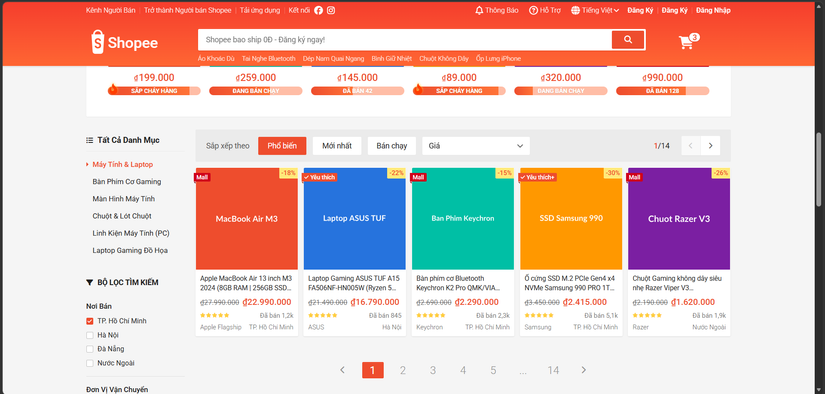
Ở Bài 18, chúng ta đã quy hoạch hệ thống lưới 12 cột và dựng xong 2 cột bên trái (Sidebar Bộ lọc tìm kiếm). Hôm nay, chúng ta sẽ lấp đầy 10 cột bên phải (.main-product-col) để hoàn thiện 100% giao diện trang Danh mục & Tìm kiếm sản phẩm chuẩn Shopee!
Khu vực 10 cột bên phải này tập hợp 3 thành phần UI cực kỳ quan trọng mà bất kỳ trang E-Commerce nào cũng phải có:
-
Thanh Sắp Xếp & Điều Hướng Nhanh (
Home Filter / Sort Bar): Nằm trên nền xám đậmrgba(0,0,0,0.04), gồm các nút bấm lọc nhanh (Phổ biến, Mới nhất, Bán chạy), Hộp chọn Giá (Select Input Dropdown) tự xổ xuống khi rê chuột (Giá: Thấp đến Cao / Cao đến Thấp), và cụm chuyển trang mini (1/14) ở góc phải. -
Lưới 5 Sản Phẩm / Hàng (
5-Column Product Grid): Nâng cấp thẻ sản phẩm có thêm Giá gốc gạch ngang (text-decoration: line-through), 5 ngôi sao vàng đánh giá và Tên Tỉnh/Thành phố nơi bán. -
Thanh Phân Trang Dưới Đáy (
Pagination UI): Dãy số trang< 1 2 3 4 5 ... 14 >giúp người dùng di chuyển qua hàng ngàn kết quả tìm kiếm.
Hãy cùng bắt tay vào giải phẫu và viết code cho cả 3 thành phần này ngay bây giờ!
1. Giải phẫu Thanh Sắp Xếp (Sort Bar): Thủ thuật đẩy cụm Phân Trang Mini sang sát mép phải bằng margin-left: auto
Trên thanh Sắp xếp của Shopee, chúng ta có 5 phần tử nằm trên cùng một hàng ngang Flexbox:[Chữ "Sắp xếp theo"] + [Nút Phổ biến] + [Nút Mới nhất] + [Nút Bán chạy] + [Hộp chọn Giá] ... (Khoảng trống lớn) ... [Cụm 1/14 < >].
-
Cách làm thông thường: Bọc 5 phần tử bên trái vào 1 thẻ
<div class="left">, bọc cụm1/14vào<div class="right">, rồi dùngjustify-content: space-betweenở thẻ cha. -
Tuyệt chiêu Flexbox không cần đẻ thêm thẻ
<div>: Giữ nguyên tất cả nằm chung trong 1 thẻ cha.home-filter, sau đó chỉ cần gắn duy nhất thuộc tínhmargin-left: auto;vào phần tử cuối cùng (.home-filter__page)! Trong Flexbox,margin-left: autosẽ tự động "hút" toàn bộ khoảng trống dư thừa trên hàng ngang về phía bên trái của nó, đẩy văng cụm1/14dính sát vào mép phải!
Plaintext
+----------------------------------------------------------------------------------+
| Sắp xếp theo  [Phổ biến] [Mới nhất] [Bán chạy] [Giá ▾]  <-- margin-left: auto -->| 1/14 [<][>] |
+----------------------------------------------------------------------------------+
Tại sao không dùng thẻ <select> mặc định cho ô chọn "Giá"?
Trong HTML có sẵn thẻ <select><option>Giá: Thấp đến Cao</option></select>. Tuy nhiên, khung xổ xuống (<option>) của thẻ <select> được vẽ bởi Hệ điều hành (Windows / macOS) nên CSS không thể tùy biến chiều cao, khoảng đệm padding, bóng đổ box-shadow hay hiệu ứng đổi màu cam khi rê chuột!
Vì vậy, các kỹ sư Frontend luôn tự dựng một Custom Select Dropdown bằng thẻ <div class="select-input"> kết hợp danh sách <ul class="select-input__list"> ẩn bên dưới (position: absolute) và bật lên khi :hover!
2. Thiết kế Thanh Phân Trang (Pagination UI) chuẩn UX
Ở dưới đáy danh sách sản phẩm, thanh phân trang (Pagination) đóng vai trò dẫn đường cho người dùng. Hãy quan sát các mẫu thiết kế thanh phân trang tiêu chuẩn trong UI/UX dưới đây:
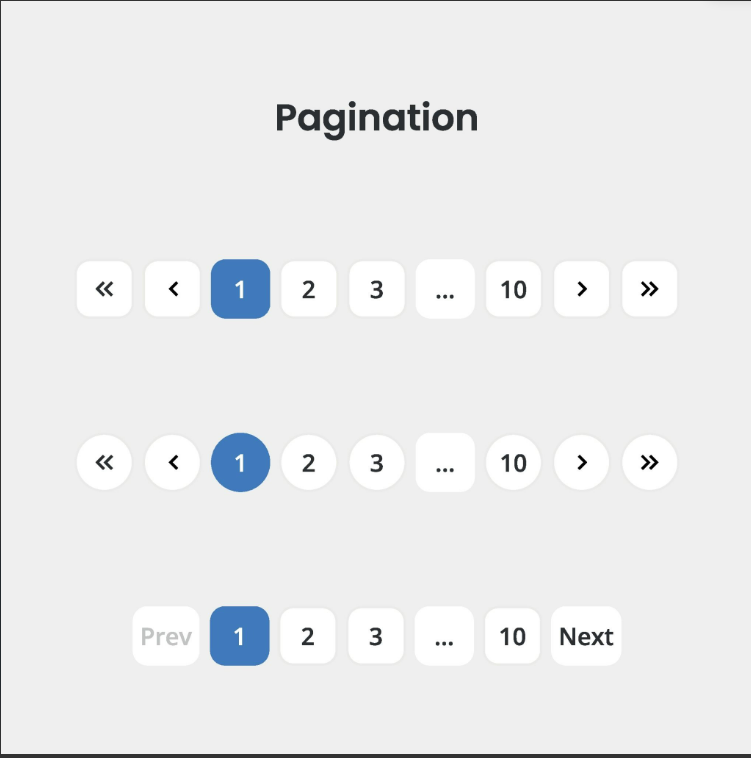
Trên Shopee, thanh phân trang được thiết kế cực kỳ thoáng đãng theo 3 quy tắc thị giác:
| Trạng thái nút phân trang | Đặc điểm thiết kế trên Shopee | Thuộc tính CSS cốt lõi |
|---|---|---|
| Trang hiện tại (Active Page - Số 1) |
Nổi bật với nền màu Cam Shopee (#ee4d2d), chữ màu trắng, bo góc nhẹ 2px. |
background-color: var(--shopee-primary); color: var(--white-color); |
| Các trang khác (Số 2, 3, 4, 5, 14) |
Không có màu nền (transparent), chữ màu xám dịu #939393, kích thước lớn 2rem (20px) để dễ bấm. |
min-width: 4rem; height: 3rem; font-size: 2rem; |
| Nút bị vô hiệu hóa (Nút < ở trang 1) |
Làm mờ đi và đổi con trỏ chuột để báo hiệu không thể lùi thêm. | color: #ccc; cursor: default; |
3. Thực hành: Lấp Đầy 10 Cột Phải (.main-product-col) Trong index.html
Bước 1: Thay thế khung giữ chỗ .catalog-placeholder-box bằng code thật trong index.html
Hãy mở file index.html, tìm đến thẻ <div class="main-product-col"> (ở cuối khối <section class="catalog-section"> mà chúng ta đã tạo ở Bài 18), xóa bỏ thẻ <div class="catalog-placeholder-box"> và thay bằng toàn bộ cấu trúc Thanh Sắp Xếp + Lưới 5 Sản Phẩm + Thanh Phân Trang dưới đây:
HTML
<!-- CỘT PHẢI (CHIẾM 10/12 CỘT): THANH SẮP XẾP, LƯỚI 5 SẢN PHẨM & PHÂN TRANG -->
<div class="main-product-col">
<!-- 1. THANH SẮP XẾP & LỌC NHANH (HOME FILTER / SORT BAR) -->
<div class="home-filter">
<span class="home-filter__label">Sắp xếp theo</span>
<button class="home-filter__btn btn btn--primary">Phổ biến</button>
<button class="home-filter__btn btn">Mới nhất</button>
<button class="home-filter__btn btn">Bán chạy</button>
<!-- Hộp Custom Select Dropdown chọn Giá -->
<div class="select-input">
<span class="select-input__label">Giá</span>
<i class="select-input__icon fa-solid fa-chevron-down"></i>
<!-- Danh sách tùy chọn xổ xuống khi Hover -->
<ul class="select-input__list">
<li class="select-input__item">
<a href="#" class="select-input__link">Giá: Thấp đến Cao</a>
</li>
<li class="select-input__item">
<a href="#" class="select-input__link">Giá: Cao đến Thấp</a>
</li>
</ul>
</div>
<!-- Cụm chuyển trang mini (Đẩy sát sang phải bằng margin-left: auto) -->
<div class="home-filter__page">
<span class="home-filter__page-num">
<span class="home-filter__page-current">1</span>/14
</span>
<div class="home-filter__page-control">
<!-- Nút lùi trang (Đang ở trang 1 nên bị vô hiệu hóa --disabled) -->
<a href="#" class="home-filter__page-btn home-filter__page-btn--disabled">
<i class="home-filter__page-icon fa-solid fa-chevron-left"></i>
</a>
<!-- Nút tiến sang trang 2 -->
<a href="#" class="home-filter__page-btn">
<i class="home-filter__page-icon fa-solid fa-chevron-right"></i>
</a>
</div>
</div>
</div>
<!-- 2. LƯỚI 5 SẢN PHẨM / HÀNG (DÀNH RIÊNG CHO KHUNG 10 CỘT) -->
<div class="catalog-product-grid">
<!-- Sản phẩm 1 (Bản nâng cấp đầy đủ Giá gốc gạch ngang + Sao + Nơi bán) -->
<article class="product-card">
<a href="#" class="product-card__link">
<div class="product-card__img-wrap">
<img src="https://placehold.co/300x300/ee4d2d/ffffff?text=MacBook+Air+M3" alt="MacBook Air M3" class="product-card__img">
</div>
<div class="product-card__favourite product-card__favourite--mall">
<span>Mall</span>
</div>
<div class="product-card__sale-off">
<span class="product-card__sale-off-percent">-18%</span>
</div>
<div class="product-card__body">
<h3 class="product-card__name">Apple MacBook Air 13 inch M3 2024 (8GB RAM | 256GB SSD) Chính Hãng Apple Việt Nam</h3>
<!-- Dòng Giá gốc gạch ngang + Giá khuyến mãi -->
<div class="product-card__price-row">
<span class="product-card__price-old">₫27.990.000</span>
<span class="product-card__price-current">₫22.990.000</span>
</div>
<!-- Dòng Đánh giá 5 sao + Đã bán -->
<div class="product-card__action">
<div class="product-card__rating">
<i class="fa-solid fa-star star--gold"></i>
<i class="fa-solid fa-star star--gold"></i>
<i class="fa-solid fa-star star--gold"></i>
<i class="fa-solid fa-star star--gold"></i>
<i class="fa-solid fa-star star--gold"></i>
</div>
<span class="product-card__sold">Đã bán 1,2k</span>
</div>
<!-- Dòng Thương hiệu & Tỉnh/Thành phố nơi bán -->
<div class="product-card__origin">
<span class="product-card__brand">Apple Flagship</span>
<span class="product-card__origin-name">TP. Hồ Chí Minh</span>
</div>
</div>
</a>
<a href="#" class="product-card__find-similar">Tìm sản phẩm tương tự</a>
</article>
<!-- Sản phẩm 2 -->
<article class="product-card">
<a href="#" class="product-card__link">
<div class="product-card__img-wrap">
<img src="https://placehold.co/300x300/2673dd/ffffff?text=Laptop+ASUS+TUF" alt="Laptop Gaming ASUS" class="product-card__img">
</div>
<div class="product-card__favourite">
<i class="fa-solid fa-check"></i><span>Yêu thích</span>
</div>
<div class="product-card__sale-off">
<span class="product-card__sale-off-percent">-22%</span>
</div>
<div class="product-card__body">
<h3 class="product-card__name">Laptop Gaming ASUS TUF A15 FA506NF-HN005W (Ryzen 5 7535HS / RTX 2050 / 16GB / 512GB / 144Hz)</h3>
<div class="product-card__price-row">
<span class="product-card__price-old">₫21.490.000</span>
<span class="product-card__price-current">₫16.790.000</span>
</div>
<div class="product-card__action">
<div class="product-card__rating">
<i class="fa-solid fa-star star--gold"></i>
<i class="fa-solid fa-star star--gold"></i>
<i class="fa-solid fa-star star--gold"></i>
<i class="fa-solid fa-star star--gold"></i>
<i class="fa-solid fa-star star--gold"></i>
</div>
<span class="product-card__sold">Đã bán 845</span>
</div>
<div class="product-card__origin">
<span class="product-card__brand">ASUS</span>
<span class="product-card__origin-name">Hà Nội</span>
</div>
</div>
</a>
<a href="#" class="product-card__find-similar">Tìm sản phẩm tương tự</a>
</article>
<!-- Sản phẩm 3 -->
<article class="product-card">
<a href="#" class="product-card__link">
<div class="product-card__img-wrap">
<img src="https://placehold.co/300x300/00bfa5/ffffff?text=Ban+Phim+Keychron" alt="Bàn phím Keychron" class="product-card__img">
</div>
<div class="product-card__favourite product-card__favourite--mall">
<span>Mall</span>
</div>
<div class="product-card__sale-off">
<span class="product-card__sale-off-percent">-15%</span>
</div>
<div class="product-card__body">
<h3 class="product-card__name">Bàn phím cơ Bluetooth Keychron K2 Pro QMK/VIA Khung Nhôm Hotswap</h3>
<div class="product-card__price-row">
<span class="product-card__price-old">₫2.690.000</span>
<span class="product-card__price-current">₫2.290.000</span>
</div>
<div class="product-card__action">
<div class="product-card__rating">
<i class="fa-solid fa-star star--gold"></i>
<i class="fa-solid fa-star star--gold"></i>
<i class="fa-solid fa-star star--gold"></i>
<i class="fa-solid fa-star star--gold"></i>
<i class="fa-solid fa-star star--gold"></i>
</div>
<span class="product-card__sold">Đã bán 2,3k</span>
</div>
<div class="product-card__origin">
<span class="product-card__brand">Keychron</span>
<span class="product-card__origin-name">TP. Hồ Chí Minh</span>
</div>
</div>
</a>
<a href="#" class="product-card__find-similar">Tìm sản phẩm tương tự</a>
</article>
<!-- Sản phẩm 4 -->
<article class="product-card">
<a href="#" class="product-card__link">
<div class="product-card__img-wrap">
<img src="https://placehold.co/300x300/ff9800/ffffff?text=SSD+Samsung+990" alt="Ổ cứng SSD Samsung" class="product-card__img">
</div>
<div class="product-card__favourite">
<i class="fa-solid fa-check"></i><span>Yêu thích+</span>
</div>
<div class="product-card__sale-off">
<span class="product-card__sale-off-percent">-30%</span>
</div>
<div class="product-card__body">
<h3 class="product-card__name">Ổ cứng SSD M.2 PCIe Gen4 x4 NVMe Samsung 990 PRO 1TB Đọc 7450MB/s</h3>
<div class="product-card__price-row">
<span class="product-card__price-old">₫3.450.000</span>
<span class="product-card__price-current">₫2.415.000</span>
</div>
<div class="product-card__action">
<div class="product-card__rating">
<i class="fa-solid fa-star star--gold"></i>
<i class="fa-solid fa-star star--gold"></i>
<i class="fa-solid fa-star star--gold"></i>
<i class="fa-solid fa-star star--gold"></i>
<i class="fa-solid fa-star star--gold"></i>
</div>
<span class="product-card__sold">Đã bán 5,1k</span>
</div>
<div class="product-card__origin">
<span class="product-card__brand">Samsung</span>
<span class="product-card__origin-name">TP. Hồ Chí Minh</span>
</div>
</div>
</a>
<a href="#" class="product-card__find-similar">Tìm sản phẩm tương tự</a>
</article>
<!-- Sản phẩm 5 -->
<article class="product-card">
<a href="#" class="product-card__link">
<div class="product-card__img-wrap">
<img src="https://placehold.co/300x300/7b1fa2/ffffff?text=Chuot+Razer+V3" alt="Chuột Gaming Razer" class="product-card__img">
</div>
<div class="product-card__favourite product-card__favourite--mall">
<span>Mall</span>
</div>
<div class="product-card__sale-off">
<span class="product-card__sale-off-percent">-26%</span>
</div>
<div class="product-card__body">
<h3 class="product-card__name">Chuột Gaming không dây siêu nhẹ Razer Viper V3 HyperSpeed</h3>
<div class="product-card__price-row">
<span class="product-card__price-old">₫2.190.000</span>
<span class="product-card__price-current">₫1.620.000</span>
</div>
<div class="product-card__action">
<div class="product-card__rating">
<i class="fa-solid fa-star star--gold"></i>
<i class="fa-solid fa-star star--gold"></i>
<i class="fa-solid fa-star star--gold"></i>
<i class="fa-solid fa-star star--gold"></i>
<i class="fa-solid fa-star star--gold"></i>
</div>
<span class="product-card__sold">Đã bán 1,9k</span>
</div>
<div class="product-card__origin">
<span class="product-card__brand">Razer</span>
<span class="product-card__origin-name">Nước Ngoài</span>
</div>
</div>
</a>
<a href="#" class="product-card__find-similar">Tìm sản phẩm tương tự</a>
</article>
</div>
<!-- 3. THANH PHÂN TRANG DƯỚI ĐÁY (PAGINATION UI) -->
<ul class="pagination catalog-pagination">
<li class="pagination-item">
<a href="#" class="pagination-item__link" aria-label="Trang trước">
<i class="pagination-item__icon fa-solid fa-chevron-left"></i>
</a>
</li>
<!-- Trang số 1 đang Active -->
<li class="pagination-item pagination-item--active">
<a href="#" class="pagination-item__link">1</a>
</li>
<li class="pagination-item">
<a href="#" class="pagination-item__link">2</a>
</li>
<li class="pagination-item">
<a href="#" class="pagination-item__link">3</a>
</li>
<li class="pagination-item">
<a href="#" class="pagination-item__link">4</a>
</li>
<li class="pagination-item">
<a href="#" class="pagination-item__link">5</a>
</li>
<li class="pagination-item">
<span class="pagination-item__link pagination-item__dots">...</span>
</li>
<li class="pagination-item">
<a href="#" class="pagination-item__link">14</a>
</li>
<li class="pagination-item">
<a href="#" class="pagination-item__link" aria-label="Trang tiếp theo">
<i class="pagination-item__icon fa-solid fa-chevron-right"></i>
</a>
</li>
</ul>
</div>
Bước 2: Viết CSS cho Sort Bar, Custom Select, Lưới 5 Cột & Pagination trong ./assets/css/main.css
Hãy mở file main.css, xóa bỏ class tạm .catalog-placeholder-box (ở Bài 18) và bổ sung đoạn code CSS dưới đây vào cuối file:
CSS
/* Bổ sung vào cuối file ./assets/css/main.css */

/* --- BÀI 19: THANH SẮP XẾP (SORT BAR), LƯỚI 5 SẢN PHẨM & PHÂN TRANG --- */

/* 1. Thanh Sắp Xếp (Home Filter / Sort Bar) */
.home-filter {
    background-color: rgba(0, 0, 0, 0.04);
    display: flex;
    align-items: center;
    padding: 1.2rem 2rem;
    border-radius: 2px;
}

.home-filter__label {
    font-size: 1.4rem;
    color: #555555;
    margin-right: 1.6rem;
}

.home-filter__btn {
    min-width: 9rem;                /* Ghi đè min-width 12.4rem của .btn để nút gọn hơn */
    margin-right: 1.2rem;
    box-shadow: 0 1px 1px 0 rgba(0, 0, 0, 0.02);
}

/* --- HỘP CHỌN GIÁ (CUSTOM SELECT INPUT DROPDOWN) --- */
.select-input {
    min-width: 20rem;               /* Rộng 200px chuẩn Shopee */
    height: 3.4rem;
    padding: 0 1.2rem;
    border-radius: 2px;
    background-color: var(--white-color);
    display: flex;
    align-items: center;
    justify-content: space-between;
    position: relative;             /* Làm gốc tọa độ cho danh sách xổ xuống */
    cursor: pointer;
    box-shadow: 0 1px 1px 0 rgba(0, 0, 0, 0.02);
    z-index: 15;                    /* Nổi lên trên các thẻ sản phẩm Hàng 1 khi xổ xuống! */
}

.select-input__label {
    font-size: 1.4rem;
    color: var(--text-primary);
}

.select-input__icon {
    font-size: 1.2rem;
    color: #555555;
}

/* Danh sách tùy chọn Giá xổ xuống khi Hover */
.select-input__list {
    position: absolute;
    left: 0;
    right: 0;
    top: calc(100% + 0.2rem);       /* Cách đáy hộp chọn đúng 2px */
    border-radius: 2px;
    background-color: var(--white-color);
    padding: 0.8rem 1.6rem;
    box-shadow: 0 1px 4px 0 rgba(0, 0, 0, 0.12);
    display: none;                  /* Mặc định ẩn */
    animation: fadeIn ease-in 0.15s;
}

/* Cầu nối vô hình 4px chống mất Hover khi kéo chuột xuống chọn Giá */
.select-input__list::before {
    content: "";
    position: absolute;
    left: 0;
    right: 0;
    top: -0.4rem;
    height: 0.6rem;
}

.select-input:hover .select-input__list {
    display: block;
}

.select-input__link {
    font-size: 1.4rem;
    color: var(--text-primary);
    display: block;
    padding: 0.6rem 0;
    transition: color 0.15s ease;
}

.select-input__link:hover {
    color: var(--shopee-primary);
}

/* --- CỤM CHUYỂN TRANG MINI GÓC PHẢI (1/14 < >) --- */
.home-filter__page {
    display: flex;
    align-items: center;
    margin-left: auto;              /* TUYỆT CHIÊU: Tự động đẩy toàn bộ cụm này sang sát mép phải! */
}

.home-filter__page-num {
    font-size: 1.4rem;
    color: var(--text-primary);
    margin-right: 2.2rem;
}

.home-filter__page-current {
    color: var(--shopee-primary);
    font-weight: 500;
}

.home-filter__page-control {
    border-radius: 2px;
    overflow: hidden;
    display: flex;
    width: 7.2rem;                  /* Tổng 2 nút = 72px (Mỗi nút vuông 36x36px) */
    height: 3.6rem;
    box-shadow: 0 1px 1px 0 rgba(0, 0, 0, 0.05);
}

.home-filter__page-btn {
    flex: 1;
    display: flex;
    align-items: center;
    justify-content: center;
    background-color: var(--white-color);
    font-size: 1.2rem;
    color: #555555;
    transition: background-color 0.15s ease;
}

/* Vạch kẻ dọc mảnh ngăn cách giữa nút < và nút > */
.home-filter__page-btn:first-child {
    border-right: 1px solid #eeeeee;
}

/* Trạng thái nút bị vô hiệu hóa (Khi đang ở trang 1 thì không thể bấm lùi <) */
.home-filter__page-btn--disabled {
    background-color: #f9f9f9;
    color: #cccccc;
    cursor: default;
}

/* 2. Lưới 5 Sản Phẩm / Hàng trong vùng 10 Cột */
.catalog-product-grid {
    margin-top: 1rem;
    display: grid;
    grid-template-columns: repeat(5, 1fr); /* Chia đúng 5 cột sản phẩm trên mỗi hàng */
    gap: 1rem;
}

/* Nâng cấp chi tiết bên trong Thẻ Sản Phẩm: Giá cũ gạch ngang, Sao đánh giá & Nơi bán */
.product-card__price-row {
    display: flex;
    align-items: baseline;          /* Căn chân chữ của giá cũ (nhỏ) và giá mới (to) nằm trên cùng 1 đường thẳng! */
    flex-wrap: wrap;
    gap: 0.6rem;
    margin-top: 0.4rem;
}

.product-card__price-old {
    font-size: 1.3rem;
    color: var(--text-secondary);
    text-decoration: line-through;  /* Gạch ngang giữa dòng chữ cho giá gốc */
}

.product-card__price-current {
    font-size: 1.6rem;
    color: var(--shopee-primary);
    font-weight: 500;
}

.product-card__action {
    display: flex;
    align-items: center;
    justify-content: space-between;
    margin-top: 0.8rem;
}

.product-card__rating {
    font-size: 0.9rem;              /* Ngôi sao nhỏ nhắn 9px chuẩn thẻ sản phẩm Shopee */
    display: flex;
    gap: 0.1rem;
}

.product-card__origin {
    display: flex;
    justify-content: space-between;
    margin-top: 0.6rem;
    font-size: 1.2rem;
    color: rgba(0, 0, 0, 0.65);
    font-weight: 300;
}

/* 3. Thanh Phân Trang Dưới Đáy (Pagination UI) */
.pagination {
    display: flex;
    align-items: center;
    justify-content: center;
    gap: 1.6rem;
}

.catalog-pagination {
    margin-top: 4.8rem;
    margin-bottom: 3.2rem;
}

.pagination-item__link {
    display: flex;
    align-items: center;
    justify-content: center;
    min-width: 4rem;                /* Rộng 40px */
    height: 3rem;                   /* Cao 30px */
    font-size: 2rem;                /* Cỡ số trang lớn 20px thoáng mắt */
    font-weight: 300;
    color: #939393;
    border-radius: 2px;
    transition: color 0.15s ease, background-color 0.15s ease;
}

.pagination-item__link:hover {
    color: var(--shopee-primary);
}

.pagination-item__dots {
    cursor: default;
}

.pagination-item__dots:hover {
    color: #939393;
}

/* Trang đang được chọn (Active): Nền cam Shopee, chữ trắng */
.pagination-item--active .pagination-item__link {
    background-color: var(--shopee-primary);
    color: var(--white-color);
    font-weight: 400;
}

.pagination-item--active .pagination-item__link:hover {
    background-color: #fb6445;
    color: var(--white-color);
}

.pagination-item__icon {
    font-size: 1.4rem;
}
4. Giải mã dòng code: 3 Chi tiết "nhỏ nhưng tinh tế bậc thầy" trong Bài 19
-
Giá trị
align-items: baselinekhi đặt Giá cũ (13px) cạnh Giá mới (16px):-
Trong dòng
.product-card__price-row, giá gốc bị gạch ngang (₫27.990.000) có cỡ chữ nhỏ1.3rem, còn giá bán hiện tại (₫22.990.000) có cỡ chữ to1.6rem. -
Nếu bạn dùng
align-items: center, con số nhỏ sẽ bị nhấc lơ lửng lên giữa bụng con số to nhìn rất lệch lạc. Khi dùngalign-items: baseline, trình duyệt sẽ căn cho đường chân chữ (Baseline) của cả hai con số chạm trên cùng một mặt phẳng ngang — đúng chuẩn quy tắc Typography báo chí và E-Commerce!
-
-
Tại sao
.select-inputlại cầnz-index: 15?-
Ở Bài 14, chúng ta đã đặt cho thẻ sản phẩm khi
:hovercóz-index: 10. -
Khi người dùng rê chuột vào hộp chọn Giá trên thanh Sort Bar, danh sách
.select-input__listsẽ xổ dài xuống dưới và đè lên đỉnh của các thẻ sản phẩm thuộc Hàng số 1. Đặtz-index: 15(lớn hơn10) giúp hộp chọn Giá luôn nằm đè lên trên mọi thẻ sản phẩm bên dưới!
-
-
Cách vô hiệu hóa nút bấm bằng CSS (
.home-filter__page-btn--disabled):- Khi người dùng đang đứng ở trang
1/14, nút mũi tên lùi<không được phép bấm. Chúng ta đổi nền của nó sang xám nhạt#f9f9f9, đổi màu mũi tên sang#ccccccvà quan trọng nhất là đặtcursor: default;(tắt bàn tay chỉ trỏpointer) để người dùng nhận biết ngay lập tức bằng trực giác!
- Khi người dùng đang đứng ở trang
5. Bài tập thực hành cuối Chương 6 & Chuẩn bị bước sang Chương 7!
Hãy lưu lại file index.html và main.css, sau đó nhấn F5 trên trình duyệt!
-
Hãy nhìn vào khu vực Chương 6: Bên trái là cột Sidebar Bộ lọc tìm kiếm (
2 cột), bên phải là thanh Sắp xếp + Lưới 5 sản phẩm công nghệ cực kỳ sắc nét + Thanh phân trang ở dưới đáy (10 cột). -
Hãy thử rê chuột vào ô "Giá" trên thanh Sắp xếp: Hộp thoại Giá: Thấp đến Cao / Giá: Cao đến Thấp lập tức xổ xuống mượt mà đè lên hàng sản phẩm bên dưới!
-
Hãy quan sát từng thẻ sản phẩm trong lưới 5 cột: Giá cũ gạch ngang nằm thẳng chân với giá mới màu cam, bên dưới có 5 ngôi sao vàng óng ánh và tên địa điểm TP. Hồ Chí Minh / Hà Nội / Nước Ngoài.
Thử thách khám phá dành cho bạn trước khi sang Bài 20:
-
Hãy thử thêm một biểu tượng Trái Tim Yêu Thích (
<i class="fa-regular fa-heart"></i>) vào bên trái của cụm 5 ngôi sao trong.product-card__actionđể tái hiện nút bấm thả tim sản phẩm giống hệt trên ứng dụng Shopee! -
Hãy thử vào
.home-filter__page, tạm thời tắt dòngmargin-left: auto;trong F12 để xem cụm1/14lập tức bị kéo tuột về dính sát vào hộp chọn Giá như thế nào nhé!
🎉 XIN CHÚC MỪNG! BẠN ĐÃ HOÀN THÀNH CHƯƠNG 6 (BÀI 18 – BÀI 19): CHINH PHỤC TRANG DANH MỤC & TÌM KIẾM SẢN PHẨM! Ở Bài 20 (cột mốc 1/5 chặng đường của chuỗi 100 bài học!), chúng ta sẽ bước vào Chương 7: Xây Dựng Giao Diện Trang Chi Tiết Sản Phẩm (Product Detail Page - PDP) — nơi khách hàng xem ảnh phóng to, chọn Màu sắc / Phân loại hàng, tăng giảm Số lượng mua và bấm nút "Thêm Vào Giỏ Hàng" / "Mua Ngay"!
All rights reserved