


MCP (Model Context Protocol): Giải Thích Dễ Hiểu Từ Gốc Đến Ngọn
Tản mạn
Có những hôm ngồi build AI agent, muốn cho nó kết nối với:
- Google Drive để đọc documents
- Slack để gửi notifications
- GitHub để tạo issues
- Database để query data
- Email để gửi báo cáo
Rồi anh em dev chúng mình phải viết... 5 cái custom integrations riêng biệt (haizz).
Mỗi integration lại là một cuộc chiến:
- Khác API format
- Khác authentication method
- Khác error handling
- Khác retry logic
- Phải maintain riêng từng cái
Một ngày đẹp trời, agent cần thêm Notion...
→ Lại viết thêm một integration nữa (bùm)
Và đây chính là vấn đề mà MCP (Model Context Protocol) ra đời để giải quyết.
1. MCP Là Gì? Hiểu Qua Ví Von USB
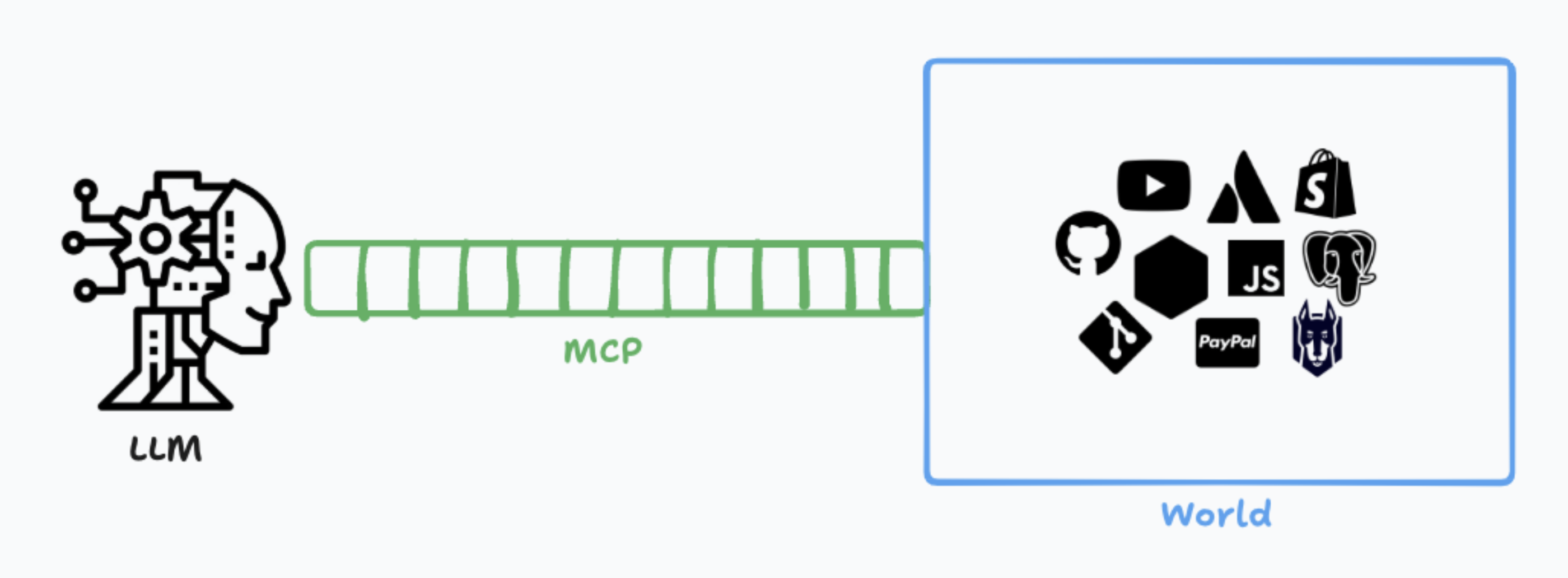
Trước khi nói định nghĩa "cao siêu", hãy tưởng tượng MCP giống như chuẩn USB.
Thời before USB (những năm 90s):
- Mỗi thiết bị có một loại cổng riêng
- Máy in dùng Parallel port
- Chuột dùng PS/2 port
- Keyboard dùng AT port
- Modem dùng Serial port
→ Máy tính đầy cổng, rối như mớ bòng bong.
Sau khi có USB:
- Một chuẩn duy nhất
- Cắm gì cũng được
- Máy tính tự nhận thiết bị
- Developer chỉ cần code theo chuẩn USB
MCP chính là "USB cho AI".
Định Nghĩa Chính Xác
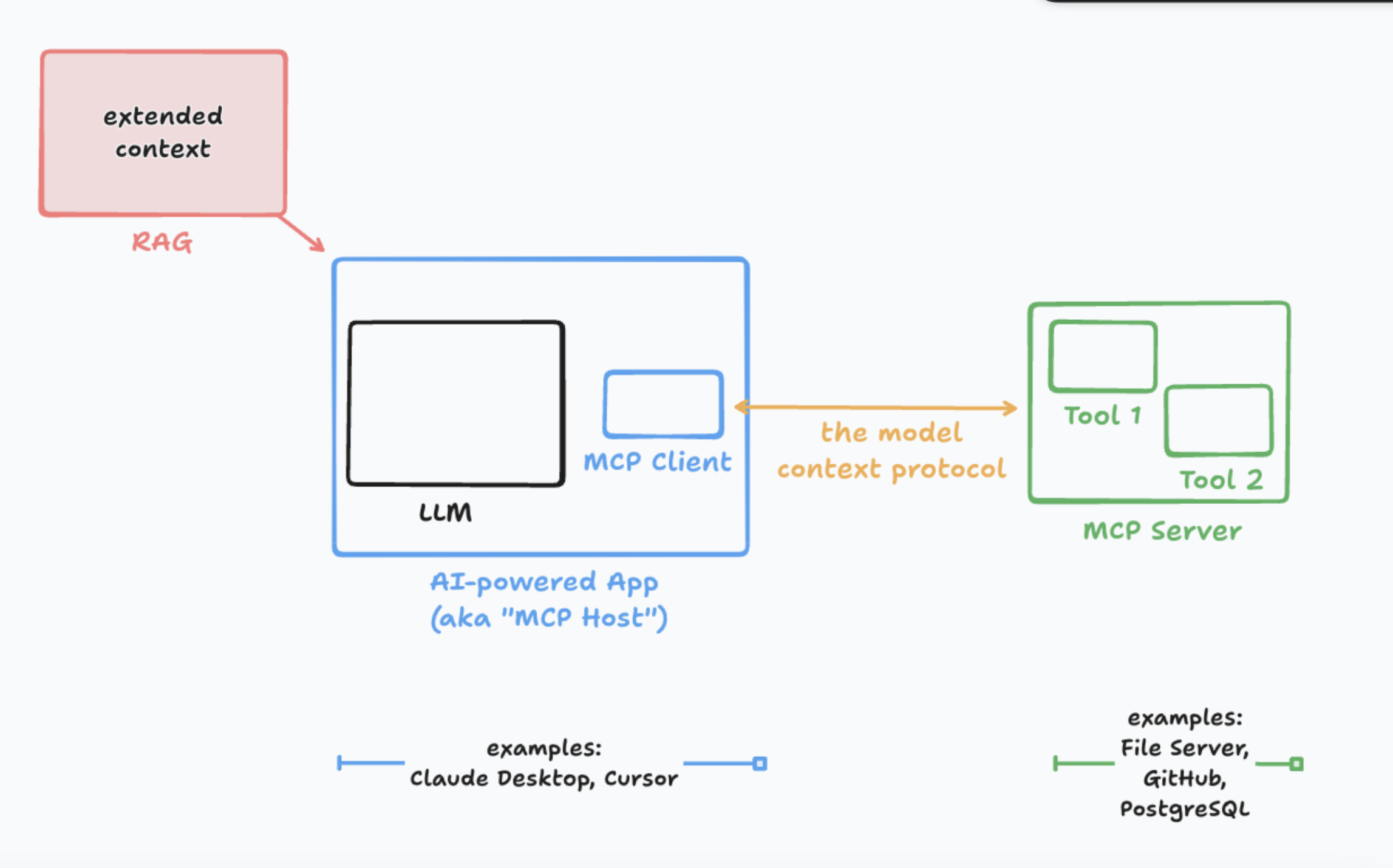
Model Context Protocol (MCP) là một giao thức mở (open protocol) chuẩn hóa cách AI applications kết nối với external data sources và tools.
Thay vì mỗi AI tool phải viết custom code cho từng data source, giờ đây:
- Data sources implement MCP server
- AI applications implement MCP client
- Chúng "nói chuyện" với nhau qua MCP protocol
Đơn giản vậy thôi.
2. Vấn Đề Mà MCP Giải Quyết
Before MCP: Fragmented Integrations Hell
AI Application
    ├─ Custom connector cho Google Drive
    ├─ Custom connector cho Slack
    ├─ Custom connector cho GitHub
    ├─ Custom connector cho Notion
    ├─ Custom connector cho Database
    └─ Custom connector cho Email

Mỗi connector:
- Khác implementation
- Khác maintenance overhead
- Khác documentation
- Khác versioning strategy
Vấn đề:
- N AI tools × M data sources = N × M integrations
- Exponential complexity (ôi thôi)
- Không scale được
Ví dụ thực tế: Nếu có:
- 10 AI tools (Claude, GPT, Gemini, local agents...)
- 20 data sources (Drive, Slack, GitHub, Notion...)
→ Cần viết 200 integrations riêng biệt (!!!)
After MCP: Standardized Protocol
AI Application (MCP Client)
        ↕
   MCP Protocol (chuẩn chung)
        ↕
MCP Servers:
    ├─ Google Drive MCP Server
    ├─ Slack MCP Server
    ├─ GitHub MCP Server
    ├─ Notion MCP Server
    └─ Database MCP Server

Mọi thứ nói cùng một "ngôn ngữ"
Giải pháp:
- N AI tools + M data sources = N + M implementations
- Linear complexity
- Scale tốt
Với cùng ví dụ trên:
- 10 AI tools implement MCP client một lần
- 20 data sources implement MCP server một lần
→ Chỉ cần 30 implementations thay vì 200 (ngon lành)
3. Kiến Trúc MCP: Client-Server Model
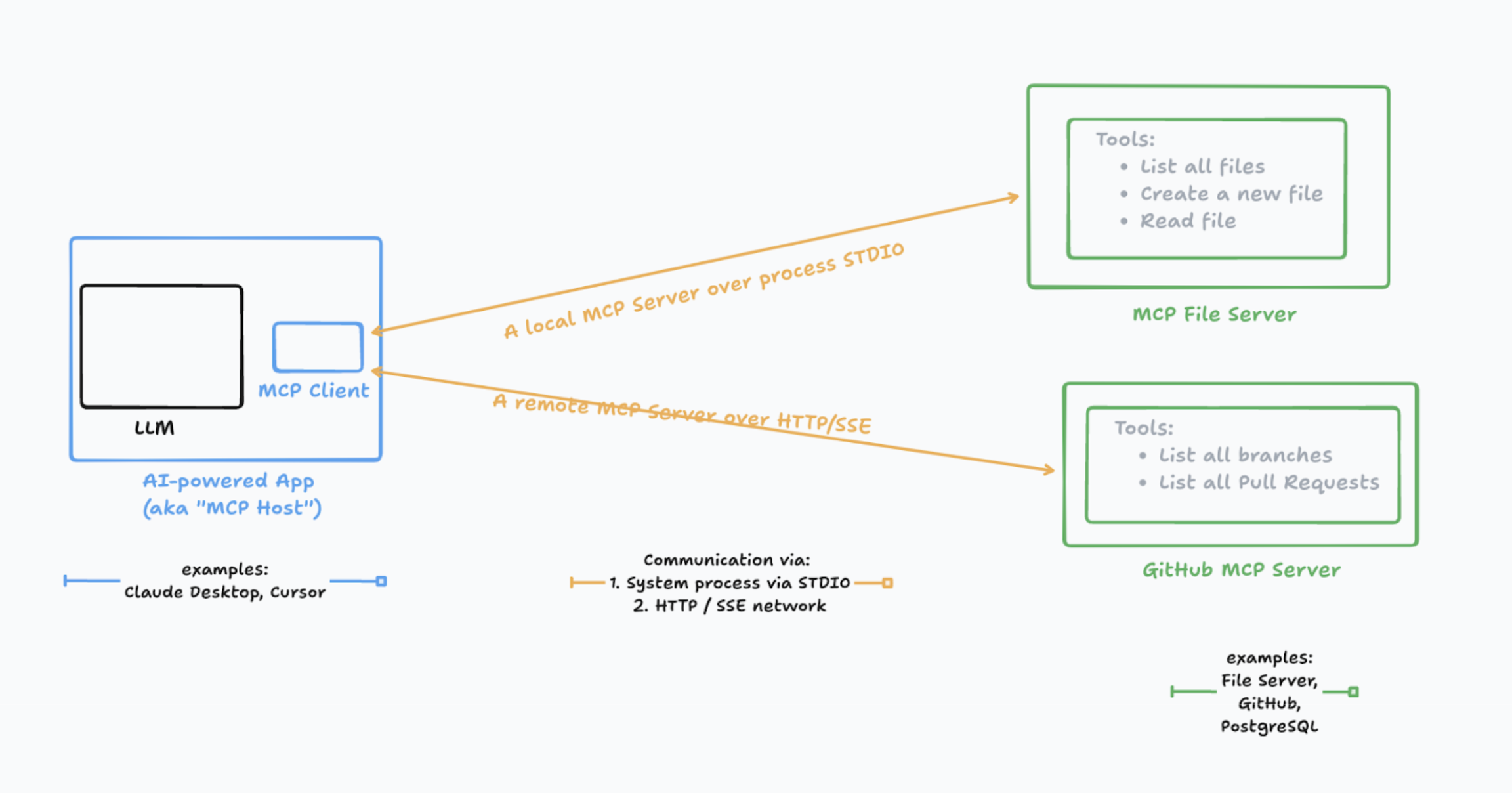
MCP theo kiến trúc client-server cổ điển, nhưng rất elegant.
Ba Thành Phần Cốt Lõi
┌─────────────────────────────────────┐
│         MCP HOST                    │
│  (AI application: Claude Desktop,   │
│   Claude Code, Cursor...)           │
│                                     │
│  ┌─────────────────────────────┐   │
│  │     MCP CLIENT              │   │
│  │  (Embedded trong host)      │   │
│  └─────────────────────────────┘   │
└─────────────────────────────────────┘
            ↕ (MCP Protocol)
┌─────────────────────────────────────┐
│         MCP SERVER                  │
│  (Google Drive, Slack, GitHub...)   │
│                                     │
│  - Expose tools                     │
│  - Expose resources                 │
│  - Expose prompts                   │
└─────────────────────────────────────┘
1. MCP Host
- Ứng dụng AI (Claude Desktop, Claude Code, Cursor, IDE...)
- Quản lý nhiều MCP clients
- Coordinate conversation context
2. MCP Client
- Component nhúng trong host
- Maintain connection với MCP server
- Translate giữa host và server
3. MCP Server
- Program cung cấp context cho AI
- Connect tới data sources (Drive, DB, APIs...)
- Implement 3 primitives: Tools, Resources, Prompts
Hãy tưởng tượng:
- Host = Người dùng điện thoại
- Client = App trên điện thoại
- Server = Backend service (Google, Facebook...)
Hai Layer Quan Trọng
Data Layer (Protocol Layer)
- Sử dụng JSON-RPC 2.0
- Định nghĩa message format
- Lifecycle management
- Core primitives (Tools, Resources, Prompts)
Transport Layer (Communication Layer)
- STDIO transport: Local process communication (dùng cho local MCP servers)
- HTTP transport: Remote communication + Server-Sent Events (dùng cho remote MCP servers)
4. Ba Primitives Cốt Lõi: Tools, Resources, Prompts
MCP có 3 khái niệm nền tảng. Hiểu 3 thứ này = hiểu MCP.
Primitive #1: Tools (Công Cụ)
Tools = Hành động mà AI có thể thực hiện
Ví dụ:
{
  "name": "create_github_issue",
  "description": "Create a new GitHub issue in a repository",
  "inputSchema": {
    "type": "object",
    "properties": {
      "repo": { "type": "string" },
      "title": { "type": "string" },
      "body": { "type": "string" }
    },
    "required": ["repo", "title"]
  }
}
Use cases cho Tools:
- Gửi email
- Tạo GitHub issue
- Query database
- Update CRM record
- Post message lên Slack
Đặc điểm:
- AI chủ động gọi tools
- Tools thực thi actions
- Có side effects (thay đổi state)
Primitive #2: Resources (Tài Nguyên)
Resources = Dữ liệu mà AI có thể đọc
Ví dụ:
{
  "uri": "file:///Users/me/documents/report.pdf",
  "name": "Q4 Sales Report",
  "mimeType": "application/pdf",
  "description": "Quarterly sales performance analysis"
}
Use cases cho Resources:
- Files (PDFs, docs, spreadsheets)
- Database records
- API responses
- Documentation pages
- Code repositories
Đặc điểm:
- AI đọc resources
- Resources là read-only context
- Không có side effects
Primitive #3: Prompts (Templates)
Prompts = Pre-defined instruction templates
Ví dụ:
{
  "name": "git_commit_message",
  "description": "Generate a conventional commit message",
  "arguments": [
    {
      "name": "changes",
      "description": "List of file changes",
      "required": true
    }
  ]
}
Use cases cho Prompts:
- Code review templates
- Commit message formats
- Documentation generators
- Bug report templates
Đặc điểm:
- Standardize workflows
- Reusable prompt templates
- Context-aware suggestions
5. MCP Hoạt Động Như Thế Nào?
Hãy xem một ví dụ thực tế: AI agent cần tạo GitHub issue.
Flow Chi Tiết
Bước 1: Initialize Connection
// Client → Server
{
  "jsonrpc": "2.0",
  "method": "initialize",
  "params": {
    "protocolVersion": "2025-11-25",
    "clientInfo": {
      "name": "claude-desktop",
      "version": "1.0.0"
    }
  }
}

// Server → Client
{
  "jsonrpc": "2.0",
  "result": {
    "protocolVersion": "2025-11-25",
    "serverInfo": {
      "name": "github-mcp-server",
      "version": "2.0.0"
    },
    "capabilities": {
      "tools": true,
      "resources": true
    }
  }
}
Bước 2: Discover Tools
// Client → Server
{
  "jsonrpc": "2.0",
  "method": "tools/list"
}

// Server → Client
{
  "jsonrpc": "2.0",
  "result": {
    "tools": [
      {
        "name": "create_issue",
        "description": "Create a GitHub issue",
        "inputSchema": { ... }
      },
      {
        "name": "list_issues",
        "description": "List repository issues",
        "inputSchema": { ... }
      }
    ]
  }
}
Bước 3: User Request
User: "Tạo GitHub issue về bug login page"
Bước 4: AI Reasoning
AI thinks:
- User muốn tạo issue
- Tôi có tool "create_issue"
- Cần params: repo, title, body
- Repo có thể infer từ context
→ Gọi tool
Bước 5: Execute Tool
// Client → Server
{
  "jsonrpc": "2.0",
  "method": "tools/call",
  "params": {
    "name": "create_issue",
    "arguments": {
      "repo": "mycompany/web-app",
      "title": "Bug: Login page not working",
      "body": "Users report unable to login..."
    }
  }
}

// Server → Client
{
  "jsonrpc": "2.0",
  "result": {
    "content": [
      {
        "type": "text",
        "text": "Issue #123 created successfully"
      }
    ]
  }
}
Bước 6: AI Response
AI: "Đã tạo issue #123 trên GitHub repo mycompany/web-app"
Vậy là xong! Đơn giản và chuẩn chỉnh.
6. Build MCP Server Đơn Giản Với FastMCP
Lý thuyết nhiều rồi, giờ code thôi (hehe).
Cài Đặt FastMCP
pip install fastmcp
MCP Server Cơ Bản: Weather Tool
from fastmcp import FastMCP

# Khởi tạo MCP server
mcp = FastMCP("Weather Server")

@mcp.tool()
def get_temperature(city: str) -> str:
    """
    Get current temperature for a city

    Args:
        city: Name of the city

    Returns:
        Temperature information
    """
    # Giả lập API call
    fake_data = {
        "hanoi": "28°C",
        "saigon": "32°C",
        "danang": "30°C"
    }

    temp = fake_data.get(city.lower(), "Unknown city")
    return f"Temperature in {city}: {temp}"

@mcp.tool()
def get_forecast(city: str, days: int = 3) -> str:
    """
    Get weather forecast for next N days

    Args:
        city: Name of the city
        days: Number of days (default: 3)

    Returns:
        Forecast information
    """
    return f"Forecast for {city} - {days} days: Mostly sunny"

# Chạy server
if __name__ == "__main__":
    mcp.run()
Chỉ vậy thôi! FastMCP đã handle toàn bộ:
- JSON-RPC protocol
- Tool registration
- Type validation
- Error handling
MCP Server Với Resource: File Reader
from fastmcp import FastMCP
from pathlib import Path

mcp = FastMCP("File Reader Server")

@mcp.resource("file://{path}")
def read_file(path: str) -> str:
    """
    Read file content

    Args:
        path: File path to read

    Returns:
        File content as text
    """
    file_path = Path(path)

    if not file_path.exists():
        return f"Error: File {path} not found"

    if not file_path.is_file():
        return f"Error: {path} is not a file"

    try:
        return file_path.read_text(encoding='utf-8')
    except Exception as e:
        return f"Error reading file: {str(e)}"

@mcp.tool()
def list_files(directory: str) -> list[str]:
    """
    List all files in a directory

    Args:
        directory: Directory path

    Returns:
        List of file names
    """
    dir_path = Path(directory)

    if not dir_path.exists():
        return []

    return [f.name for f in dir_path.iterdir() if f.is_file()]

if __name__ == "__main__":
    mcp.run()
Chạy MCP Server
# Method 1: Chạy trực tiếp
python weather_server.py

# Method 2: Dùng MCP CLI
fastmcp dev weather_server.py

# Method 3: Production với uvicorn (nếu dùng HTTP transport)
fastmcp run weather_server:mcp --transport http
Kết Nối Với Claude Desktop
Thêm vào ~/Library/Application Support/Claude/claude_desktop_config.json:
{
  "mcpServers": {
    "weather": {
      "command": "python",
      "args": ["/path/to/weather_server.py"],
      "env": {}
    },
    "file-reader": {
      "command": "python",
      "args": ["/path/to/file_reader.py"],
      "env": {}
    }
  }
}
Restart Claude Desktop → MCP servers sẽ tự động connect.
Giờ bạn có thể hỏi Claude:
"What's the temperature in Hanoi?"
"Read the file at ~/documents/report.txt"
Claude sẽ tự động gọi tools từ MCP server của bạn (ngon lành).
7. Use Cases Thực Tế Trong 2025
Use Case #1: Development Workflow
Scenario: Dev dùng Claude Code để code
# GitHub MCP Server
@mcp.tool()
def create_pr(title: str, branch: str, base: str = "main"):
    """Create pull request"""
    # Implementation using GitHub API
    pass

@mcp.tool()
def run_ci_checks(pr_number: int):
    """Trigger CI/CD pipeline"""
    pass
Workflow:
Developer: "Create a PR from feature/login to main"
→ Claude gọi create_pr tool
→ PR được tạo tự động

Developer: "Run CI checks on PR #123"
→ Claude gọi run_ci_checks tool
→ CI pipeline triggered
Use Case #2: Business Intelligence
Scenario: Analyst query data từ nhiều nguồn
# Database MCP Server
@mcp.resource("db://sales/{table}")
def get_table_data(table: str):
    """Get data from sales database"""
    # Connect to PostgreSQL
    pass

# Spreadsheet MCP Server
@mcp.resource("sheet://google-drive/{sheet_id}")
def get_spreadsheet(sheet_id: str):
    """Get Google Sheets data"""
    # Google Sheets API
    pass
Workflow:
Analyst: "So sánh doanh thu Q4 từ database và Google Sheets"
→ Claude đọc db://sales/revenue (Resource)
→ Claude đọc sheet://google-drive/abc123 (Resource)
→ Claude phân tích và so sánh
→ Trả về insights
Use Case #3: Customer Support Automation
Scenario: Support agent với MCP tools
# CRM MCP Server
@mcp.tool()
def search_customer(email: str):
    """Search customer in CRM"""
    pass

@mcp.tool()
def create_ticket(customer_id: str, issue: str):
    """Create support ticket"""
    pass

# Email MCP Server
@mcp.tool()
def send_email(to: str, subject: str, body: str):
    """Send email to customer"""
    pass
Workflow:
Support: "Customer john@example.com báo lỗi login"
→ Claude search_customer("john@example.com")
→ Claude create_ticket(customer_id, "Login error")
→ Claude send_email với thông tin ticket
→ Xong trong vài giây thay vì vài phút
Use Case #4: Content Creation Pipeline
# Notion MCP Server
@mcp.resource("notion://pages/{page_id}")
def get_notion_page(page_id: str):
    """Read Notion page content"""
    pass

# WordPress MCP Server
@mcp.tool()
def publish_post(title: str, content: str):
    """Publish WordPress post"""
    pass
Workflow:
Writer: "Publish Notion page abc123 to WordPress"
→ Claude đọc Notion content (Resource)
→ Claude format content cho WordPress
→ Claude publish_post tool
→ Blog post live ngay lập tức
8. MCP Ecosystem: Công Cụ & Resources
Official MCP Servers (từ Anthropic)
Reference servers hay dùng:
- filesystem: Secure file operations
- git: Repository manipulation
- github: GitHub integration
- fetch: Web content fetching
- memory: Persistent knowledge graph
- postgres: Database operations
Install qua npm:
npm install -g @modelcontextprotocol/server-filesystem
npm install -g @modelcontextprotocol/server-github
Community MCP Servers
Top picks mình recommend:
- Docker MCP - Manage containers với natural language
- AWS MCP - Interact với AWS services
- Kubernetes MCP - K8s cluster management
- Stripe MCP - Payment processing
- Slack MCP - Team communication
- Notion MCP - Workspace integration
Full list tại: Awesome MCP Servers
Tools Để Build & Test
FastMCP (Python)
pip install fastmcp
fastmcp dev your_server.py
MCP Inspector (Testing tool)
npm install -g @modelcontextprotocol/inspector
mcp-inspector
Claude Desktop (Client for testing)
- Download tại: https://claude.ai/download
- Config tại:
~/Library/Application Support/Claude/
10. Tương Lai Của MCP
MCP vừa tròn 1 tuổi (Nov 2025) và đã có adoption cực mạnh.
Trends mình thấy:
1. Enterprise adoption tăng mạnh
- Microsoft đã có 10+ official MCP servers
- AWS tích hợp MCP vào Q CLI
- Docker Gateway hỗ trợ dynamic MCP discovery
2. Code Mode + MCP = Combo bá đạo Như mình đã share ở bài trước, kết hợp:
- MCP cho tool discovery
- Code Mode cho execution → Giảm 98.7% tokens, tăng tốc gấp nhiều lần
3. Multi-agent collaboration MCP giúp agents communicate với nhau:
Agent A (coding) ← MCP → Agent B (testing)
        ↓                        ↓
    MCP Server            MCP Server
4. Security & Authorization layers FastMCP đã hỗ trợ:
- OAuth2 integration
- Role-based access control
- Audit logging
Open questions còn lại:
- MCP versioning strategy cho breaking changes?
- Cross-language interop (Python ↔ TypeScript servers)?
- Standard test suites cho MCP servers?
Community đang actively solve những câu hỏi này.
11. Kết Luận
Nếu chỉ nhớ vài điểm từ bài này:
MCP là gì:
- Open protocol chuẩn hóa AI ↔ Data connections
- Client-server architecture đơn giản
- 3 primitives: Tools, Resources, Prompts
Tại sao quan trọng:
- Giảm N×M integrations xuống N+M
- Standardize cách AI tools kết nối với data
- Tạo ecosystem mở, không vendor lock-in
Làm sao bắt đầu:
- Dùng FastMCP để build server nhanh
- Test với Claude Desktop
- Ship tools đơn giản trước, iterate sau
Tương lai:
- Enterprise adoption tăng mạnh
- Combo với Code Mode cực mạnh
- Multi-agent collaboration sẽ phổ biến
MCP không phải hype, mà là infrastructure layer cần thiết cho AI systems thế hệ mới.
Giống như HTTP là nền tảng của web, MCP đang trở thành nền tảng của agentic systems.
Năm 2025 là năm để anh em dev chúng mình làm quen với MCP. Càng sớm càng tốt, vì ecosystem này đang explode (hehe).
Happy building MCP servers!
Nguồn tham khảo:
- Model Context Protocol Official Docs
- MCP Specification 2025-11-25
- Anthropic: Introducing MCP
- MCP Architecture Overview
- FastMCP GitHub Repository
- Building MCP Server with FastMCP - DataCamp
- MCP Architecture Visual Guide - Snyk
- Awesome MCP Servers Collection
- 10 Microsoft MCP Servers
All rights reserved
