


A Lifesaver for Indie Developers: Fixing AI-Generated HTML with a Handy Online Tool
As a freelance indie developer, I spend most of my days building websites, crafting landing pages and refining front-end layouts for personal projects and small clients. Like many peers in the industry, I regularly leverage AI coding tools to boost productivity. AI can churn out complete HTML structures, basic styles and page frameworks in seconds, which saves me from writing repetitive boilerplate code from scratch. At first, I thought this combination would let me finish projects far faster and cut down tedious coding work, but I soon ran into a recurring and frustrating problem.
AI-generated code is rarely perfect. It often contains trivial yet annoying flaws: misaligned page elements, inappropriate text styles, redundant code segments, broken layout details, or styles that fail to match the design requirements. What makes the situation worse is the inefficient back-and-forth when trying to fix these issues with AI. Describing minor visual defects and layout adjustments in plain language is surprisingly tricky. I have to write lengthy prompts to explain exactly which part needs tweaking, what style to modify, or how to adjust a layout detail. More often than not, the AI fails to fully understand my nuanced demands, and each round of revision brings new errors. This endless cycle of prompting, regenerating code, and rechecking results eats up plenty of time, turning a time-saving tool into a productivity bottleneck.
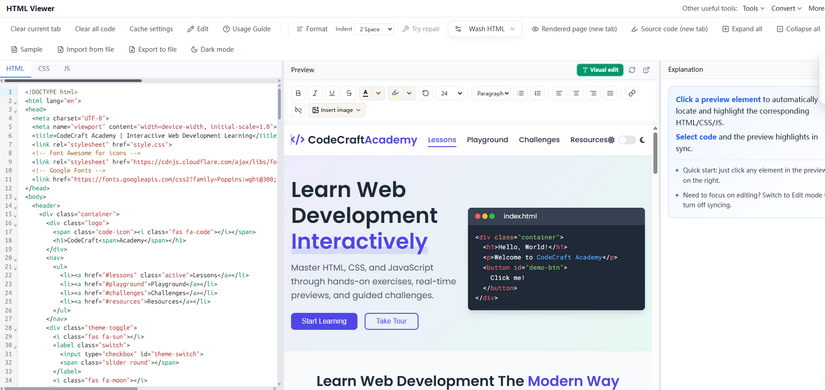
For a long time, I stuck to my old workflow: copy AI-generated code to a local editor, switch back and forth between the code window and the browser preview, and hunt for problematic lines manually. When the page structure was complicated, locating the code corresponding to a single misplaced button or a wrong font color meant scrolling through hundreds of lines of markup. It was slow, exhausting, and completely disrupted my creative rhythm. I kept wishing for a simple tool that could bridge the gap between code and visual display, allowing me to make direct, precise changes without unnecessary hassle.
That’s when I discovered this html editor tool, and it has completely transformed how I polish and revise AI-written HTML code. What impresses me most is its outstanding visual editing experience and the game-changing two-way highlight sync feature. The tool arranges code and live preview side by side on one page, so I never need to jump between different software or browser tabs. Whenever I spot an unsatisfactory element in the preview area—whether it’s a paragraph with wrong line spacing, an ill-sized image, or a poorly styled navigation bar—I just click on that visual part. The code panel will instantly jump to and highlight the exact source line behind it. Conversely, if I want to adjust a specific code snippet, selecting the code will also mark the matching area on the preview page. This function eliminates the tedious line-by-line search and lets me pinpoint targets in one click.
Beyond quick positioning, its flexible editing capabilities fit my needs perfectly. Since all operations run locally in the browser, my code stays secure with no risk of data leakage. I can directly paste messy AI-generated code into the editor, tweak text content, adjust CSS styles, or restructure page elements freely. Every modification takes effect in the live preview immediately, so I can observe changes in real time and iterate until the page fully matches my vision. When the revision is done, the one-click formatting function tidies up chaotic indentation and messy code structures, turning rough AI-generated markup into clean, standardized code. Finally, I can export the polished HTML file directly for subsequent use or deployment. The entire process of importing, editing, debugging and exporting is completed on this single platform, forming a seamless workflow.
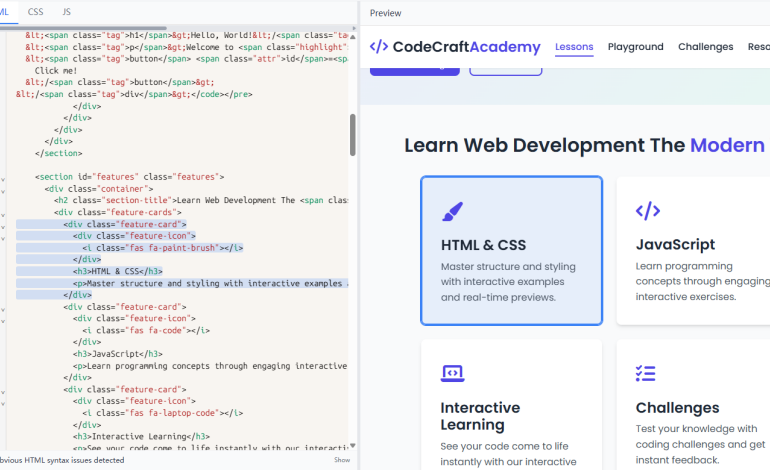
Working as an indie developer means we not only need solid technical skills but also the ability to optimize every working link. AI is undeniably a great assistant for accelerating the initial coding phase, but it cannot replace human judgment and fine-tuning for detailed design. Instead of wasting hours on ineffective communication with AI for tiny revisions, it is wiser to take control of the code ourselves. This lightweight HTML viewer and editor acts as a perfect complement to AI coding tools. It handles all the detailed revision work that AI struggles with, letting me focus more on overall design logic, user experience and core project planning.
After months of daily use, this tool has become an indispensable part of my workflow. If you are also an indie developer, freelancer or front-end practitioner who frequently uses AI to generate code and gets stuck in repeated revision loops, I highly recommend giving html-viewer.org a try. It is free to use, requires no registration or installation, and focuses purely on practical HTML editing and debugging functions. It will help you break free from inefficient workflows, make code revision simple and intuitive, and let your creativity and professionalism shine through every line of code you write.
All rights reserved
